The 3D-QSAR wizard
The 3D-QSAR builder page by page: the series and its test set, structure preparation, alignment, the lattice, the models (KEFRA and the atom-based cubes), PLS and validation, the maps and the saved model, with the defaults and the reasons for them.
A 3D-QSAR model relates the activity of a congeneric series, measured on one assay, to the fields the molecules produce around them once they are superposed in a common frame. The wizard offers two models. KEFRA (Kernel Ensemble Field Regression Analysis) describes every molecule as a sum of atom-centred Gaussian densities of its properties, compares two molecules by the overlap of their densities, and relates that similarity to the activity with a Gaussian process; it needs no lattice. The atom-based cubes sample the molecules on a regular lattice, every cube and atom class becomes a column, and partial least squares (PLS) relates the columns to the activity. Either model is only as good as the alignment and the structures behind it, which is why most of the wizard is about preparing and placing the molecules.
Open the wizard with Wizards > 3D-QSAR builder, or 3D-QSAR in the Wizards group of the Workflow tab of the ribbon. Like every wizard it computes nothing itself: it builds a workflow, opens it on the canvas and runs it, and the dashboards open when the run finishes. Every parameter it sets can therefore be inspected and changed on the canvas, and the same workflow runs again with the same seed to the same result.
There are nine pages. A page shows the common options as rows; the remaining parameters of the workflow node behind it are under a collapsible section (Advanced, or one named after the step, such as Embedding options), whose heading says how many of its parameters you changed. Rest the pointer on a label for its explanation.
| Page | What it decides |
|---|---|
| 1 Data | The series and its activity column. |
| 2 Training and test | Which compounds are held out for external validation. |
| 3 Preparation | Standardisation, 3D structures, conformers and partial charges. |
| 4 Alignment | How the molecules are superposed, with a live preview. |
| 5 Lattice | Where the atom-based cubes are sampled. KEFRA uses no lattice. |
| 6 Fields | Which models are built (KEFRA, the atom-based cubes or both), with which fields and settings. |
| 7 PLS and validation | The number of components, cross-validation and resampling of the cubes; the Y-scrambling and the seed of both models. |
| 8 Maps and output | Contour maps, the report and the saved model. |
| 9 Prediction set | Only when Predict a second file is ticked: a second file to predict with the model. |
1 Data
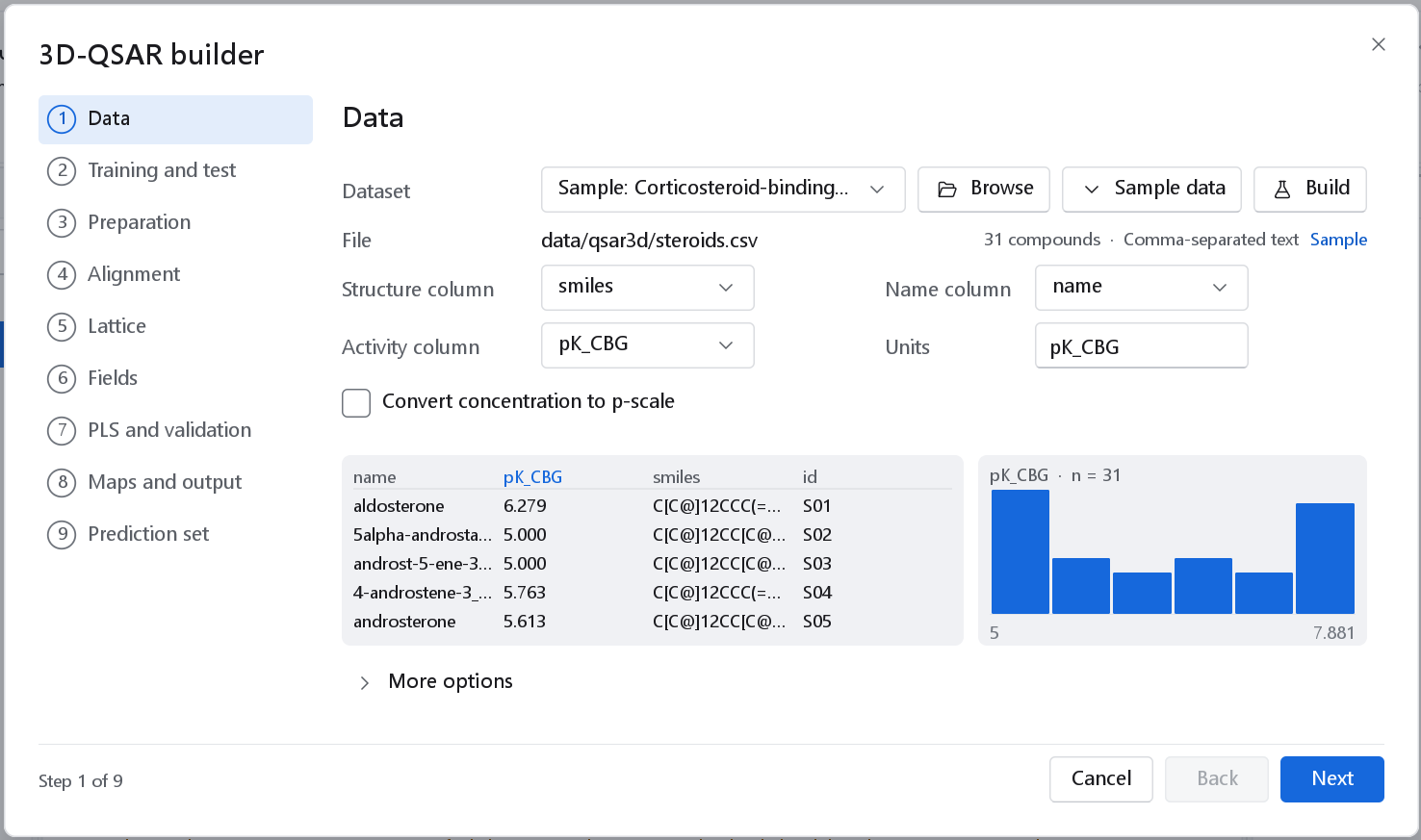
data/qsar3d/steroids.csv): the structure column smiles, the name column, the activity column pK_CBG, a preview of the first rows and the activity distribution from 5 to 7.881.The Data page is shared by all wizards and is described on The 2D-QSAR wizard: an open dataset, Browse for a file, Sample data, or Build to assemble a dataset with the Dataset Builder first. The 3D-QSAR builder needs at least five compounds. Activities must be on a logarithmic scale (pIC50, pKi); tick Convert concentration to p-scale for a column of concentrations. A file whose records all carry 3D coordinates, such as an SD file of docked poses, is recognised here, and the Alignment page then suggests keeping the poses.
2 Training and test
External validation needs compounds the model never saw. Test set says where the division comes from.
| Test set | Meaning | When to use it |
|---|---|---|
| None: every compound trains | The default. Every compound with an activity trains the model; validation is by cross-validation only. | A small series where every compound is needed, or a first look. |
| Column of the file | A column or SD field names the set of every compound. Test values (default test) and Training values (empty: all others) list the values that mean each, compared without regard to case. With training values listed, a compound that matches neither list is left out. A column named set that marks test compounds is pre-set and tagged Suggested. | A published division, or the Training and Test marks you set in the spreadsheet. |
| Split made here | Activity ranked: the compounds are sorted by activity and every k-th one is a test compound (Every k-th compound, 2 to 20, default 4, which holds out about a quarter); the least and the most active compound always train, so no test compound lies outside the activity range of the model. Random: a seeded draw of the Test fraction (0.05 to 0.5, default 0.25). | A series without a published division. Activity ranked is the safer choice for a small series, because a random draw can put the extremes in the test set. |
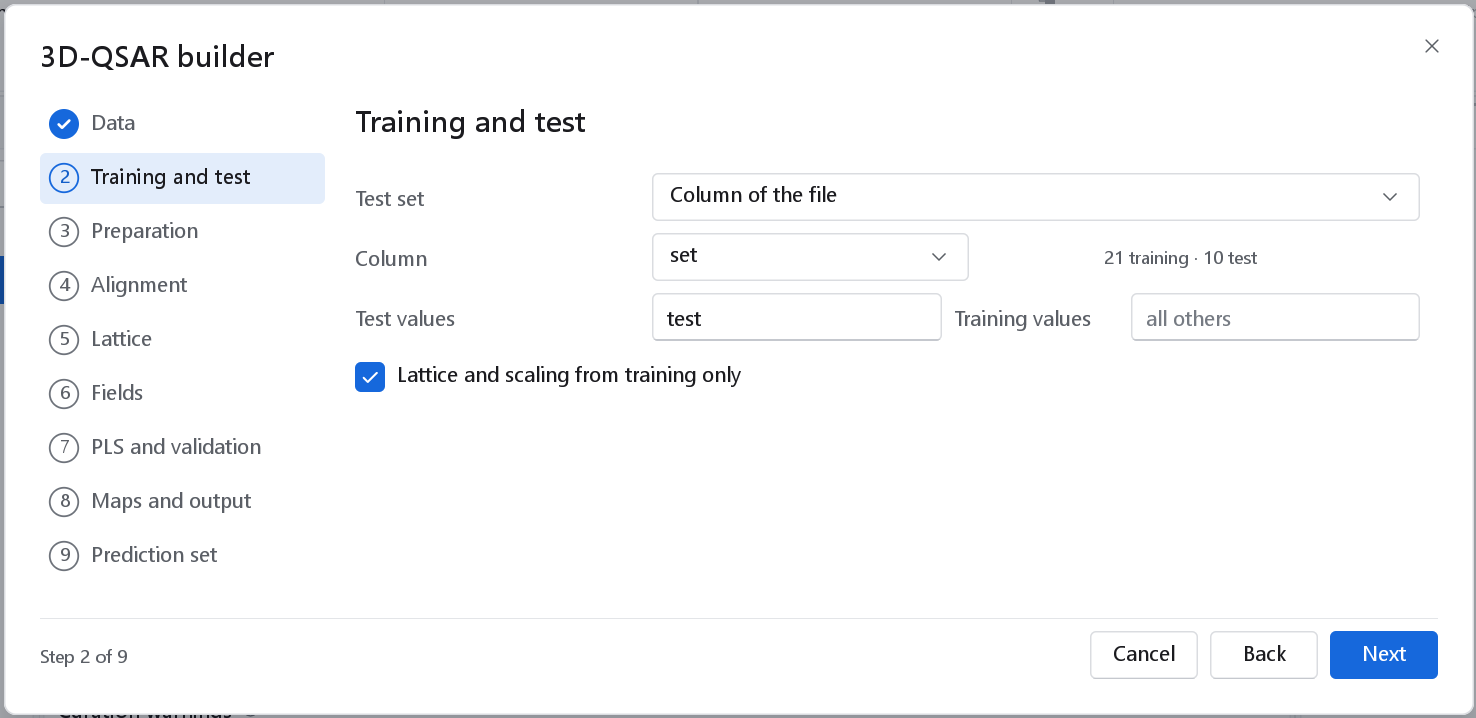
test marks the test compounds, every other compound trains, and the page counts 21 training and 10 test compounds.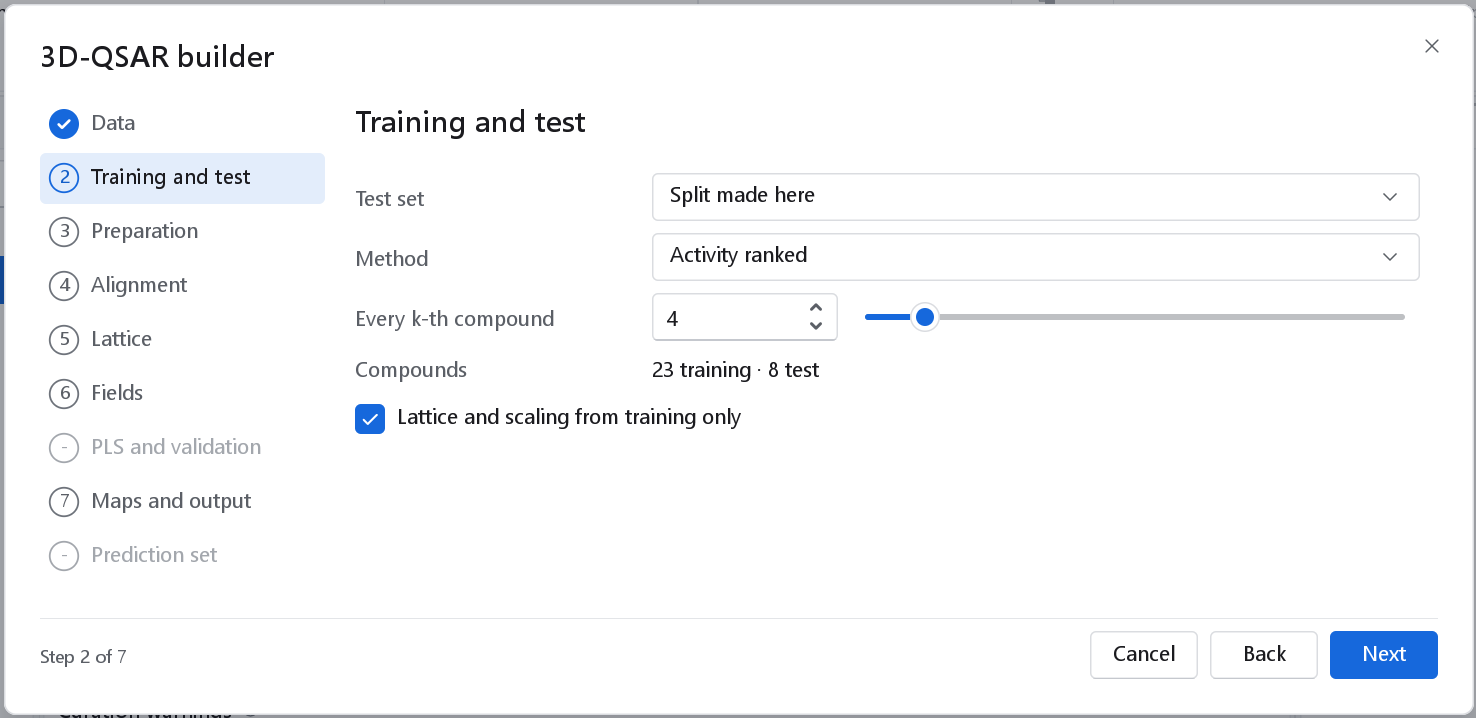
A split made here is written as a derived file next to the dataset snapshots: the data file with one more column (a table) or one more data field per record (an SD file). The structures are not rewritten, the workflow reads that file, and the rule is recorded in the workflow.
Lattice and scaling from training only (on) derives the lattice, the column filter and the block scaling from the training compounds only, so the test set takes no part in the model and a later prediction reproduces them exactly. Switch it off only to reproduce a published study that used every compound for the lattice.
3 Preparation
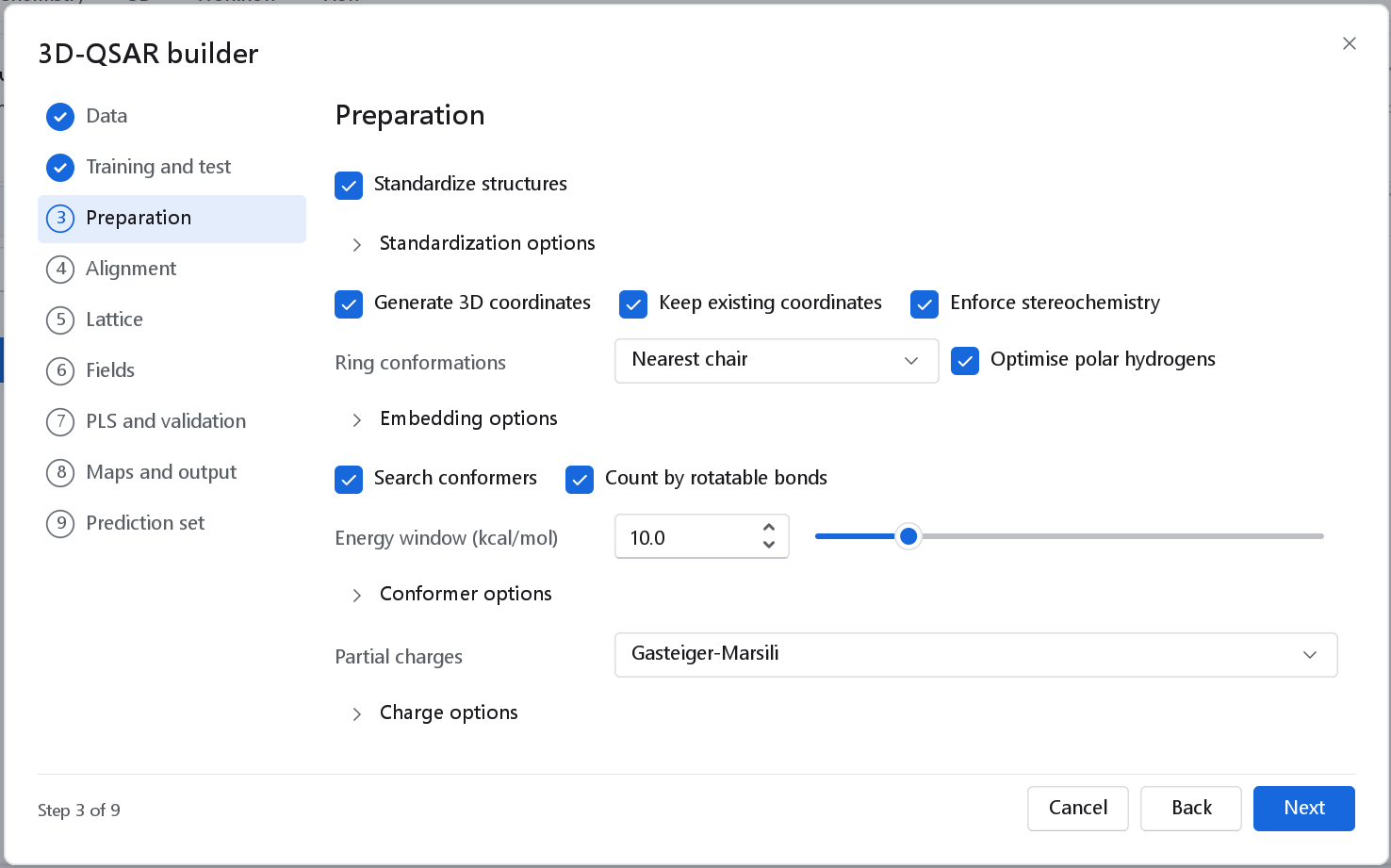
| Option | Default | What it does and when to change it |
|---|---|---|
| Standardize structures | On | Strips salts and counter-ions and normalises charge states, which would otherwise change the fields. With the alignment As supplied the explicit hydrogens of the poses are kept. Standardization options holds the individual steps. |
| Generate 3D coordinates | On | Embeds one 3D structure per molecule by distance geometry and refines it with the Universal Force Field (UFF). Needed for a file of SMILES. |
| Keep existing coordinates | On | Molecules that already carry 3D coordinates keep them. Untick it to rebuild every structure from its connectivity. |
| Enforce stereochemistry | On | The embedded structure must have the configuration the input specifies. Leave it on: a model built on the wrong enantiomer has the wrong fields. |
| Ring conformations | Nearest chair | Nearest chair drives a saturated six-membered ring into the nearer chair. Lower-energy pucker also tries every puckered five- or six-membered ring in its mirror pucker and keeps the lower UFF energy, at the cost of two more minimisations per ring; consider it for sugars and other rings that carry hydroxyl groups. As embedded repairs nothing. The choice matters when single structures are aligned; with a conformer search the ensemble starts from its own embeddings. |
| Optimise polar hydrogens | On | Turns every O-H, S-H and amine N-H hydrogen to its position of lowest energy, in the embedded structure and in every conformer. As embedded they point in unrelated directions from one molecule to the next, and the donor, acceptor and electrostatic fields inherit that noise. The workflow node leaves this off; the builder switches it on. Poses kept as supplied are not touched. |
| Search conformers | On | The bioactive conformer is unknown. With a search, every molecule gets an energy-ranked ensemble and the alignment keeps, for each molecule, the conformer that fits the reference best. Not available with As supplied, where the poses of the file are the conformers. |
| Count by rotatable bonds | On | Keeps 50 conformers for a molecule with fewer than 8 rotatable bonds, 200 for 8 to 12 and 300 above (Ebejer, Morris and Deane, J. Chem. Inf. Model. 2012, 52, 1146). Untick it to set a number (1 to 1000, starting at 20); a small fixed number does not cover a flexible molecule. |
| Energy window (kcal/mol) | 10.0 | Conformers more than this above the lowest are discarded (1 to 50). Conformer options has the duplicate RMSD (0.5 Å) and whether amide C-N bonds count as rotatable. |
| Partial charges | Gasteiger-Marsili | The electrostatic fields need charges. Gasteiger-Marsili computes PEOE charges in a charges step. Formal charges uses the formal charge of each atom. From a molecule property reads one charge per atom, in atom order, from the data field named in Charge property (default atom.dprop.PartialCharge), which is how the charges of a MOL2 file reach an SD file. As supplied uses the charges the molecules already carry. |
Why these defaults
Which preparation options the builder switches on was settled by a sweep fixed in advance: four configurations, each adding to the one before, twelve random seeds, two series built from scratch (the steroids and a set of benzodiazepine-site ligands) and the two lattice field models of version 1.1.0 (a two-field and a five-field model) at the builder's own settings. An option became a default only when it reduced the seed-to-seed spread of q2 in at least three of the four cases without lowering the mean test-set statistic of any case by more than its pooled standard deviation.
- Conformer ensembles with conformer selection reduced the spread of q2 in all four cases, by a factor of 1.2 to 2.3, and lowered no test statistic. With one embedded structure per molecule the nucleus of the steroids of one ring type superposes about four times worse (0.31 Å against 0.08 Å).
- Optimised polar hydrogens reduced the spread strongly for the five-field model (on the steroids from 0.091 to 0.026) and steadied the number of components chosen.
- Matching polar hydrogens across the aligned set (an option of the Alignment page) lowered the test statistic of the steroid five-field model in every one of the twelve seeds (mean from 0.451 to 0.385), so it stays available but is off.
- Ring conformations made no difference to any model once conformers were searched, so the builder leaves it at the node default.
A single seed can go either way, which is why one run is not a reason to change an option.
4 Alignment
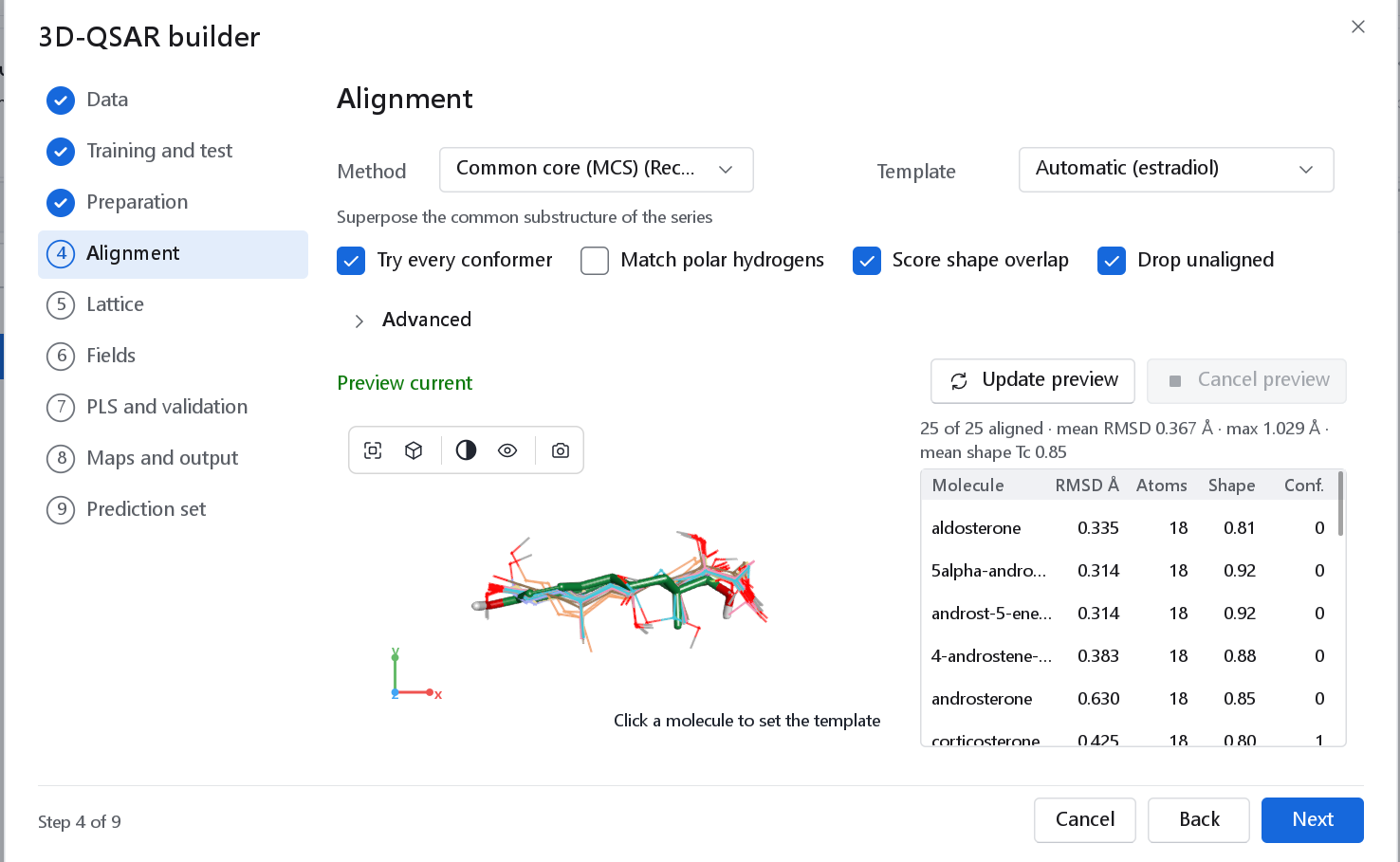
This is the step a 3D-QSAR model stands or falls on. Both models compare the molecules in the frame of the alignment, so a molecule that is placed badly corrupts the model. The page computes a preview the first time it is shown: it runs the preparation and alignment steps of the final workflow in the background, with the same parameters and seeds, so what it shows is what the model will be built from, and the real run reuses the result.
| Method | What it does | When to use it |
|---|---|---|
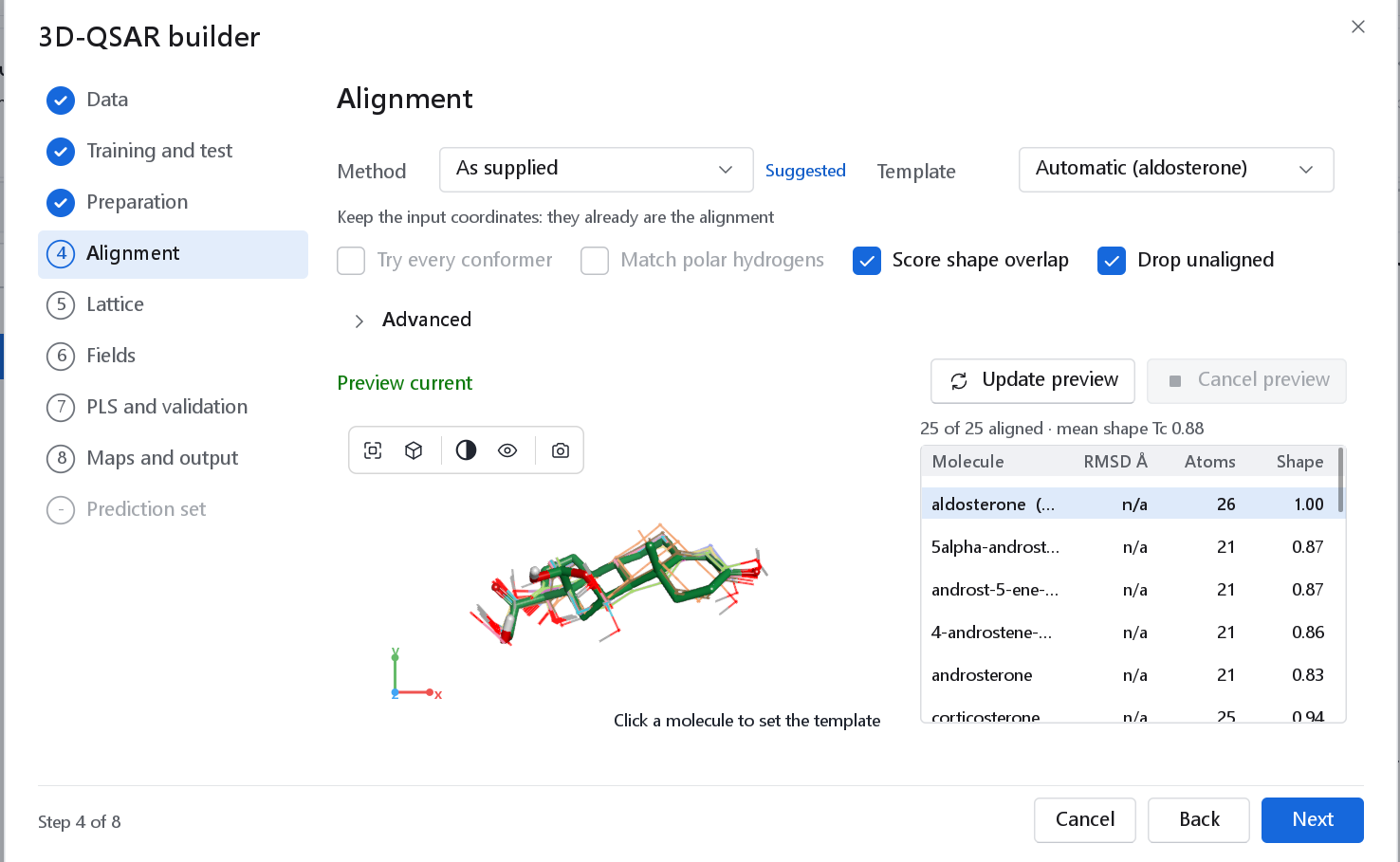
| As supplied | The coordinates of the file are the alignment. Nothing is moved, no conformers are searched, and the explicit hydrogens of the poses are kept. | Docked poses, a published alignment, or the aligned actives of a pharmacophore search. Pre-set and tagged Suggested when every record of the file has 3D coordinates. |
| Common core (MCS) | Finds the substructure the series shares with a reference molecule, resolves symmetry-equivalent atom mappings by geometry and superposes the core by least squares (Kabsch). The default. | A congeneric series with a common scaffold, which is what 3D-QSAR needs anyway. |
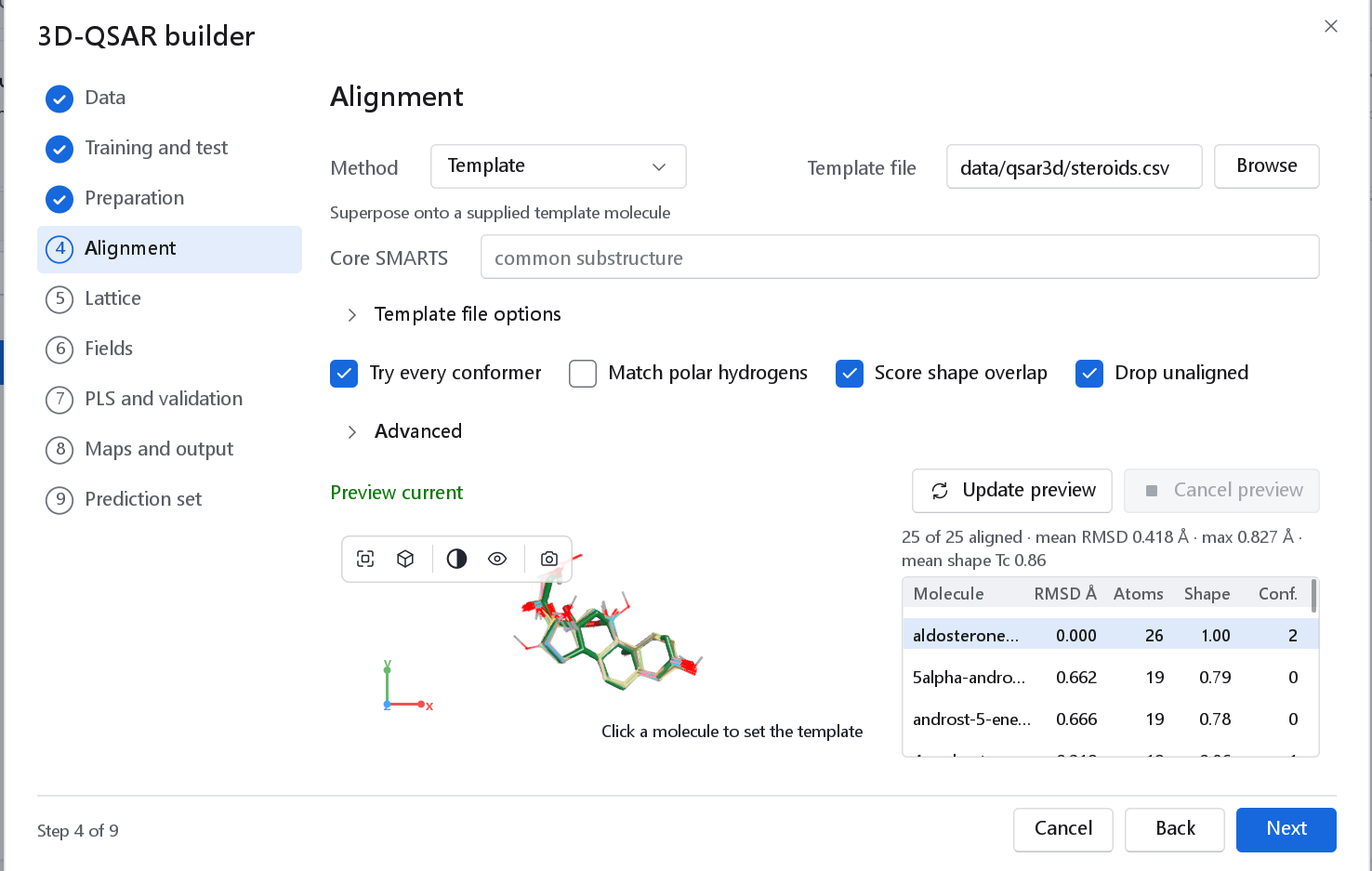
| Template | Superposes the series onto a molecule of another file, optionally on a core given as SMARTS. | A bound ligand from a crystal structure as the frame. |
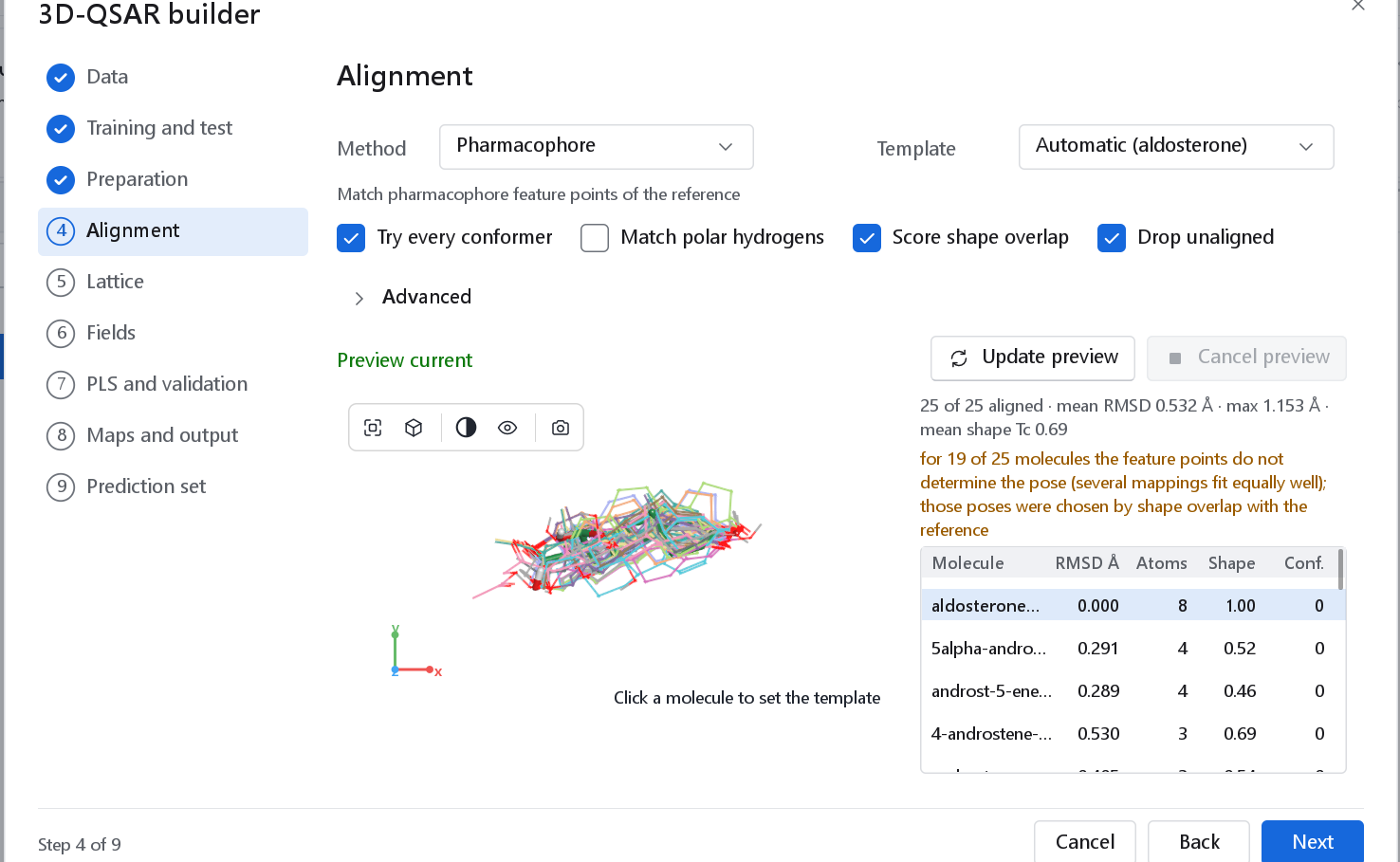
| Pharmacophore | Matches feature points of the reference. | A series without a common scaffold but with common features. Unreliable for series with few features. |
| Shape / field | Maximises the Gaussian shape and feature-colour overlap with the reference. | Scaffold hops. |
| Inertial frame | Principal axes of the mass distribution only. | The baseline a real alignment must beat; not for a model you intend to use. |
| Control | Default | Meaning |
|---|---|---|
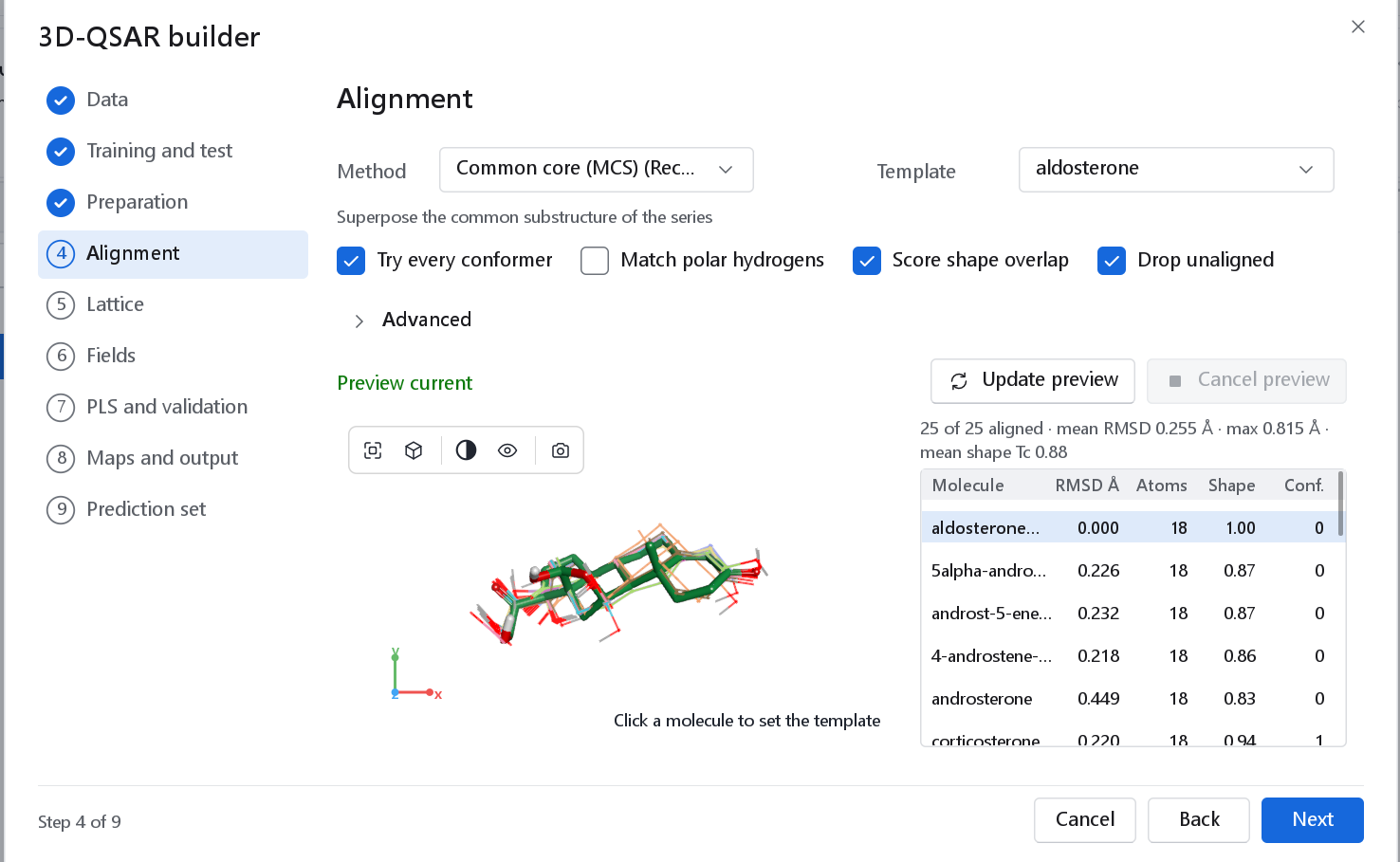
| Template | Automatic | The molecule everything is superposed onto. Automatic lets the method choose (for the common core, the molecule with the fewest heavy atoms) and names the choice once the preview is current. Click a molecule in the view or a row of the table to pick another; the preview is recomputed at once. |
| Try every conformer | On | Superposes every stored conformer and keeps the one that fits the reference best. Needs Search conformers on the Preparation page. |
| Match polar hydrogens | Off | Turns a hydroxyl or amine hydrogen the same way as the hydrogen of a molecule already placed whose donor atom coincides with it: one orientation per donor site across the series. Not applied to poses kept as supplied. See Why these defaults above for why it is off. |
| Score shape overlap | On | Reports the Gaussian shape Tanimoto of every molecule with the template (Grant and Pickup 1995). |
| Drop unaligned | On | A molecule that could not be superposed sits in a frame of its own and would corrupt the fields, so it is left out of the model. |
Below the controls, Update preview recomputes the preview after you change a setting, and Cancel preview stops a run. The status line says Preview current, or Preview out of date: update it; its tooltip gives the common core as SMARTS. The table lists the RMSD of the matched atoms, their number, the shape Tanimoto and, when conformers were searched, the conformer that was superposed, counted from 0, the lowest in energy. The page cannot be left while a preview runs.
Advanced
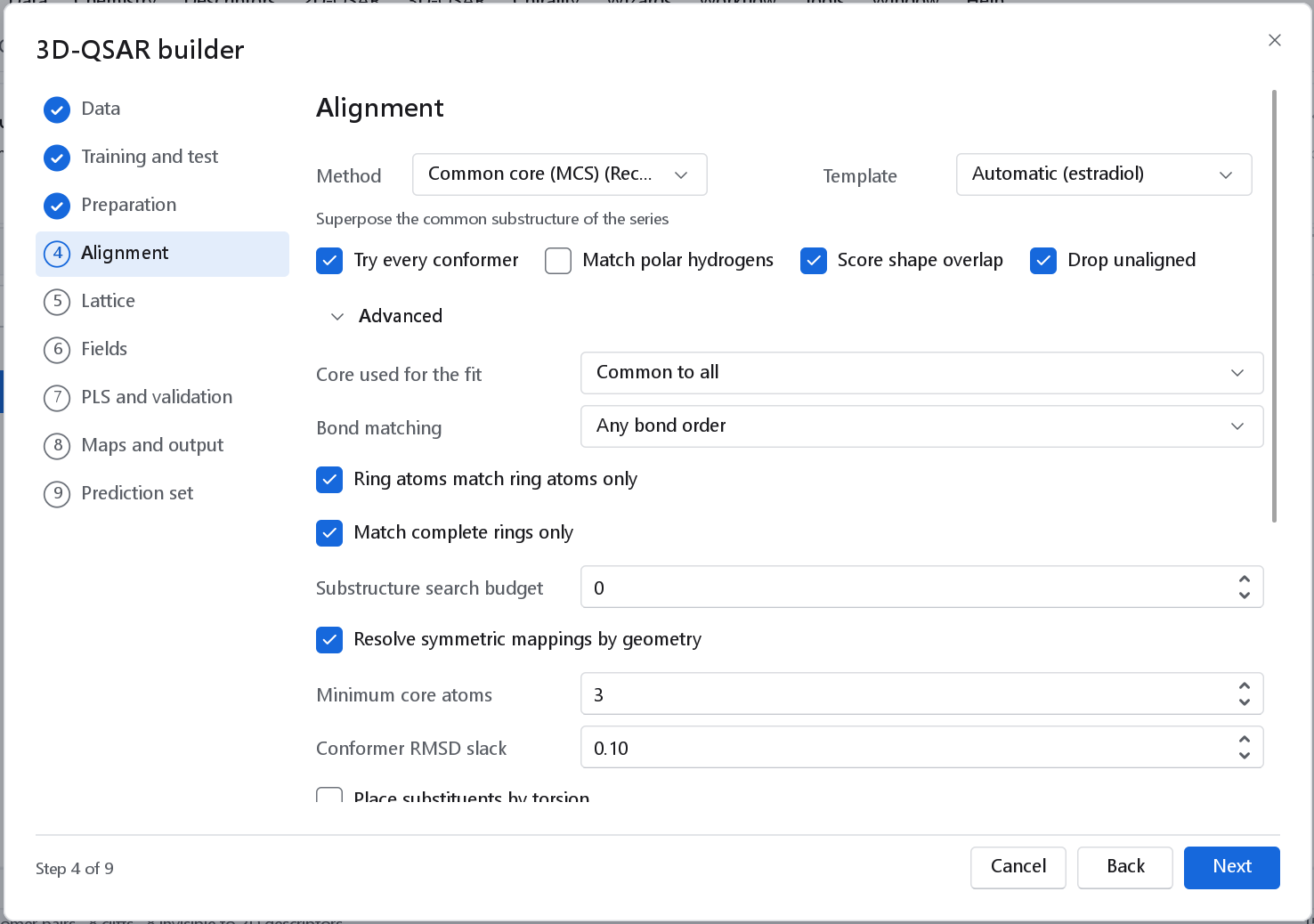
Advanced shows the parameters of the method in use; those of other methods are hidden.
| Parameter | Default | Meaning |
|---|---|---|
| Core used for the fit | Common to all | Common to all fits only the atoms every molecule shares with the reference. Pairwise fits all the atoms each molecule shares with the reference, which suits a series with no core common to all. |
| Bond matching | Any bond order | Whether aromatic, double and single bonds match each other, or only bonds of the same order. |
| Ring atoms match ring atoms only, Match complete rings only | On, on | Keep the core chemically sensible: no ring atom mapped onto a chain atom, no half ring. |
| Substructure search budget | 0 | Seconds per molecule pair; 0 means no limit. A search that is cut off returns a smaller core, and the alignment would then depend on how busy the machine is, which is why there is no limit by default. |
| Resolve symmetric mappings by geometry | On | Tries every symmetry-equivalent mapping of the core and keeps the one with the lowest RMSD. |
| Minimum core atoms | 3 | Fewer than three matched atoms cannot fix a rotation. |
| Conformer RMSD slack | 0.10 Å | Conformers whose core RMSD is within this of the best compete on shape overlap with the reference. |
| Place substituents by torsion | Off | After the core fit, rotates non-core single bonds to maximise shape overlap with the reference under a force-field strain penalty. |
| Feature colour weight, Random starts | 1.0, 8 | Shape method: the weight of the feature-colour term (0 is pure shape) and the extra seeded orientations. |
| Feature distance tolerance, Feature RMSD cutoff | 1.5, 2.0 Å | Pharmacophore method. |
| Resolve equal feature fits by shape, Equal-fit score slack | On, 0.5 | Pharmacophore method: when several feature mappings fit equally well, the features do not determine the pose; the pose with the best shape overlap is taken and the page says so. |
| Keep an earlier alignment record | On | As supplied: molecules that carry the record of an earlier alignment by the program keep it, so compounds predicted later can be placed by that rule. |
A molecule of the series with its Align.reference, Align.core_smarts, Align.frame and Align.polar_hydrogens properties carries the record of the alignment. The prediction of new compounds replays the alignment from that record, so these properties must stay on the reference molecule when an aligned set is exported and read back.
5 Lattice
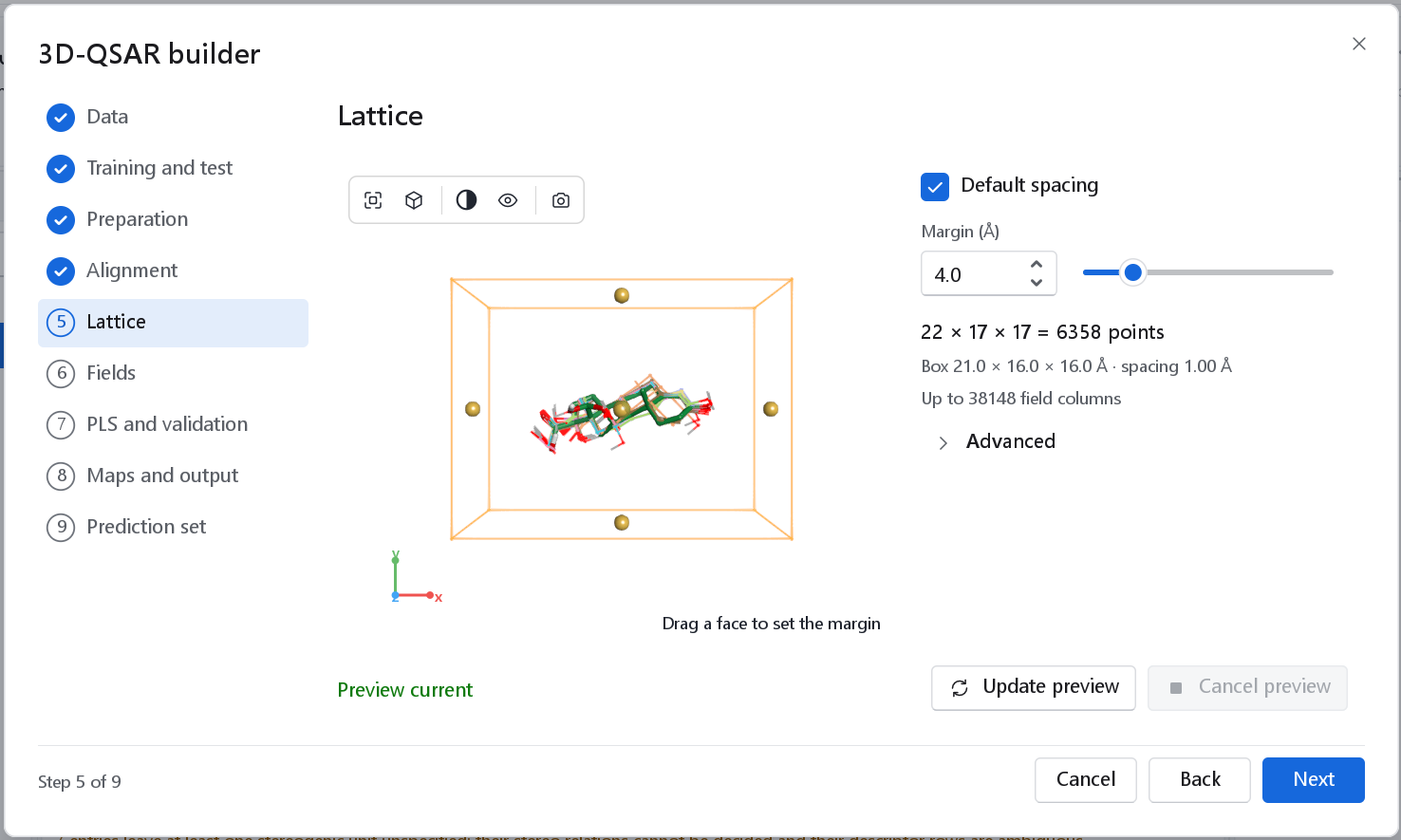
The lattice belongs to the atom-based cubes. KEFRA uses none, because its overlap integrals are computed analytically, so the settings of this page do not apply to it; the lattice its maps are drawn on is set among its own options. The lattice of the cubes is the atom bounding box of the aligned training set, extended by the margin on every side and rounded outwards to the spacing (Cramer, Patterson and Bunce 1988). The view shows the box around the aligned molecules; drag one of the yellow face handles to change the margin.
| Control | Default | Meaning and when to change it |
|---|---|---|
| Default spacing | On | The cubes of the atom-based model are 1 Å on a side. Untick it to set the spacing yourself. |
| Spacing (Å) | 1.0 | From 0.5 to 4.0, shown when Default spacing is unticked. The number of points, and the cost, grows with the cube of 1/spacing: 1 Å has eight times the points of 2 Å. |
| Margin (Å) | 4.0 | From 0 to 20, added on every side of the box that holds the atoms of the training compounds. The fields reach beyond the atoms, so the margin decides how much of them is sampled. |
| Summary | The points along x, y and z, the box and its spacing, and the number of columns before the column filter. |
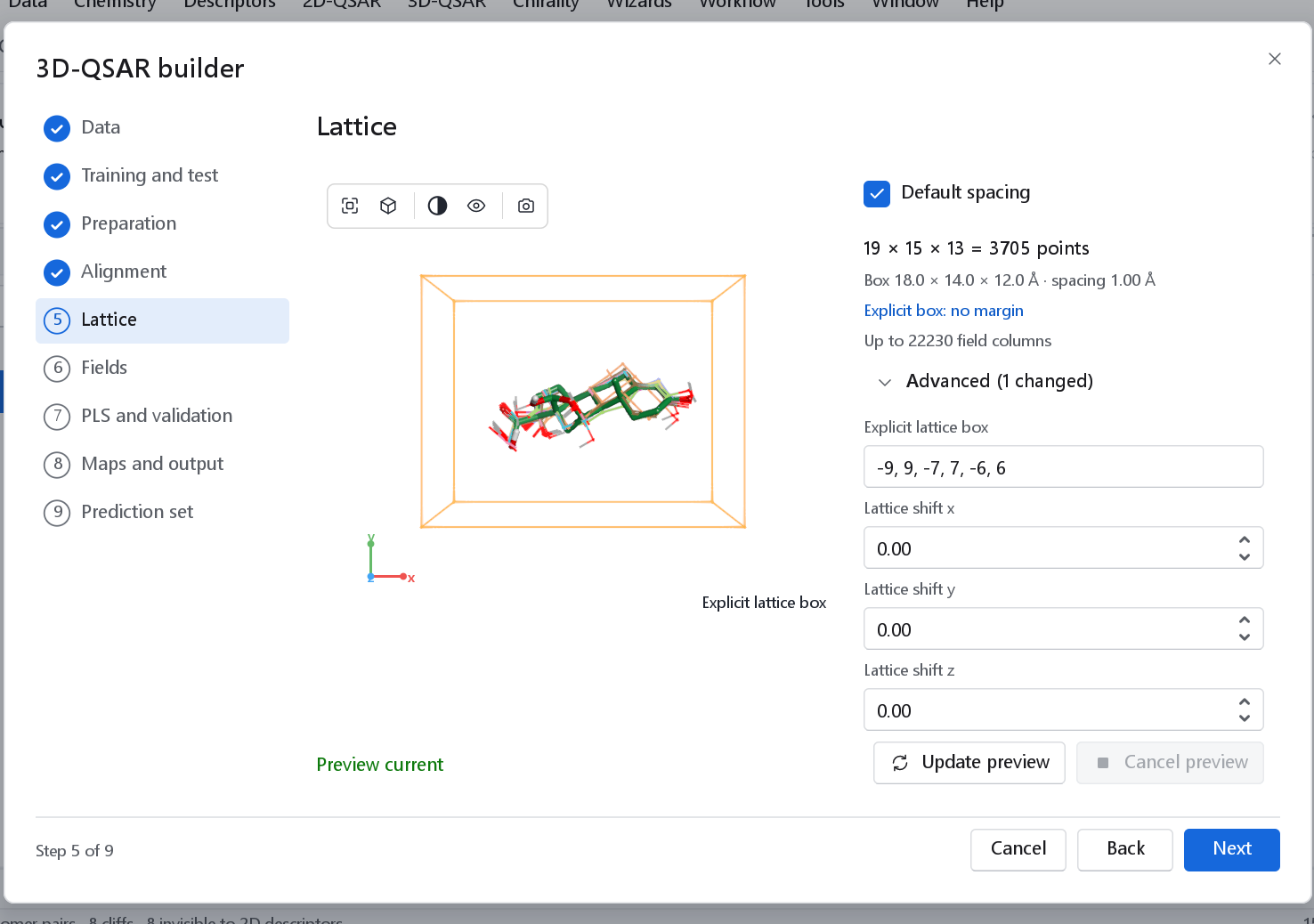
Advanced has Explicit lattice box, six numbers xmin, xmax, ymin, ymax, zmin, zmax in Å: that box is used exactly, the margin no longer applies, and the box is drawn without handles. Use it to reproduce a published region definition. Lattice shift x, y and z (from -4 to 4 Å) move the finished lattice, which measures how much q2 depends on where the points fall (Cho and Tropsha 1995). On the published benchmark sets, shifting the lattice by fractions of its spacing changed the q2 of a lattice field model by 0.02 to 0.13 within a set, so a difference of that size between two models is not a finding.
6 Fields
The page offers two models. Tick one or both: each ticked model is built on the same alignment and gets its own dashboard, so their statistics can be compared directly. KEFRA is ticked when the wizard opens. With both ticked, Primary model says which one feeds the report, the lattice preview and the prediction of a second file.
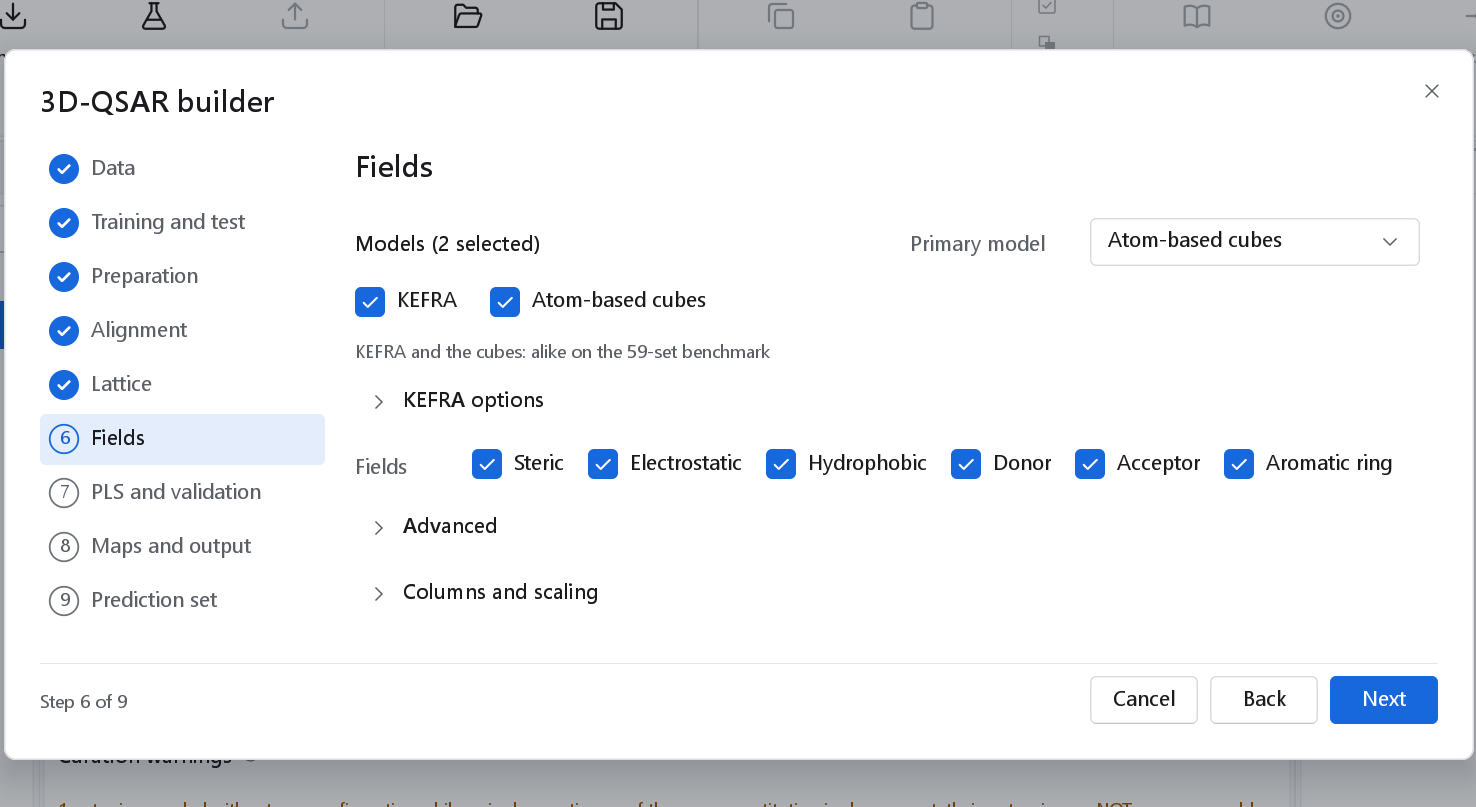
| Model | What it is | Reference |
|---|---|---|
| KEFRA | Kernel Ensemble Field Regression Analysis. Every compound is a sum of atom-centred Gaussian densities of six properties: steric, electrostatic, hydrophobic, hydrogen-bond donor and acceptor sites, and aromatic rings, optionally averaged over a Boltzmann-weighted ensemble of aligned conformers. Two compounds are compared by the analytic overlap integral of their densities, and a Gaussian process is fitted on that kernel. Field weights, widths and the regularisation are chosen by cross-validation inside the training set. No lattice and no PLS components; every prediction carries a predictive standard deviation and an applicability domain. | Builds on continuous molecular fields (Baskin and Zhokhova, J. Comput.-Aided Mol. Des. 2013, 27, 427) and the conformer ensembles of 4D-QSAR (Hopfinger et al., J. Am. Chem. Soc. 1997, 119, 10509) |
| Atom-based cubes | For every lattice cube, the volume filled by atoms of each of six classes: hydrogen-bond donor hydrogen (D), hydrophobic or non-polar (H), formally negative (N), formally positive (P), electron withdrawing (W) and other (X). Each atom belongs to one class. The columns are modelled by PLS. | Dixon et al., J. Comput.-Aided Mol. Des. 2006, 20, 647 |
On the benchmark of 59 data sets the two models performed alike: the median test Q2F3 was 0.28 for KEFRA and 0.21 for the cubes, a difference that was not significant. KEFRA ran a whole pass of the benchmark in 23 s, where the cubes took 69 minutes, and it reports a prediction uncertainty and an applicability domain for every compound.
Fields (Steric, Electrostatic, Hydrophobic, Donor, Acceptor, Aromatic ring) ticks the fields KEFRA uses; they become its field weights. The atom classes of the cubes are not fields and are always all used. The last ticked box cannot be unticked.
KEFRA options
Every setting starts at the default of the KEFRA step and can be changed here. The activity, the division into training and test, the charges, the Y-scramble runs and the seed are set on their own pages.
| Setting | Default | Meaning and when to change it |
|---|---|---|
| Learner | Gaussian process | Gaussian process: the kernel ridge mean with a calibrated predictive standard deviation. Kernel ridge regression: the same predictions without the uncertainty. Kernel PLS: latent variables on the centred kernel. |
| Kernel | Normalised | Normalised (Carbó cosine) compares shape and property pattern, not size. Unnormalised is the raw overlap integral, in which larger compounds overlap more. |
| Field weights | S,E,H,D,A,R | The fields and their weights, for example S,E,H or S=1,E=0.5. search chooses among six field subsets by inner cross-validation; with a small training set that choice is itself over-fitted, which the nested q2 shows. |
| Width scales | 0.5, 1, 2 | Candidate factors on the widths of the Gaussian densities. |
| Regularisation grid | 0.001 to 3 | Candidate regularisation, relative to the mean diagonal of the centred training kernel. |
| Inner cross-validation | Leave-one-out | Chooses the widths and the regularisation. Leave-one-out is exact and fast for the Gaussian process; k-fold uses seeded random groups. |
| Reported cross-validation | Nested leave-one-out | The whole choice is repeated without each compound (Varma and Simon, BMC Bioinformatics 2006, 7, 91), so no compound influences the model that predicts it. Nested k-fold for large sets. |
| Ensemble | Aligned pose | Aligned pose: one conformer per compound. Conformer ensemble: every conformer, superposed on the aligned pose and weighted by its Boltzmann factor (temperature, energy window and number of conformers alongside). Needs Search conformers on the Preparation page. |
| Hydrogens contribute, H-bond site placement | On, projected | Whether hydrogens carry density, and whether donor and acceptor sites sit where the partner atom would be (1.9 Å) or on the atoms. |
| Map lattice spacing, margin | 0.5, 6.0 Å | The lattice the maps are drawn on. It never enters the model. |
Hydrophobicity property names a data field with one value per atom that replaces the built-in contributions. Compounds predicted later must then carry the same field.
Columns and scaling
These settings belong to the atom-based cubes.
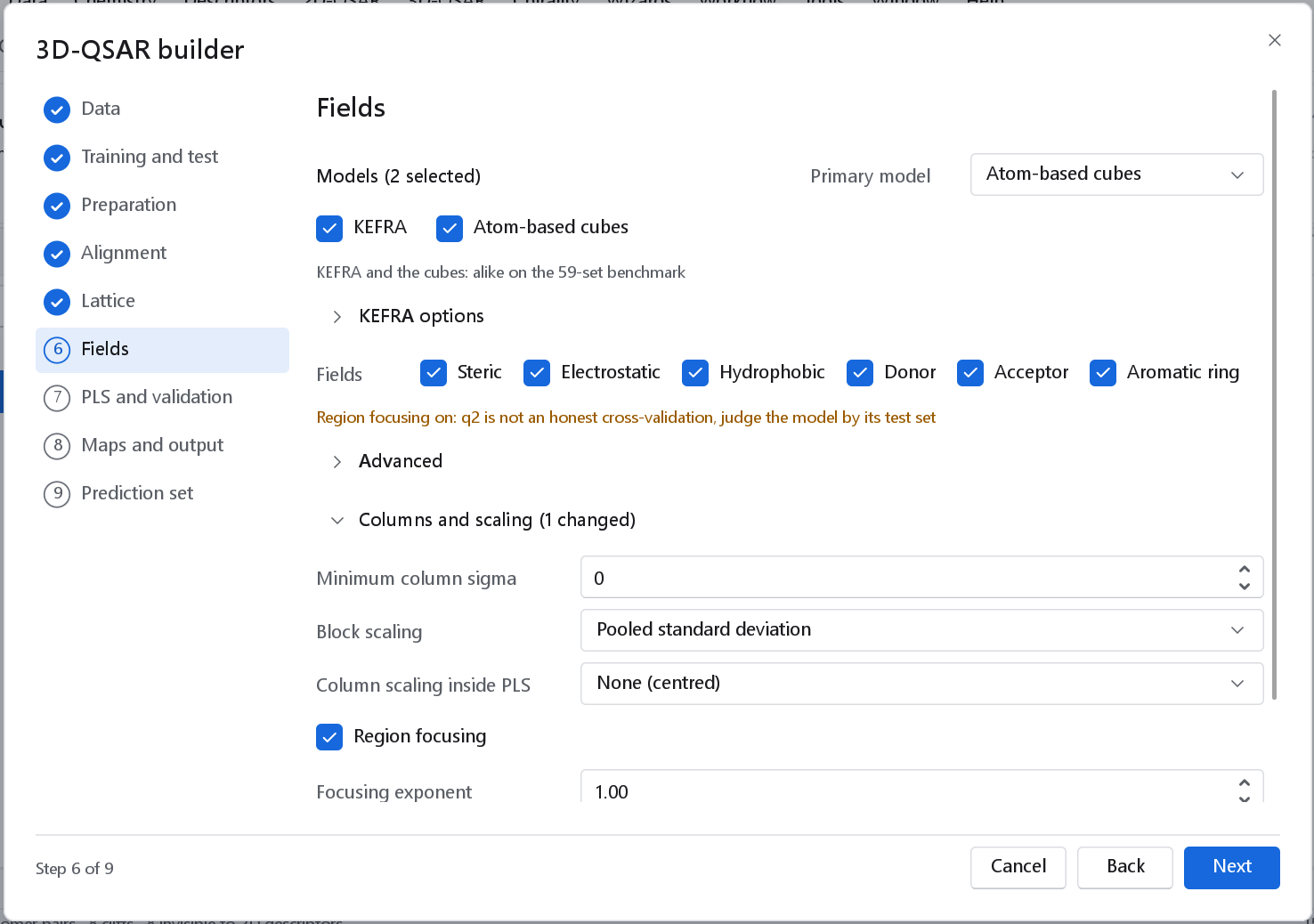
| Parameter | Default | Meaning |
|---|---|---|
| Minimum column sigma | 0 | Column filter: a column whose standard deviation over the training set is below this is dropped. Most lattice cubes far from the molecules vary little and carry only noise. |
| Block scaling | Pooled standard deviation | Each field block divided by its pooled standard deviation, so the blocks weigh alike; or unit block variance, or none. |
| Column scaling inside PLS | None (centred) | The usual 3D-QSAR convention. Autoscaling would give a rarely occupied far cube the same weight as a binding-site cube. |
| Region focusing | Off | Rebuilds the model with every lattice point weighted by |StDev x Coeff| of a first model (Kroemer and Hecht, J. Comput.-Aided Mol. Des. 1995, 9, 396), with its exponent, iterations and discard weight. The compounds left out in the cross-validation have then already shaped the columns, so q2 is optimistic; the test set and the Y-scrambling stay honest. |
7 PLS and validation
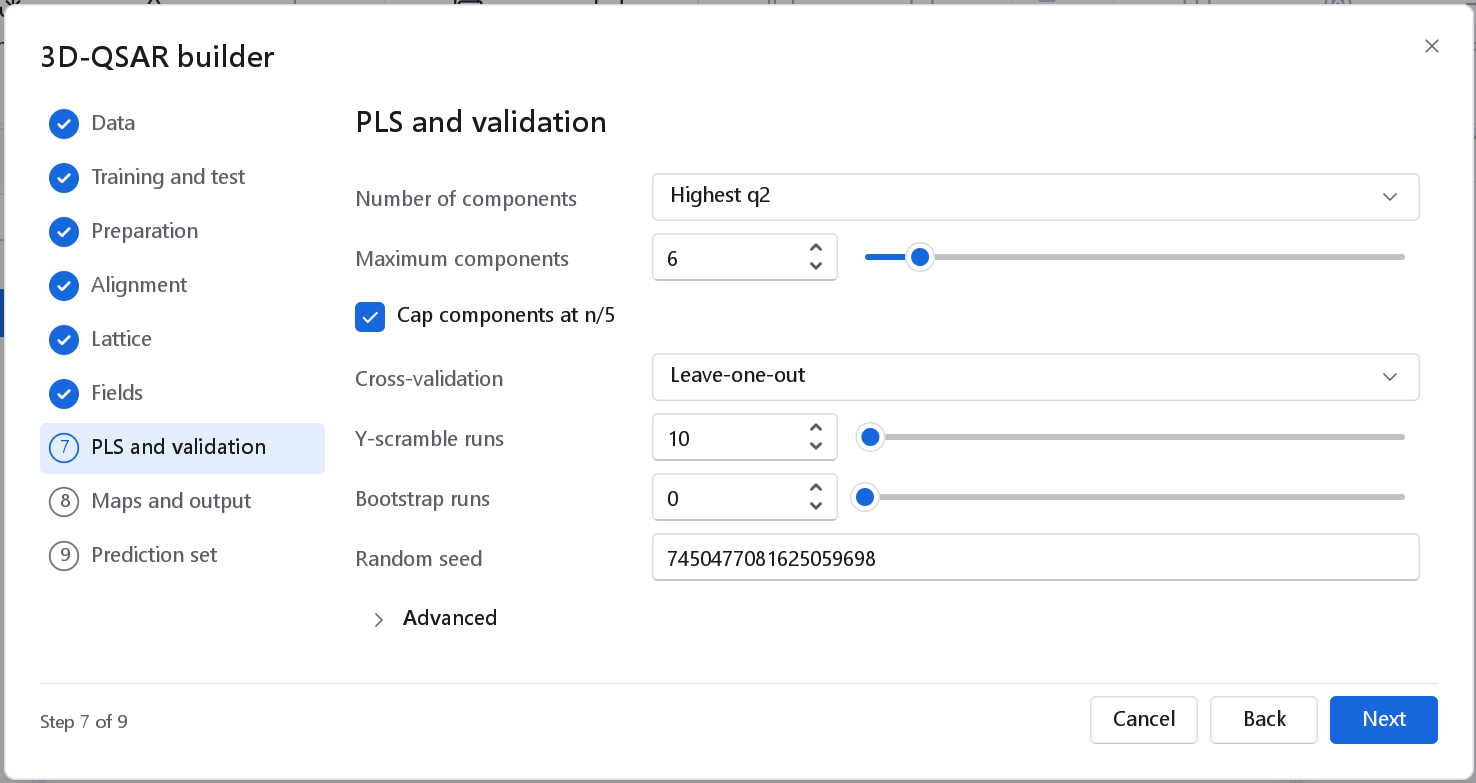
| Option | Default | Meaning and when to change it |
|---|---|---|
| Number of components | Highest q2 | Highest q2: the global maximum of the cross-validated q2. First q2 maximum: stop at the first component that does not raise q2. Parsimony (5 % rule): the fewest components whose q2 is within the q2 gain threshold (0.05) of the highest. Lowest s_PRESS, Wold's R and Per-component Q2 (above 0.0975) are the other published rules; Fixed uses Components exactly, for reproducing a study with a stated number. |
| Maximum components | 6 | The largest number the rule may choose. |
| Cap components at n/5 | On | Caps the components at about one fifth of the training set, the field-QSAR practice against over-fitting a small series. |
| Cross-validation | Leave-one-out | Leave-one-out is the classical 3D-QSAR standard. Leave-group-out uses random Groups (5) and Repeats (20). Leave-many-out leaves out a Fraction left out (0.2) in each of the repeats. With repeats the dashboard reports q2 with its standard deviation. |
| Y-scramble runs | 20 | Refits with the activities permuted; 0 skips them. A model whose scrambled twins score almost as well is fitting noise. |
| Bootstrap runs | 0 | Refits on resampled training sets; 0 skips them. |
| Random seed | 7450477081625059698 | One seed drives the embedding, the conformer search, the alignment, a random split and the validation runs, so the workflow reproduces exactly. Change it to see how much a result depends on the random parts of the preparation. |
The component rule, the cross-validation and the bootstrap belong to the atom-based cubes. KEFRA has no components and chooses its widths and regularisation by its own nested cross-validation (see KEFRA options above); of this page, the Y-scramble runs, each of which repeats that choice on permuted activities, and the random seed apply to it.
Advanced has SAMPLS (on): the cross-validated, bootstrapped and scrambled models are computed on the sample inner-product matrix (Bush and Nachbar 1993), which gives identical results far faster on large lattices and requires column scaling None. Extra leave-group-out groups (0: skip) and repeats (100) cross-validate the selected model once more with random groups and report the mean and spread of q2. Progressive scrambling levels (0: plain Y-randomisation) spreads the scramble runs over levels of perturbation (Clark and Fox 2004).
8 Maps and output
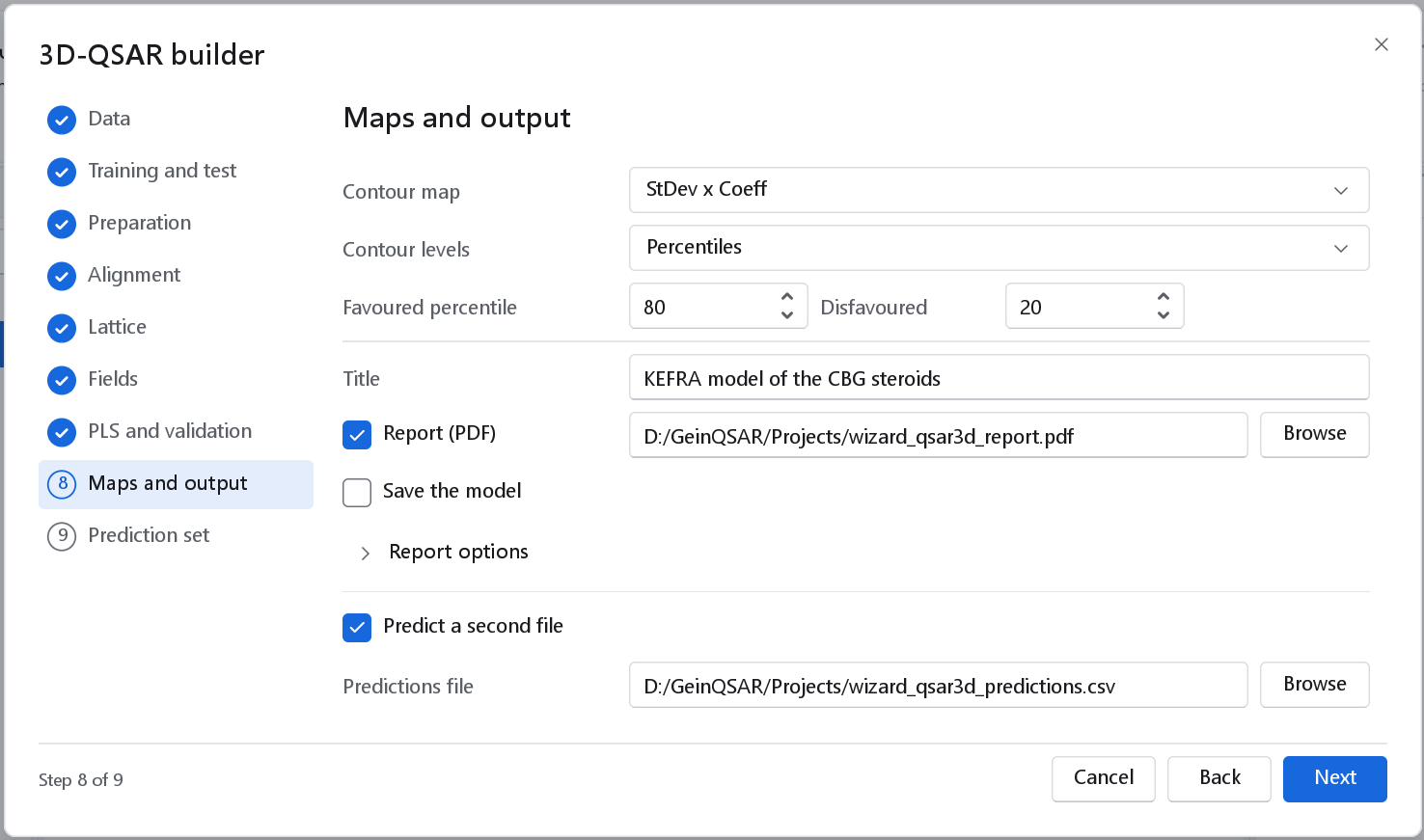
| Option | Default | Meaning |
|---|---|---|
| Contour map | StDev x Coeff | StDev x Coeff: the standard interpretive map. Coefficient: the bare PLS coefficient, which is misleading because lattice points differ enormously in how much they vary. Contribution of one compound: what one compound's own field does to its prediction, with Compound to choose it. A KEFRA model has no lattice coefficients; its map is the activity field back-projected from the kernel model, read in the same way. |
| Contour levels | Percentiles | Percentiles of the map values, with Favoured percentile (80, from 50 to 100) and Disfavoured (20, from 0 to 50), the usual 3D-QSAR convention; or Absolute levels in map units. |
| Title | 3D-QSAR model | Names the workflow, the report and the dashboard tabs. |
| Report (PDF) | On | The report of the model: its statistics, the per-compound predictions and the maps. Report options holds the rest of the report node, including its Word and Excel forms and the paper size. The dashboard's Export report writes it again at any time. |
| Save the model | Off | Writes the primary model as a .gqfm file. |
| Predict a second file | Off | Adds the Prediction set page and the file the predictions are written to as CSV. |
These levels belong to the contour-map step of the workflow and its report. The Maps tab of the dashboard has its own Levels control, which starts from a share of the lattice; see Contour maps and atom cubes for why.
Saving the model
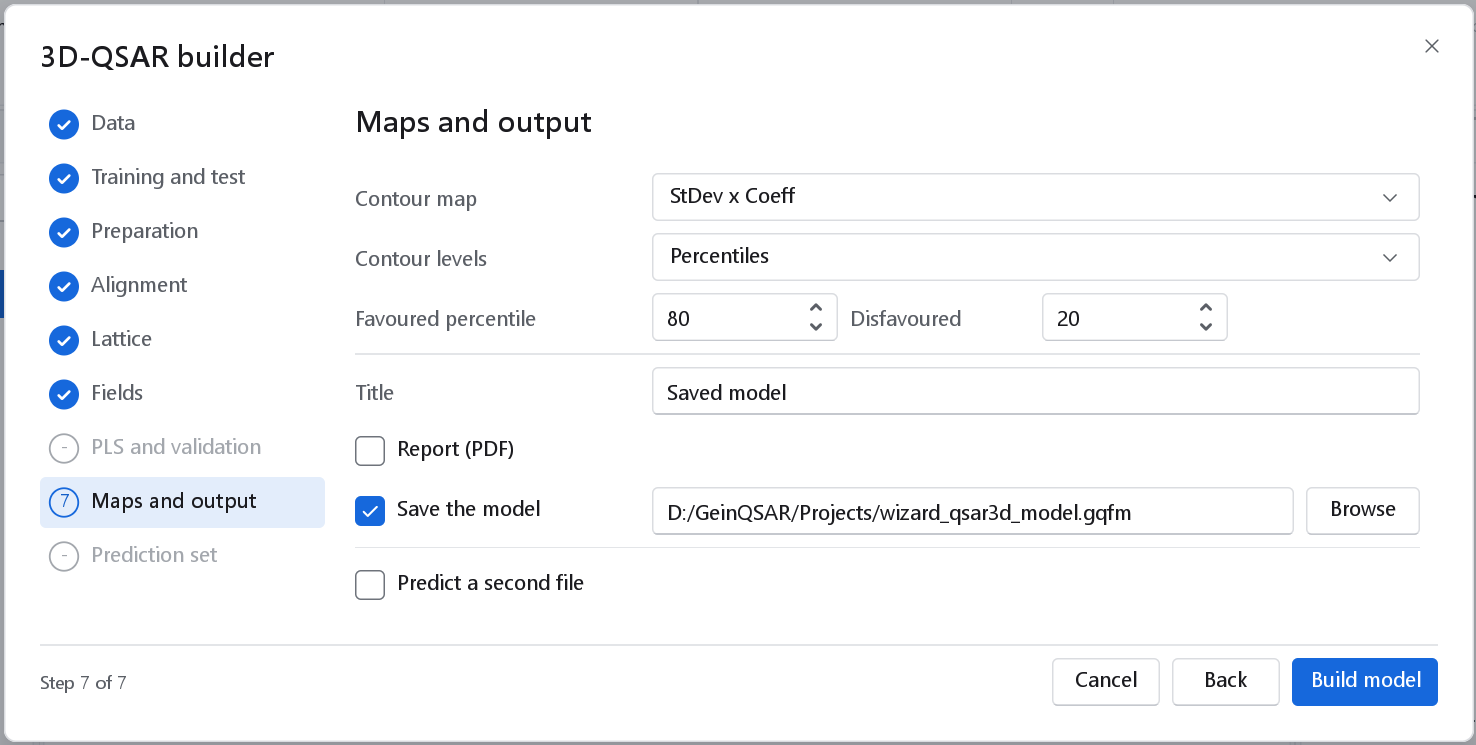
.gqfm file. With Predict a second file unticked, the Prediction set page is skipped and the dialog has eight steps; the finish button reads Build model.The model file holds the model with its statistics (and, for the atom-based cubes, its lattice), its aligned compounds with the record of their alignment, and every preparation step with its parameters. The prediction wizard applies it to new compounds without the workflow that built it: the compounds go through the recorded steps, are placed by the recorded alignment and get the charges of the model. File > Open on a .gqfm file, or the file dropped on the window, opens its dashboard again (see The 3D-QSAR dashboard).
9 Prediction set
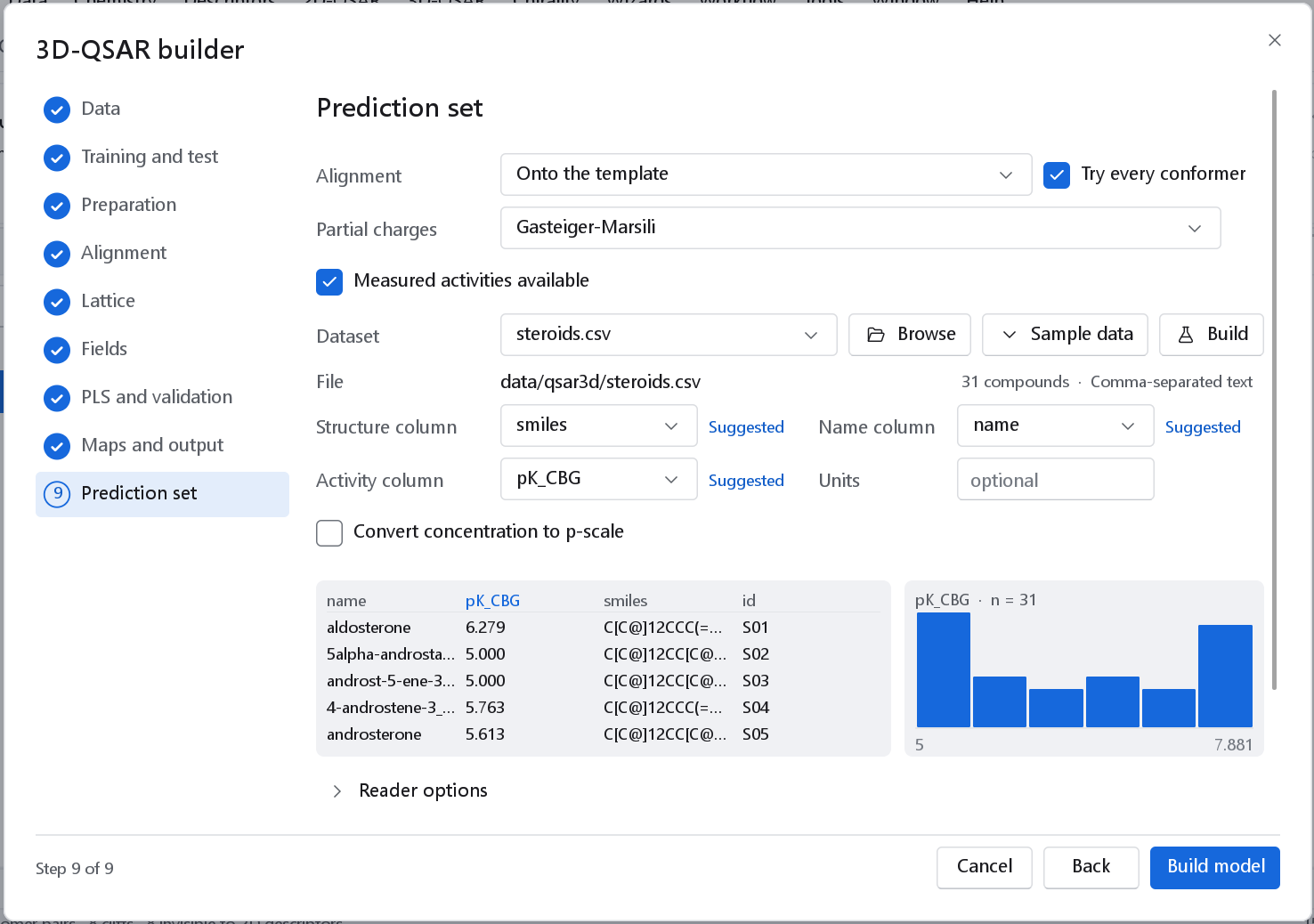
The compounds of a second file are prepared like the series and predicted with the primary model. They must be placed in the frame the model was built in.
| Control | Default | Meaning |
|---|---|---|
| Alignment | Onto the template | Onto the template: the reference molecule and the core of the training alignment place the new compounds, which reproduces that alignment. As supplied: the compounds are in the frame of the model already; this is the default when the series itself was kept as supplied. |
| Try every conformer | On | Keeps the conformer of each compound that fits the template best, as the alignment of the series does. |
| Partial charges | The model's | Must be the charge model the model was built with; a different choice is flagged in orange. |
| Measured activities available | Off | With measured activities for at least three compounds the external validation statistics are computed. |
The predictions file lists, for every compound, the predicted value, its standard error (for KEFRA the predictive standard deviation of the Gaussian process) and why it was flagged: outside the applicability domain of the model (for KEFRA the kernel similarity to the training compounds; for the cubes leverage, DModX and Hotelling T2 in the PLS score space), or, for the cubes, atoms beyond the lattice, where part of the compound is not sampled at all. Build model builds and runs the workflow.
What to expect
On the benchmark of 59 data sets, with the comparison fixed in advance, KEFRA and the atom-based cubes performed alike: the median test Q2F3 was 0.28 for KEFRA and 0.21 for the cubes, a difference that was not significant. A q2 also depends on the reference molecule of the alignment and on the random parts of the preparation, so a value above a published one is not in itself a finding. More in Accuracy and validation.
The program has one force field, UFF; MMFF94 is not implemented. The conformer search covers the low-energy conformers of molecules with up to about six rotatable bonds well and those of more flexible molecules incompletely, and nitrogen inversion is not sampled. For flexible series an alignment from docked poses, kept as supplied, is often the better starting point.