Chirality and activity cliffs
Find the pairs of compounds that a QSAR model cannot learn: stereoisomers with different potencies, and structurally similar compounds with very different potencies.
Two enantiomers have the same constitution, so every conventional 2D descriptor and every ordinary fingerprint gives them byte-identical values. A model built on those descriptors receives one input row with two measured activities and can do no better than predict their mean. A chirality cliff is such a pair of stereoisomers whose potencies differ by a set amount or more; an activity cliff is the general case, a pair of compounds that are structurally very similar but differ strongly in potency. Cliffs are where the similarity principle fails, and they bound the accuracy any model can reach on a data set. The analysis described here finds them, quantifies them and says whether the descriptors you would model with can tell the two members apart.
The analysis is run from the wizard Chirality > Chirality and activity cliffs (the same command is in the Wizards menu). Like every wizard it builds a workflow, opens it on the canvas, runs it and opens the cliff dashboard when the run finishes, so every setting stays visible and can be changed and run again (see The workflow canvas).
Before you start
- Activities must be on a logarithmic scale (pIC50, pKi, pEC50). A difference of raw IC50 values in nM has no meaning as a potency difference. A column of concentrations can be converted on the data page with Convert concentration to p-scale.
- A compound whose activity is missing or not a finite number takes part in no pair; the run says how many compounds were left out.
- The analysis needs at least two compounds. The activity-cliff analysis compares every pair, which is fine up to a few thousand compounds; it refuses sets of more than 20 000.
- Only pairs whose two activities were measured in the same assay should enter the eudismic analysis and Pfeiffer's rule. Potencies from different assays are not commensurable, even for the same target.
The data page
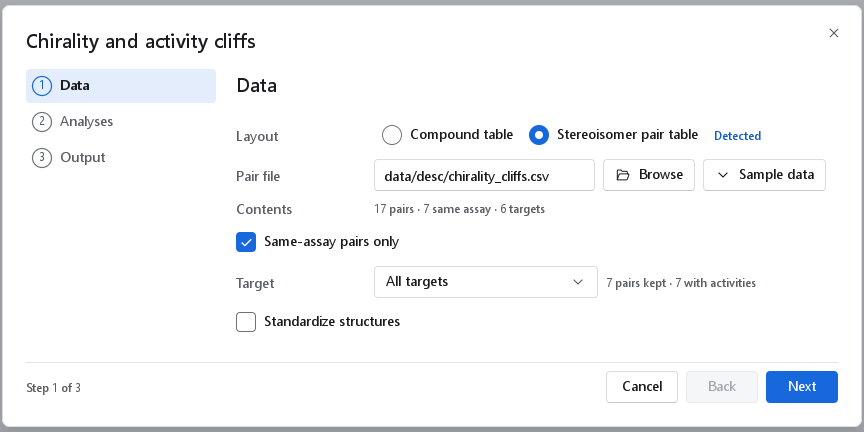
The wizard reads two kinds of file, chosen with Layout. A Compound table has one structure per record, like any QSAR data set: the stereoisomers are found among the records. A Stereoisomer pair table has one pair per row: both structures, their relation and, for pairs measured in one assay, both activities. The generic reader cannot parse the pair layout, so the wizard reads it with a reader of its own. When the header of a chosen file names the pair columns, the page switches to the pair layout by itself and marks it Detected; you can switch back.
| Control (pair table) | What it does | When to change it |
|---|---|---|
| Pair file, Browse | The pair table, a comma-separated file. | Choose your own curated pair set here. |
| Sample data | The shipped pair set, Stereoisomer pairs with measured activities: real pairs from ChEMBL with their assay and document identifiers. Nothing is loaded from it unless you pick it. | To see the analysis work before preparing your own file. |
| Contents | The number of pairs in the file, how many were measured in one assay and how many targets they cover. | Read only. |
| Same-assay pairs only | On by default. Keeps only the rows whose two activities come from one assay. | Leave it on for any potency comparison. Switch it off only to study pair detection and relation classification on rows without activities. |
| Target | All targets or one target of the file. The counts beside it are the pairs kept and those of them with activities. | Choose one target whenever you run the activity-cliff analysis on a pair table: cliffs across targets compare potencies that are not commensurable. |
| Standardize structures | Off by default. Strips salts and solvents, keeps the largest fragment and neutralises charges before the pairs are formed; the stereochemistry is kept. Standardization options appear when it is on. | Switch it on for structures taken from a vendor or a registration system that still carry counter-ions. |
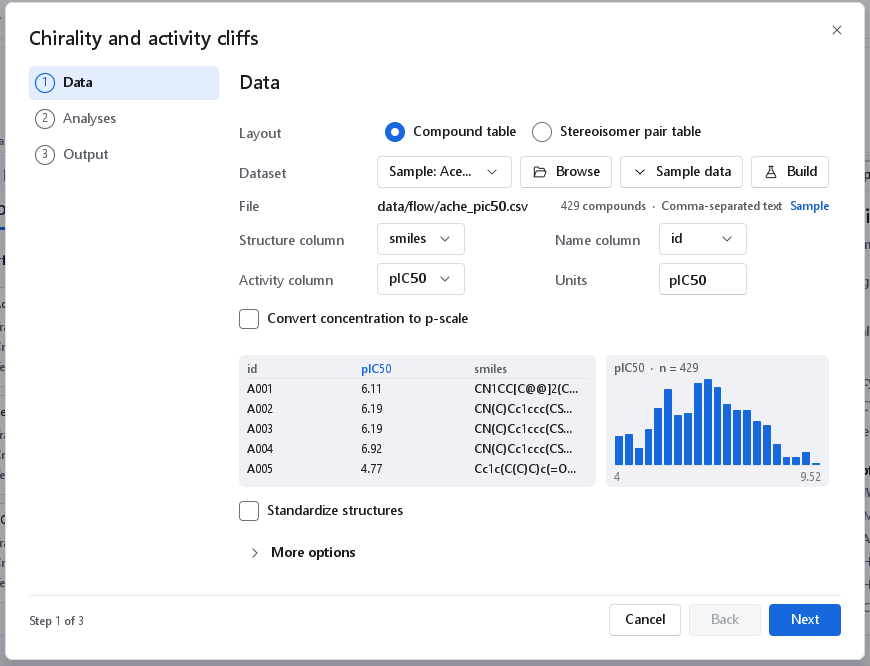
For a Compound table the page is the shared data page of every wizard: the open dataset or a file, the structure, name and activity columns, the units and the conversion to the p-scale (described with The 2D-QSAR wizard). The preview shows the first records and the distribution of the chosen activity.
The pair table format
A pair table is plain comma-separated text (RFC 4180: a field that contains a comma is quoted). Lines that begin with # are comments, and the first other line is the header. The header must contain pair_id, smiles_a, smiles_b, relation and provenance; the shipped file has 21 columns per row, which add the names and ChEMBL identifiers of both members, the target, the assay and document identifiers, the activity type, both values in nM and both pActivities. provenance is same_assay when one assay measured both members, or structure_only when the relation is established but no single assay measured both; the activity fields of a structure-only row are left empty, never guessed. A compound measured against several targets appears in several rows: the row, not the compound, is the unit of analysis. The reader reports a row with the wrong number of fields instead of reading it shifted.
The Analyses page
The page offers the two analyses, each with its thresholds. At least one must be on.
| Control | Default and range | Meaning, and when to change it |
|---|---|---|
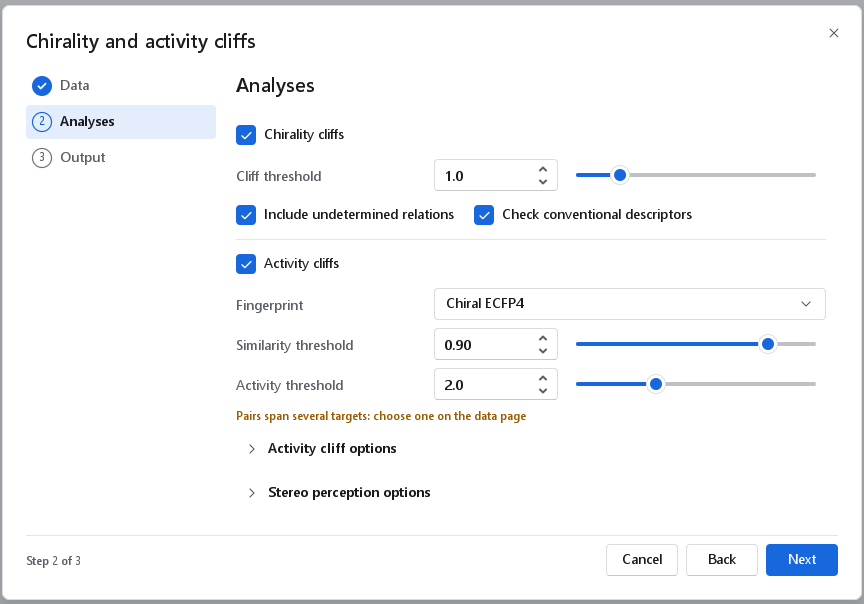
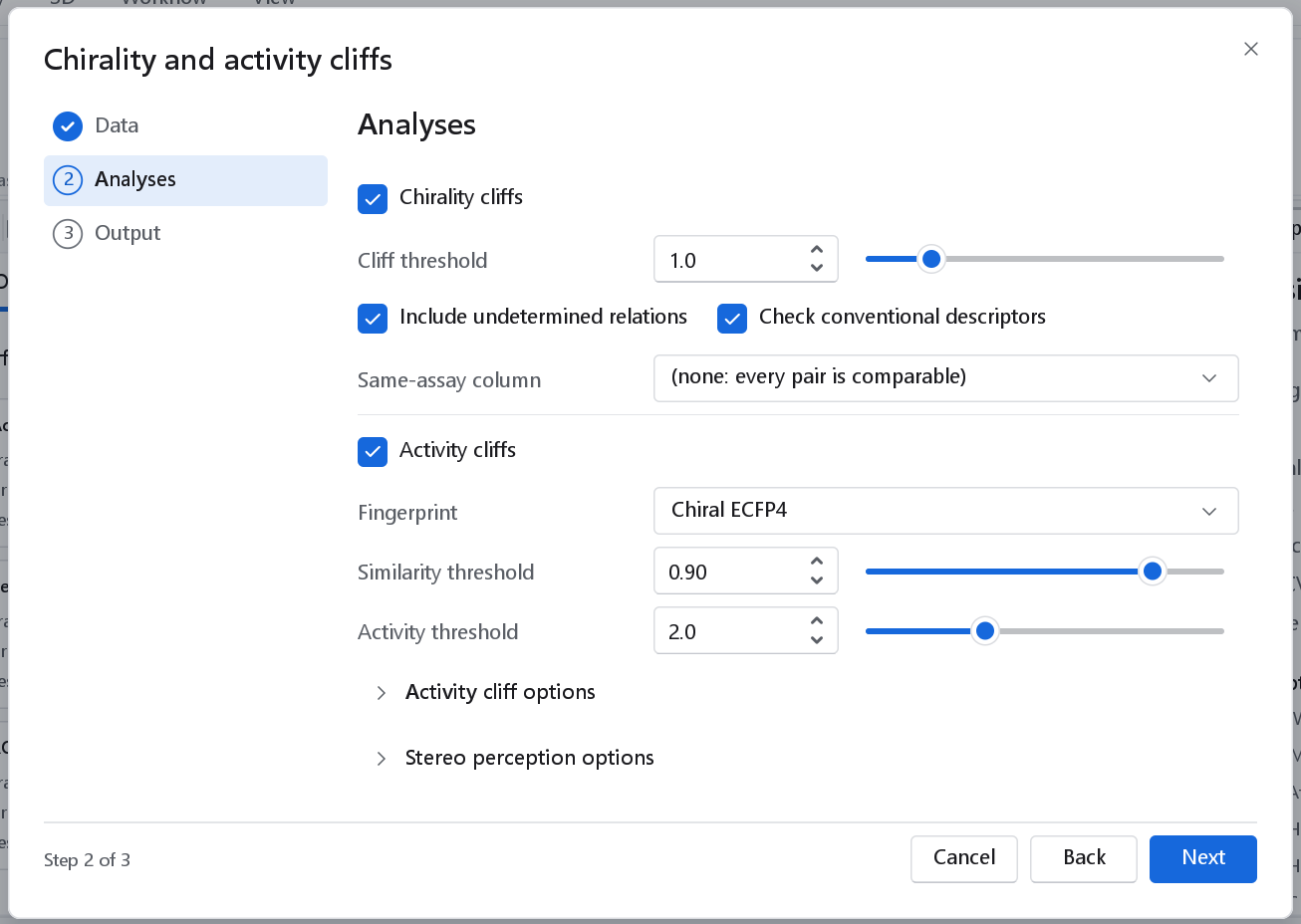
| Chirality cliffs | On | Stereoisomer pairs (enantiomers, diastereomers, epimers, geometric isomers) whose potencies differ by the threshold or more, and which of them the conventional 2D descriptors cannot separate. |
| Cliff threshold | 1.0 log unit (0.1 to 5.0) | A potency difference at or above this marks a chirality cliff. One log unit is a tenfold potency ratio. Lower it to see milder stereoselectivity, raise it to keep only the dramatic pairs. |
| Include undetermined relations | On | Keeps pairs whose relation cannot be decided, for example because a centre is unspecified, in the pair list. Switch it off to list only pairs with a decided relation. |
| Check conventional descriptors | On | Compares a row of conventional 2D descriptors for the two members of every pair and flags identical rows. This is the diagnosis that tells you to add chirality descriptors; leave it on. |
| Same-assay column | None (compound table only) | A column of the file that marks which entries share an assay. A value other than empty, 0, no or false marks the entry as commensurable, and only pairs of two marked entries enter Pfeiffer's rule. A pair table carries this mark in its provenance column, so the control is not shown for it. |
| Activity cliffs | On | Every pair of compounds with an activity for both, ranked by SALI and placed on the structure-activity similarity map. |
| Fingerprint | Chiral ECFP4 | The representation the similarity is computed on: ECFP4, FCFP4, MACCS 166, Atom pairs, Topological paths, Chiral ECFP4, Chiral atom pairs or 3D shape. The two chiral fingerprints separate stereoisomers; the others score two enantiomers as identical. 3D shape compares Gaussian shapes and needs 3D structures, so the wizard adds a Generate 3D structure node for it (existing coordinates are kept, stereochemistry is enforced) and an Embedding options section with its seed. |
| Similarity threshold | 0.90 (0.50 to 1.00) | Pairs at or above this similarity count as structurally similar. Lower values admit more distant pairs; a cliff at 0.6 is rarely a cliff a chemist would recognise. |
| Activity threshold | 2.0 log units (0.5 to 5.0) | A potency difference at or above this counts as large. Two log units (a hundredfold) is the usual choice in the literature. |
| Activity cliff options | Store pairs above similarity 0.5 | Pairs below this similarity still count in the statistics (SARI, the quadrant counts) but are not kept in the pair table, which keeps the table usable for large sets. |
| Stereo perception options | Clear non-stereogenic configurations off, Perceive atropisomers on, Smallest stereogenic ring double bond 8 (3 to 64) | How stereogenic units are found. The first removes stored configuration tags on atoms and bonds that cannot define a stereoisomer; the last stops double bonds in small rings from being treated as stereogenic. The defaults suit drug-like sets. |
The Output page
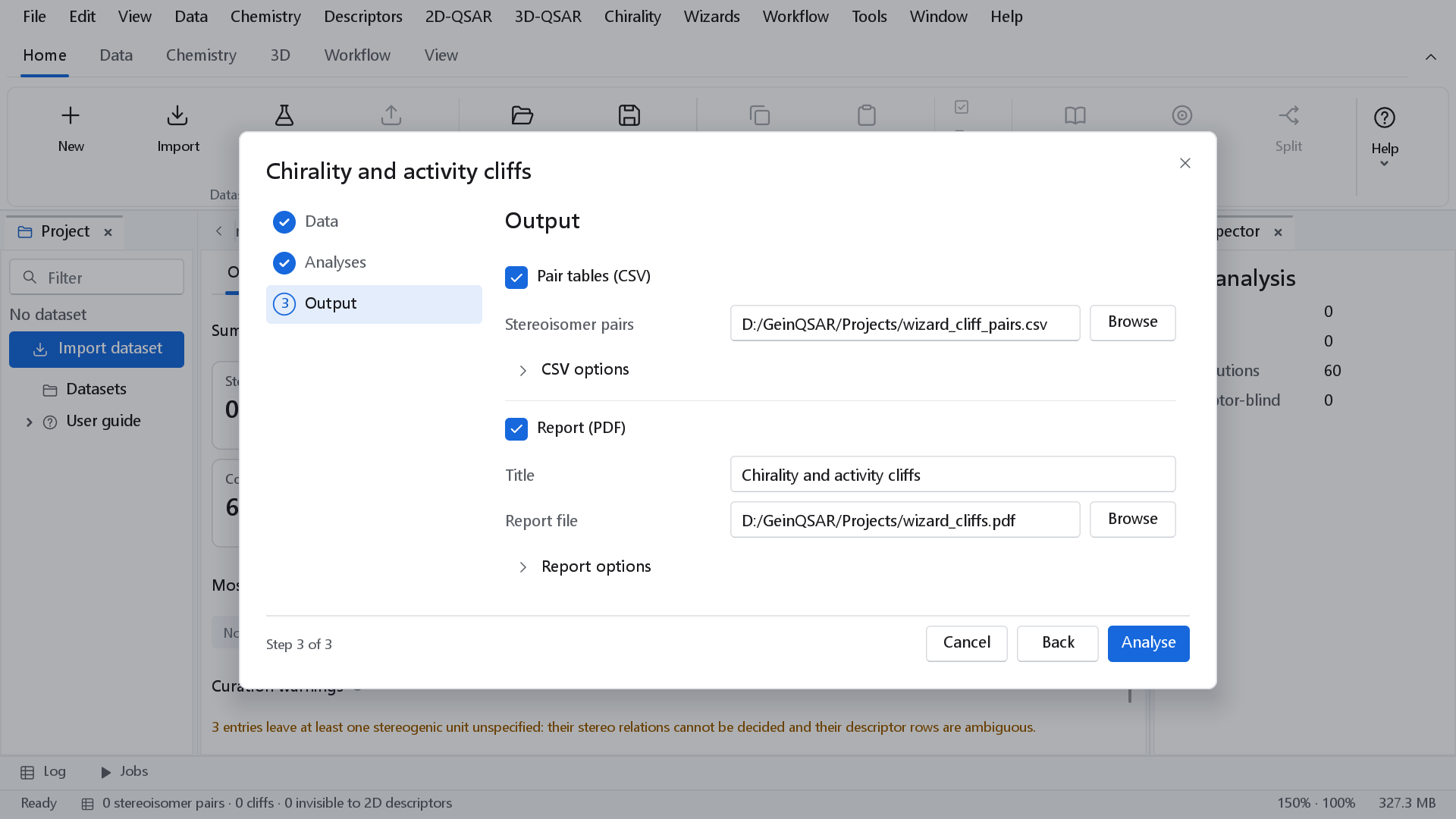
The last page names the files the workflow writes; Analyse builds and runs it.
| Control | What it writes |
|---|---|
| Pair tables (CSV) | On by default. One row per pair: the two compounds, their relation or similarity, both activities and the cliff verdict. Stereoisomer pairs names the file of the chirality analysis, Activity cliff pairs that of the activity cliffs; when both analyses run, the two files must differ. CSV options holds the Delimiter (Comma by default; Semicolon, Tab, Pipe or Detect automatically). |
| Report (PDF) | On by default, with the Title Chirality and activity cliffs and the Report file. Report options adds the subtitle, author, endpoint description, mechanistic interpretation, whether figures and the prediction table are included, and the formats to write and the paper size, and the Maximum table rows (500; the Excel workbook and the CSV are always complete). For a compound table with units, the endpoint description is filled with the activity and its units. When both analyses run, the chirality analysis leads the report and the activity cliffs add their map and pair table. See Reports and export. |
How the pairs are defined
Stereoisomer pairs
Every entry is reduced to its constitution: the canonical SMILES with every configuration removed and the isotopes kept. Two entries of the same constitution whose stereo-canonical SMILES differ form a pair, and the relation between them is then decided from their CIP descriptors:
| Relation | Meaning |
|---|---|
| Enantiomers | Non-superimposable mirror images: every stereo element inverted. |
| Diastereomers | Same constitution, different configuration, not mirror images. |
| Epimers | Diastereomers that differ at exactly one tetrahedral centre. |
| Geometric isomers | Diastereomers that differ at exactly one double bond (E/Z). |
| Racemate vs enantiomer | One entry carries no configuration at all while the other is fully specified and chiral: an activity reported for a racemate next to that of one enantiomer. |
| Undetermined | The relation cannot be decided. |
Curated data often leave one stereogenic unit unwritten, such as the bridgehead nitrogen of the quinuclidine in quinine and quinidine. The relation is then classified from the elements whose descriptors are known and differ (quinine and quinidine come out as diastereomers, not undetermined), and the entries are still listed among the curation warnings. Every differing element is reported with its labels, so the pair table reads atom 5: R → S rather than only diastereomers.
Compound pairs of the activity-cliff analysis
Every pair of compounds that both carry an activity is compared on the chosen fingerprint (Tanimoto similarity) and placed in one of four quadrants of the structure-activity similarity (SAS) map. Both thresholds are inclusive: a pair at exactly 0.90 and 2.0 is a cliff.
| Quadrant | Similarity | Potency difference | Reading |
|---|---|---|---|
| Activity cliff | at or above s* | at or above d* | Similar structures, very different potency. |
| Smooth SAR | at or above s* | below d* | The similarity principle holds. |
| Scaffold hop | below s* | below d* | Different structures, comparable potency. |
| Non-descriptive | below s* | at or above d* | Different structures, different potency. |
The quantities
| Quantity | Definition | Reference |
|---|---|---|
| SALI | Structure-activity landscape index, |A(i) - A(j)| / (1 - sim(i, j)). Two different compounds with identical fingerprints would give infinity; the value 109 is reported instead and the pair is flagged IDENTICAL. | Guha and Van Drie, J. Chem. Inf. Model. 48:646 (2008) |
| SARI | 0.5 x (continuity score + (1 - discontinuity score)): 1 for a smooth landscape, 0 for one dominated by cliffs. The raw scores follow the publication; they are normalised inside the analysed data set, so SARI ranks data sets as in the paper but its absolute values are not comparable with published ones. The dashboard marks it relative only. | Peltason and Bajorath, J. Med. Chem. 50:5571 (2007) |
| Eudismic index | pAct(eutomer) - pAct(distomer) in log units; the eutomer is the more potent member. | Lehmann, Trends Pharmacol. Sci. 7:281 (1986) |
| Eudismic ratio | 10 to the power of the eudismic index: the potency ratio of eutomer to distomer. | Lehmann, Rodrigues de Miranda and Ariëns, Prog. Drug Res. 20:101 (1976) |
| Chirality cliff index (CCI) | |pAct(i) - pAct(j)| divided by the number of stereo elements whose configuration differs: the mean potency change per inverted element. It makes an epimer pair and the enantiomers of a molecule with four centres comparable, and equals the eudismic index for one differing element. A GeinQSAR definition. | |
| Pfeiffer's rule | Least-squares regression of the eudismic index on the eutomer potency over the commensurable enantiomer pairs, with slope, r and the two-sided p value. It needs at least three pairs with different eutomer potencies; a positive slope with p < 0.05 supports the rule for the data set. | Pfeiffer, Science 124:29 (1956) |
The cliff dashboard
The dashboard has three tabs, Overview, Pairs and Charts, and the Export report button. The inspector on the right repeats the main counts. The wizard opens the dashboard of the chirality analysis when that analysis ran, otherwise that of the activity cliffs; when both ran, the activity-cliff results are in the report and their pair table. Workflow > Open results dashboards opens the dashboard of any finished workflow that contains a cliff node.
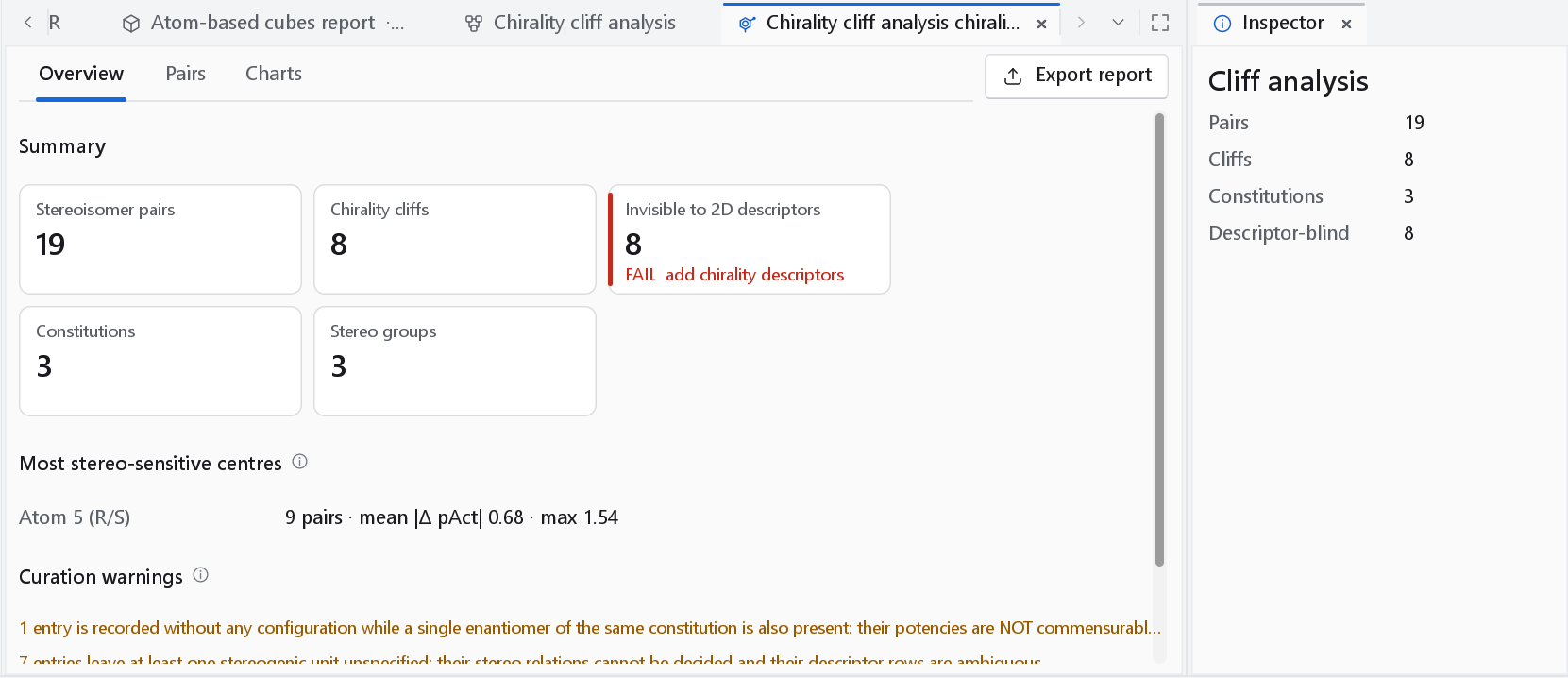
| Card | Meaning |
|---|---|
| Stereoisomer pairs | Pairs with the same constitution and a different configuration. |
| Chirality cliffs | Pairs whose activities differ by at least the cliff threshold. |
| Invisible to 2D descriptors | Cliffs whose two members have an identical conventional 2D descriptor row. Fails whenever the count is above zero: a model on those descriptors cannot learn the pair, and the chirality-aware families separate it. |
| Constitutions | Distinct structures without their stereochemistry. |
| Stereo groups | Constitutions present as more than one stereoisomer. |
| Pairs compared | Activity cliffs: compound pairs with an activity for both members. |
| Activity cliffs | Pairs at or above the similarity threshold whose activities differ by at least the activity threshold. |
| SARI | The landscape index, marked relative only (see above). |
| Identical fingerprints | Pairs with similarity 1 and different activities; fails (not separable) when there are any. |
Most stereo-sensitive centres ranks, for up to ten centres, the activity difference a centre causes over the epimer pairs that differ at that one centre only: the atom index with the labels seen there, the number of pairs, and the mean and largest |Δ pAct|. Curation warnings lists what limits the reading of the numbers: activities recorded for a racemate beside a single enantiomer, entries with an unspecified stereocentre, cliffs the 2D descriptors cannot see, and the line Pfeiffer's rule not testable when there are fewer than three enantiomer pairs.
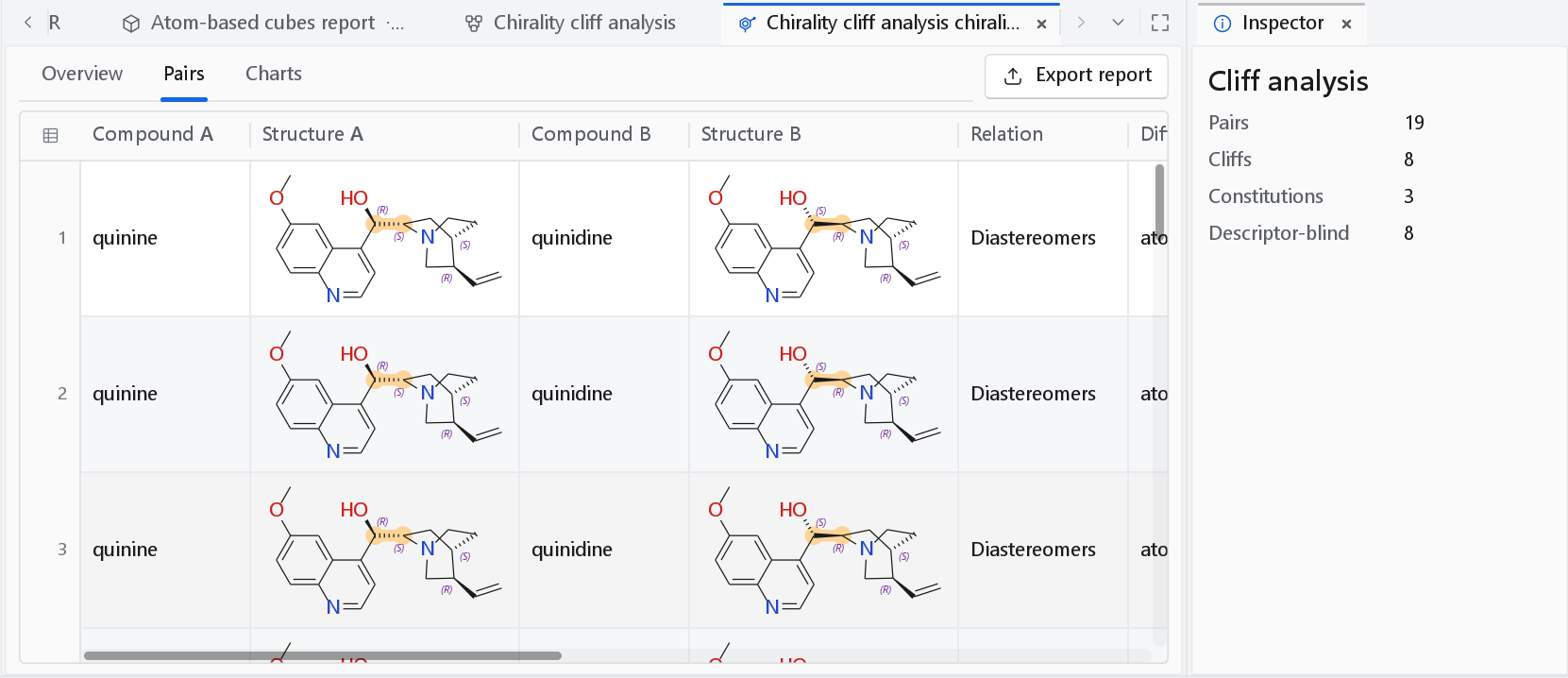
| Column | Chirality analysis | Activity-cliff analysis |
|---|---|---|
| Compound A, Compound B | The two members, drawn in Structure A and Structure B | The same |
| Relation | Enantiomers, Diastereomers, Epimers, ... | The SAS quadrant |
| Differing stereocentres | Each differing element with its labels | - |
| Activities | pAct A, pAct B, |Δ pAct| | Similarity, Activity A, Activity B, |Δ Act| |
| Indices | Eudismic index, Eudismic ratio, CCI | SALI |
| Flag | 2D descriptors: IDENTICAL when the conventional rows are the same | Fingerprint: IDENTICAL when the similarity is 1 |
The activity-cliff table lists the cliffs only; the complete pair list is in the CSV the workflow writes.
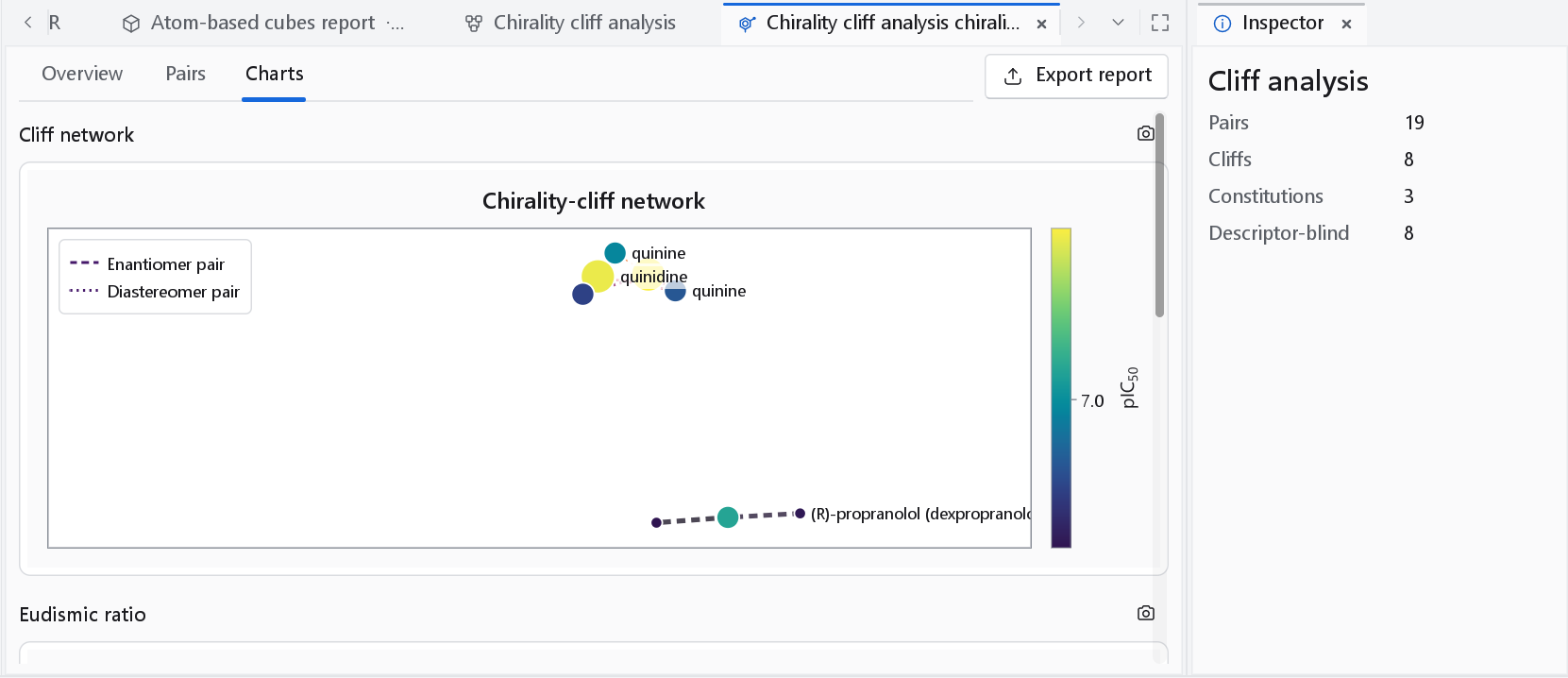
The Charts tab holds up to four charts, each with a camera button that opens the figure dialog (see Publication figures):
| Chart | What to read from it |
|---|---|
| Cliff network | Compounds as nodes coloured by activity, cliffs as edges: solid for an activity cliff, dashed for an enantiomer pair, dotted for a diastereomer pair. Edge colour and width follow the SALI of the pair (the CCI for stereoisomers). A compound at the centre of many edges is a cliff generator worth examining. The line under the charts gives the numbers of compounds and edges. |
| Structure-activity similarity map | Activity cliffs only: every stored pair, similarity against potency difference, with the two thresholds drawn. The cliffs are in the upper right. |
| Eudismic ratio | Chirality analysis: the eutomer/distomer potency ratio of every pair with activities. |
| Pfeiffer plot | Chirality analysis: eudismic index against eutomer potency, when the rule can be tested. |
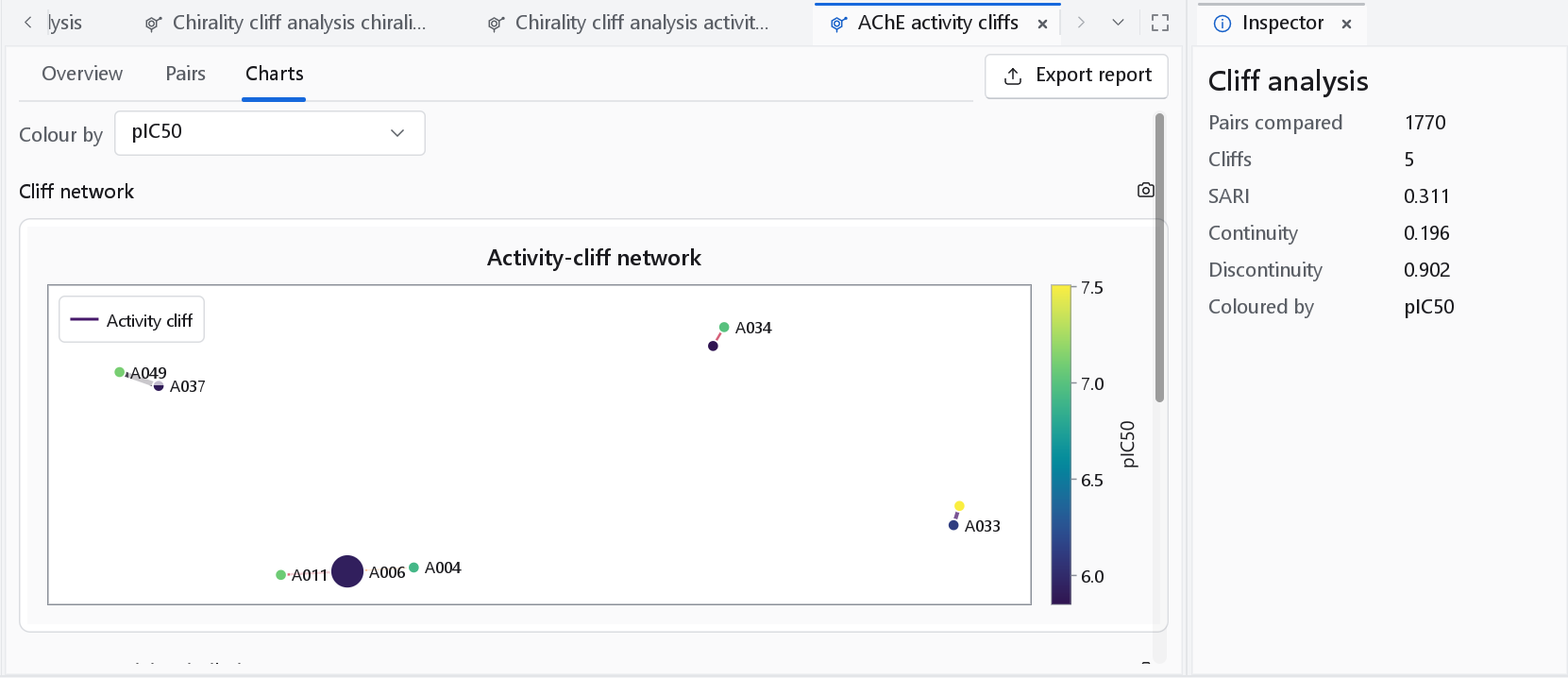
Colour by appears for an activity-cliff analysis. It lists the numeric properties of the compounds and starts on the activity the workflow analysed, or on None; choosing another property recolours the nodes without changing the cliffs.
Chirality descriptors
When the analysis reports cliffs invisible to 2D descriptors, the remedy is to model with descriptors whose values differ between stereoisomers. Chirality > Add chirality descriptors computes the chirality families into the active dataset, and Chirality > Stereochemistry summary reports how many of its compounds are chiral, how many leave a centre undefined and how many are meso. In a workflow or a wizard, the presets Chirality-aware 2D (the conventional 2D families together with the chirality-sensitive ones) and Chirality-aware 3D (the chirality-sensitive 2D families with the conformation-dependent ones; needs 3D structures) choose them in one step. The families are described with Molecular descriptors.
| Family | Descriptors | Content |
|---|---|---|
| Stereochemical counts | 38 | Numbers of stereocentres and stereogenic bonds, specified and unspecified, the exact number of stereoisomers (meso forms counted correctly up to six units) and its information content in bits. |
| Chirality-corrected topological indices | 51 | Topological indices with a correction of the vertex degree of opposite sign for R and S centres (Golbraikh, Bonchev and Tropsha, 2001). |
| ZE-isomerism corrected topological indices | 25 | The same construction for E and Z double bonds. |
| Chirality autocorrelation | 24 | Autocorrelation with the CIP sign as the atomic property, lags 1 to 8. |
| Relative stereo descriptors | 15 | Like and unlike centre pairs. |
| Chiral ECFP4 fingerprint (1024 bits) | 1024 | ECFP4 with the CIP label folded into labelled atoms; identical to ECFP4 for a molecule without labels. |
| Chiral atom-pair fingerprint (1024 counts) | 1024 | Atom pairs with stereo-extended atom types. |
| 3D chirality measures | 48 | Continuous chirality measure, chirality indices and signed chiral volumes; need 3D coordinates. |
Accuracy
- Stereo perception assigns the CIP descriptors of all 298 comparable structures of the published CIP validation suite (Hanson et al., J. Chem. Inf. Model. 58:1755, 2018) correctly, read from SMILES, from 2D MOL files with wedges and from 3D MOL files alike. Helicenes are not perceived.
- On the shipped pair set (17 curated pairs from ChEMBL v34, 7 same-assay and 10 structure-only), every pair is detected as a stereoisomer pair of one constitution, its relation agrees with the curated label in all 17, and all 17 have identical conventional 2D descriptor rows.
- Worked case: (R)- and (S)-propranolol at the 5-HT1A receptor (ChEMBL assay CHEMBL616305), Ki 1700 and 55 nM, give a eudismic index of 1.49009, a eudismic ratio of 30.90 and a CCI of 1.49009, with (S) as the eutomer, and the chirality descriptors separate the pair.
- The chirality template on the same set finds 19 stereoisomer pairs and 8 chirality cliffs over 3 constitutions, all 8 invisible to the conventional 2D descriptors. Pfeiffer's rule is reported as not testable there, correctly: the set is sized to check the algorithms, not to support a SAR conclusion.
- SALI, the SAS quadrants and the eudismic quantities reproduce hand calculations exactly; SARI does so for the normalisation described above.
See Accuracy and validation for the complete record.