Importing a dataset
Bringing your own structures and activities into the program: the file formats, the three pages of the import dialog, how activities and sets are read, and what happens to a row that cannot be read.
A dataset in GeinQSAR Studio is a table of compounds: one row per compound with its structure, name and identifier, the measured activity, the training/test set, and any further columns the file carries. Importing turns a file into such a table. The import never guesses silently: it proposes how each column should be read, shows you the proposal, and reads nothing until you press Import.
If your activities are still in ChEMBL or PubChem, or your table needs curation (units, relations, replicates, assay selection), the Dataset Builder is the better start: it prepares the dataset in recorded steps and keeps a provenance file.
Ways to start an import
- File > Import dataset (Ctrl+I), Import on the Home tab, or Import dataset on the welcome page or in the Project panel. These open the file dialog Open dataset or project, which also opens projects, workflows and saved 3D-QSAR models; a data file goes on to the import dialog.
- Drop one or more files on the window.
- Open a file from the Recent list of the welcome page or File > Recent files.
- Start the program with the file on its command line.
- Pick a sample on the welcome page; it goes through the same dialog.
Two quicker routes skip the dialog. File > New dataset (Ctrl+N) creates an empty table, into which Ctrl+V pastes a SMILES list from the clipboard and Chemistry > Draw a new compound adds drawn structures (see The molecule spreadsheet).
Formats the import reads
| Format | Extensions | Notes |
|---|---|---|
| SD file and MOL file | .sdf, .sd, .mol | V2000 and V3000. The data fields of the records become columns; a field that first appears late in the file still becomes a column. |
| MOL2 | .mol2 | Structures with their coordinates. |
| PDB | .pdb | Ligand structures with coordinates. |
| XYZ coordinates | .xyz | Atoms and coordinates. |
| SMILES list | .smi, .smiles, .ism, .can | One structure per line, optionally followed by a name and further fields. Lines that start with # are skipped. |
| Delimited table | .csv, .tsv, .txt | Comma, semicolon, tab or pipe as the separator, detected from the content. One column must hold SMILES. |
The format is taken from the extension and, when the extension says nothing, from the content. A .txt file is read as a table when its first line is split by a delimiter and as a SMILES list otherwise. Structure files keep what they carry: the stored molecule of a MOL2, PDB or XYZ record keeps its 3D coordinates and explicit hydrogens, while the SMILES column of the table shows the canonical SMILES without hydrogens. File formats describes every format in detail.
Page 1: Source
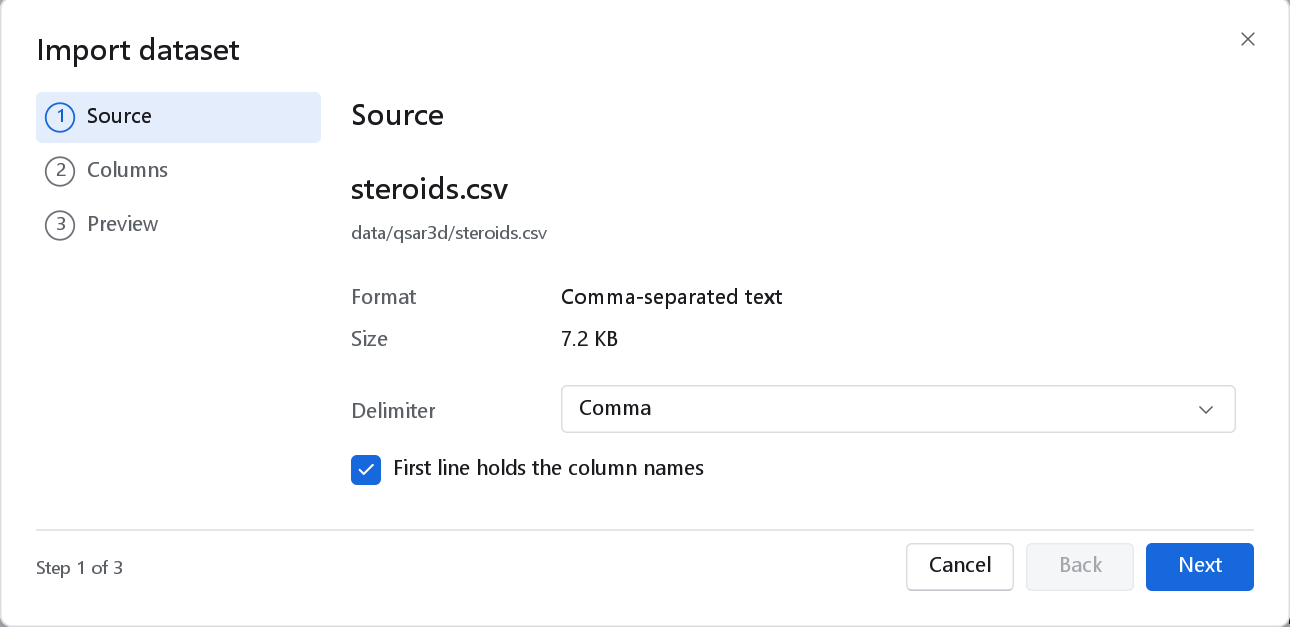
| Control | What it does | When to change it |
|---|---|---|
| Format, Size | What the program found. Read only. | If the format is wrong the file probably has the wrong extension; rename it. |
| Delimiter | Comma, Semicolon, Tab or Pipe (tables only). | When the preview shows one wide column, or values split in the wrong places. Tables from computers set to a European locale often use semicolons, because there the comma is the decimal mark. |
| First line holds the column names | Whether the first line is a header (tables only). | The program decides by itself: a first line in which any field parses as a structure is taken as data, and the columns are then called Column 1, Column 2 and so on. Untick or tick the box if it decided wrongly. |
If the file cannot be read at all, the page says why in red and Next refuses to go on. A structure file with records that cannot be parsed shows a warning such as "2 sampled record(s) could not be parsed".
Page 2: Columns
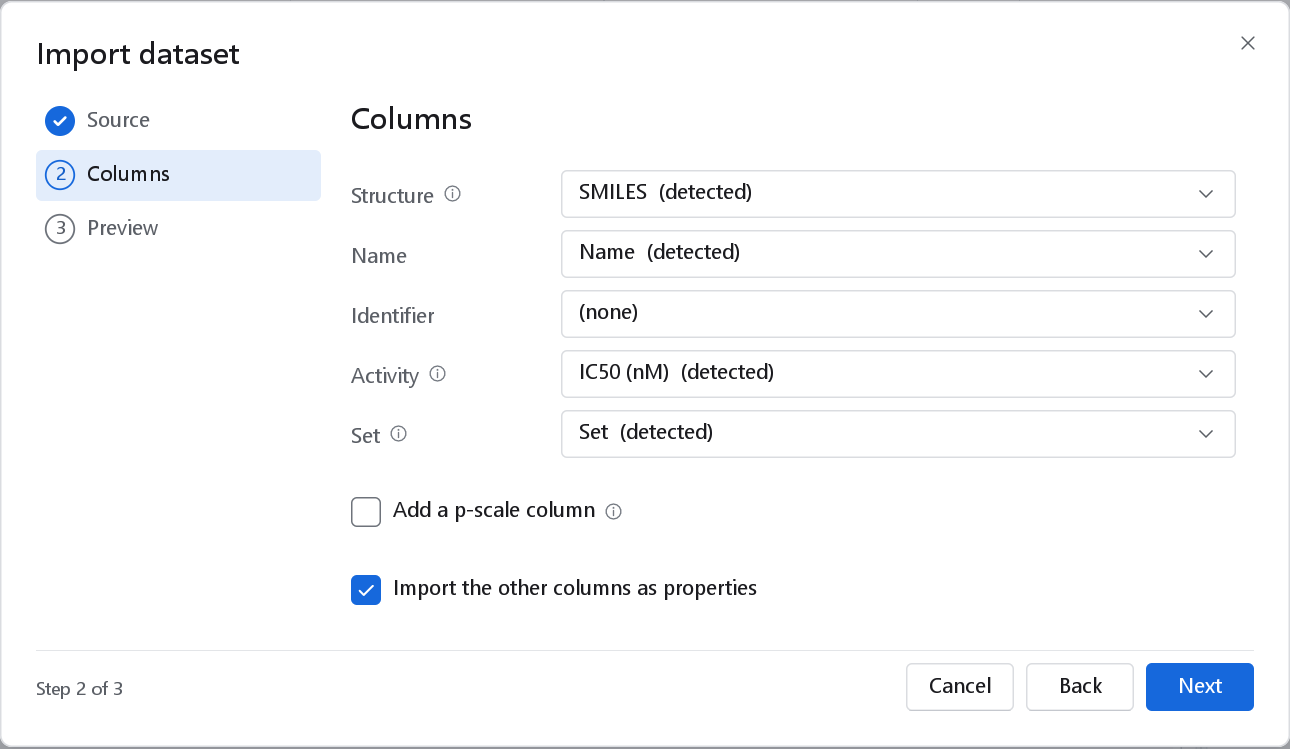
Each row of the page maps one role to a column of the file. Every drop-down lists all the columns and (none); the proposal is only a suggestion, marked (detected), and you can change any of it. A role set to (none) is not filled, and the program does not detect it again behind your back.
| Role | What it becomes | Detected from |
|---|---|---|
| Structure | The structure of the row, drawn in the Structure column, and its SMILES. Required for tables and SMILES lists; for structure files the page says From the records. | A header such as smiles, canonical_smiles, isomeric_smiles, smi or structure; otherwise the column in which at least 60 per cent of the sampled values parse as SMILES of three or more atoms. |
| Name | The Name column. | name, compound, compound_name, title, molecule, molecule_name, drug, label, chemical_name. |
| Identifier | The ID column. A row without one takes its name, or R and its row number. | id, cid, compound_id, molecule_id, chembl_id, cas, code, record, no, entry. |
| Activity | An activity column, the response the models are fitted to, with four decimals and the unit named in its header. | A numeric column whose header contains pIC50, pEC50, pKi, pKd, pActivity or pK_ (preferred), or else IC50, EC50, activity, potency, affinity, Ki, Kd or response. |
| Set | The Set marks: Training, Test, External, Excluded. | A header such as set, split, role, subset, group, partition or train_test, in which at least half of the sampled values are recognised set names. |
The headers for Structure, Name, Identifier and Set must equal one of the listed names, apart from case and surrounding spaces; an activity header need only contain one of its words. Naming your columns this way before export from another program saves the mapping step; nothing else depends on it.
Activities, units and the p-scale
The activity column is imported exactly as it is in the file. A model of potency is normally fitted to the negative decadic logarithm of a molar concentration (pIC50, pKi), not to the concentration itself, because the error of a potency measurement is roughly constant on the logarithmic scale. When the activity is a concentration, tick Add a p-scale column:
| Control | Meaning |
|---|---|
| Unit | The unit of the measured values: M, mM, µM, nM, pM or fM. A unit named in the header, as in IC50 (nM) or Ki_uM, is preselected and tagged (detected). Check it: a unit off by a factor of 1000 shifts every value by 3 log units. |
| Column name | The name of the new column, by default pActivity. Call it what it is, for example pIC50. |
The new column holds -log10(c / mol L-1) next to the measured one, with three decimals and the unit "log units"; for example 10 nM becomes 8.000 and 1 µM becomes 6.000. Values that are zero, negative or missing stay empty. The measured column is kept, so the conversion can always be checked. If you skip the conversion here, Data > Convert activity does the same later (see Preparing the data).
>10000, <5 or ~30 cannot be placed on a scale, so it is imported as an empty cell and the line is listed in the log. If many of your values are censored, decide how to treat them before modelling; the Dataset Builder has a curation step for relations.Sets
A Set column whose values are the words training (or train, tr), test (ts, validation), external (ext) or excluded (exclude, excl), in any case, becomes the Set marks of the rows. Of numeric codes only 1 (training) and 2 (test) are read, because what 0 or 3 mean differs from file to file; any other code leaves the row unassigned. A coded column is also kept as an ordinary column with its codes, so a wizard can take the split from it later with its own meaning (From a property).
Other columns
Import the other columns as properties, ticked by default, imports every column that has no role as an Imported column, numeric when every sampled value is a number and text otherwise. A numeric column of whole numbers (a count, a code) is shown without decimals. Untick the box to keep the table to the mapped roles. Records written by the 3D-QSAR steps (Align.*, Prep.record) are imported as hidden columns; Data > Columns shows them.
Page 3: Preview
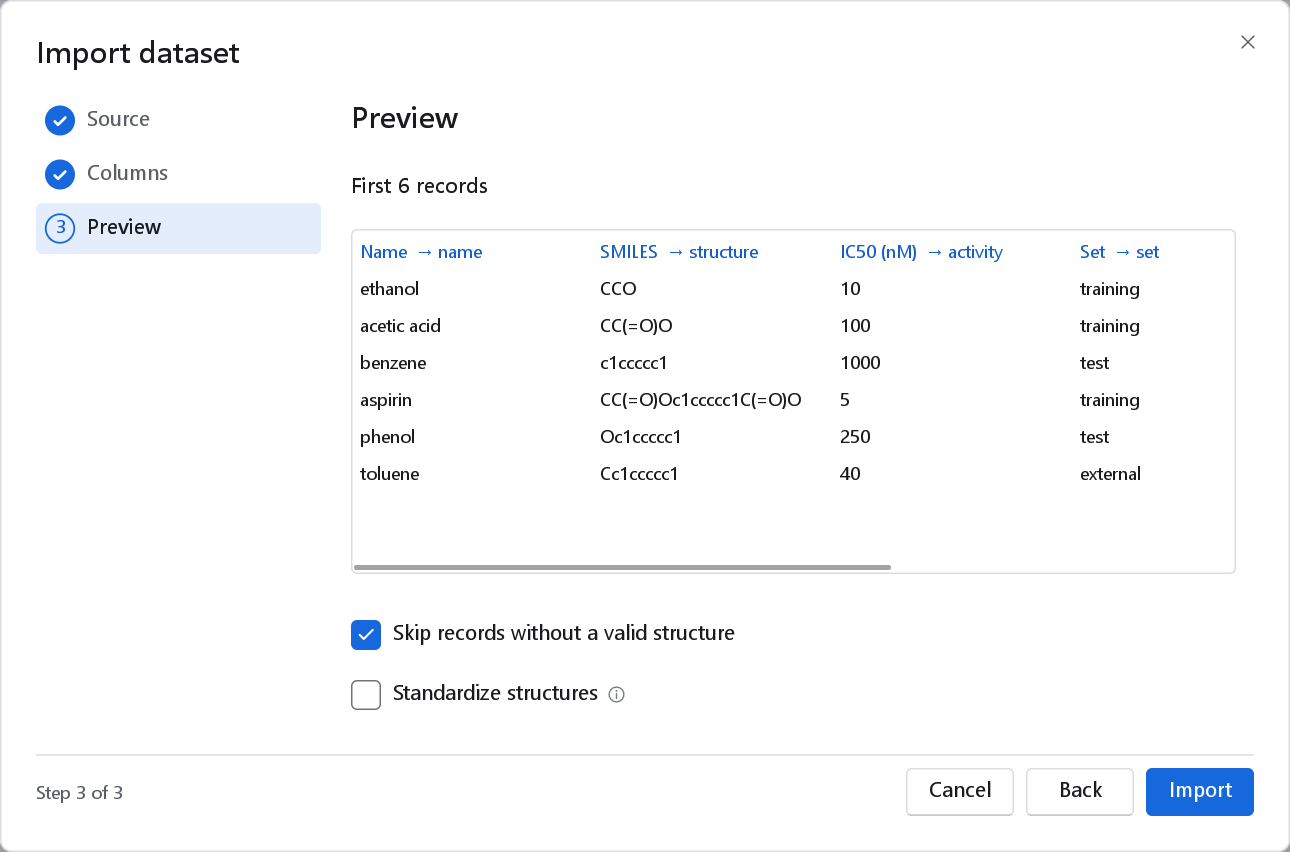
| Control | Meaning | When to change it |
|---|---|---|
| Skip records without a valid structure | Ticked by default: a row whose SMILES is empty or cannot be parsed is left out. | Untick it to keep such rows without a structure, for example to see and repair them in the spreadsheet. They show a red cross in the Structure column, and descriptors and models leave them out. |
| Standardize structures | Unticked by default. Strips salts and solvents, keeps the largest organic fragment, neutralises charges and writes the canonical tautomer, as each structure is read. | Tick it for data collected from several sources, where the same compound may arrive as a salt or in another tautomer. You can also standardise later with more control (Preparing the data). |
| New dataset / Append to the active dataset | Shown only when a dataset is active. Appending adds the rows to it and creates any column it lacks. | To add a second batch of compounds to a series you are already working on. |
Import starts the import as a background job; the new dataset opens as a spreadsheet tab named after the file, and its file joins the recent list.
What happens to rows that cannot be read
An import never stops at a bad row. Each problem is recorded with its line number in the file, and the import goes on:
| Problem | What happens |
|---|---|
| A SMILES that does not parse, or an empty structure field | The row is skipped, or kept without a structure if you unticked the skip box. Counted as invalid. |
| An SD, MOL2, PDB or XYZ record that cannot be read | The record is always skipped and counted as invalid. |
| An activity that is not a number | The row is imported with an empty activity; the log line says "activity value '...' is not a number". |
| A value that does not fit its column | The cell stays empty and the line is logged. |
| A malformed line of a table (an unclosed quote) | Logged; the import ends at that line with the rows read so far. |
When the import finishes, a notification gives the number of compounds and, in amber, the number of invalid records, for example "29 compounds · 2 invalid". The details are in the Log panel (Ctrl+J), one line per problem with the line number of the file, up to 200 lines and a count of the rest. Read them before modelling: two invalid structures in a set of 30 are worth repairing by hand.
After the import
- Look through the spreadsheet and confirm that the structures are the ones you expected and that the activity is in the right column. The Inspector shows the statistics of a clicked column.
- Standardise the structures and look for duplicates if the data came from several sources.
- Convert concentrations to a p-scale if you did not do so here.
- Check the range of the activity with Data > Column statistics.
- Compute descriptors and design the split, or let a wizard do both.
Preparing the data describes each of these steps.