Step 5: Running a job
Starting a docking run, reading its progress, following it in the Job Queue, and understanding what the software reports when it finishes.
With a prepared receptor, prepared ligands and a committed binding site, Run Docking becomes available. It queues one job that prepares whatever still needs preparing and then docks every prepared ligand against the receptor in turn.
Starting a run
If the button is disabled, hover over it. Its tooltip names the exact thing that is missing rather than simply reporting that it is unavailable. The usual causes are a receptor that was loaded but never prepared, a binding site that was never committed, or, in one of the specialised modes, a step 4 picker that has not been filled in.
Reading the progress
Two readouts, and they deliberately say different things.
| Readout | What it carries |
|---|---|
| The line above the bar | The detail: which ligand is being worked on, which stage it is in, how far through that stage it is, and how long the run has been going. It wraps, so it can hold a whole sentence. |
| The bar itself | The phase, as a short noun, and the percentage of the whole run. The percentage covers the run rather than the current ligand, so it climbs steadily through a batch instead of resetting for each compound. |
The phases of a run
| Phase | What is happening |
|---|---|
| Protein preparation | The receptor is converted into the form the search reads. This happens once for the whole batch and takes seconds. |
| Ligand prep | The current ligand is converted, minimised and its rotatable bonds are identified. |
| Docking | The search itself. This is where nearly all the time goes, and it is the phase that scales with exhaustiveness and box volume. |
| Finishing | Poses are collected, scored, sorted and written, and the receptor and each pose are combined into a complex file that the viewer and the interaction tools read. |
The Job Queue
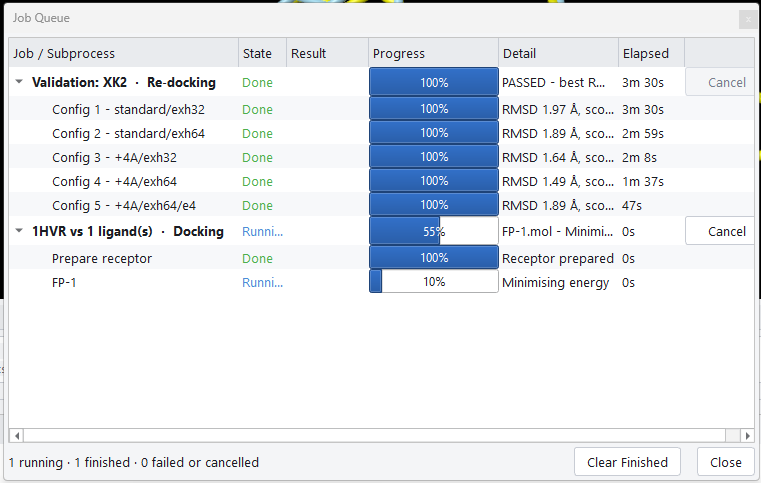
Docking › Job Queue, or Ctrl+J, shows every job this session has submitted, expandable into the individual steps that make it up.
| Column | Meaning |
|---|---|
| Job / Subprocess | The job's name, which names the receptor and how many ligands it covers, and beneath it one row per step. |
| State | Whether the work itself ran: Pending, Running, Done, Failed or Cancelled. Three further states save you from misreading a row. Partial marks a batch in which some ligands docked and others failed, so the good results are still there to use. Skipped marks a step that was deliberately left out, with the reason in the Detail column. Not reported marks a step the job never reached, because it failed or was cancelled first. |
| Result | The protocol's verdict for the job as a whole. In the specialised modes this is where you see whether the condition you asked for was actually met. |
| Progress | A bar per row, so a stalled step is obvious. |
| Detail | What that step is doing now, or what it concluded when it finished. |
| Elapsed | How long each step took, which is the figure to look at when you are deciding whether a setting is worth its cost. |
Stopping a run
Stop ends the running job, and Cancel on a Job Queue row does the same for that job. The current subprocess is terminated and no further ligands are started. Anything that had already finished is kept, so stopping a batch partway through leaves you with the results for the ligands that completed.
Clear Finished, at the foot of the Job Queue, removes every job that is no longer pending or running from the list. Use it to tidy a long session; it does not touch the results, and Close beside it only hides the window.
The progress bar drops back rather than freezing at whatever it had reached, because a cancelled run left at three quarters is more misleading than one that plainly reads as stopped.
When a run finishes
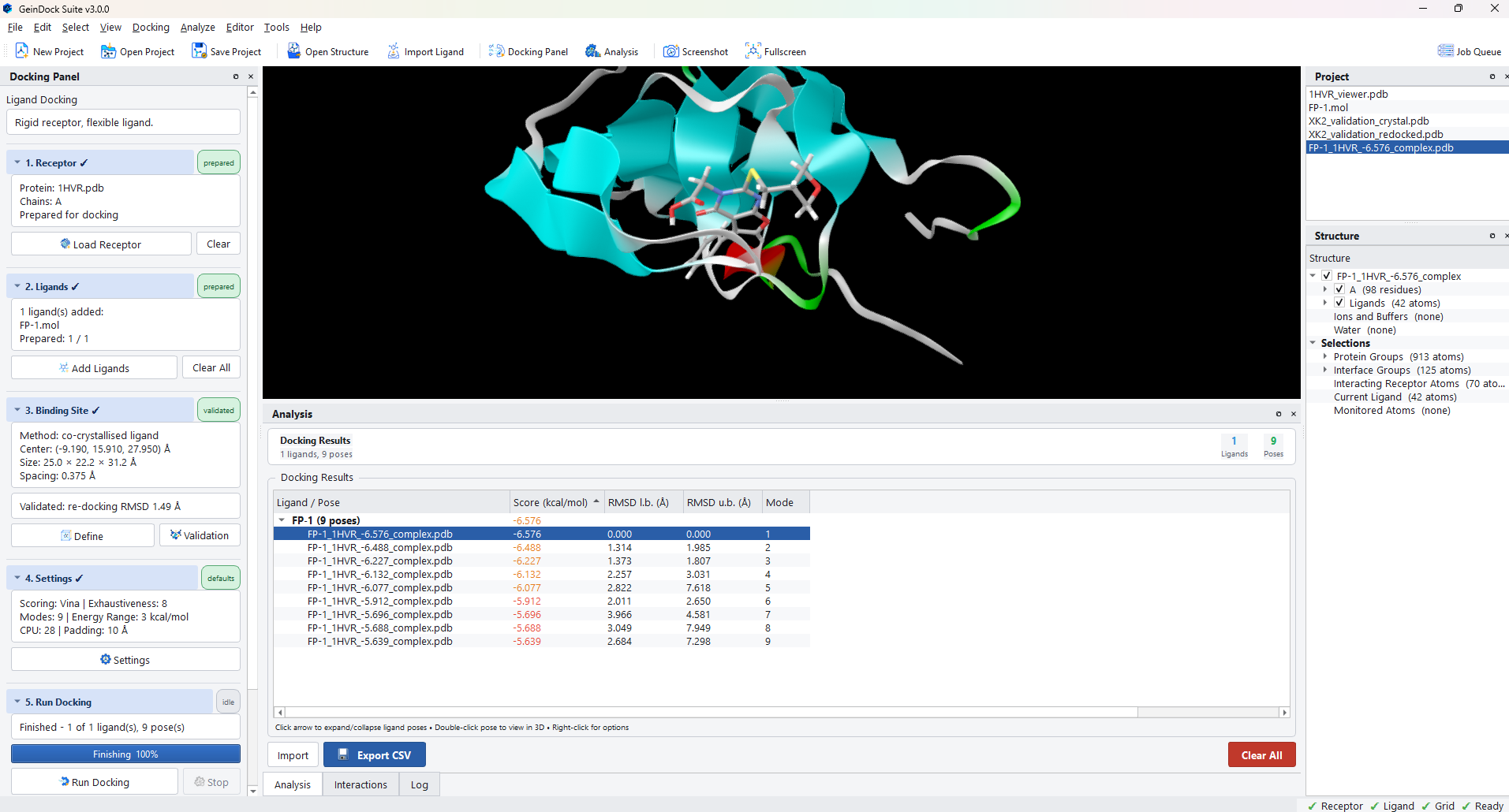
The summary line reports how many ligands succeeded out of how many were attempted, and how many poses came back in total. Step 6 becomes available and its chip turns to results.
The Log panel
The Log tab beside Analysis carries the full commentary, including the exact configuration each step used and the output of the underlying tools. When a run behaves unexpectedly, read the log from the point where the job started rather than from the end, because the cause is usually a decision made early rather than the error reported last.
How long should a run take?
There is no single answer, but the factors are predictable, and knowing which of them you have changed is usually enough to explain a run that is slower than you expected.
| Factor | Effect on run time |
|---|---|
| Box volume | Close to linear. Doubling each edge multiplies the volume by eight. |
| Exhaustiveness | Close to linear. Sixteen takes about twice as long as eight. |
| Rotatable bonds in the ligand | Steep. Each additional rotatable bond enlarges the space the search has to cover. |
| Cores | Close to a linear speed up, up to the number the machine has. |
| Number of ligands | Linear. Ligands are docked one after another. |