The pose table
What each column means, how much weight a docking score can carry, and how to move from a row in the table to a pose in the viewer.
When a run finishes, the Analysis panel fills with one row per ligand, and each of those expands into one row per pose. The header above the table reports the totals, and the counters on the right give the number of ligands and the number of poses at a glance.
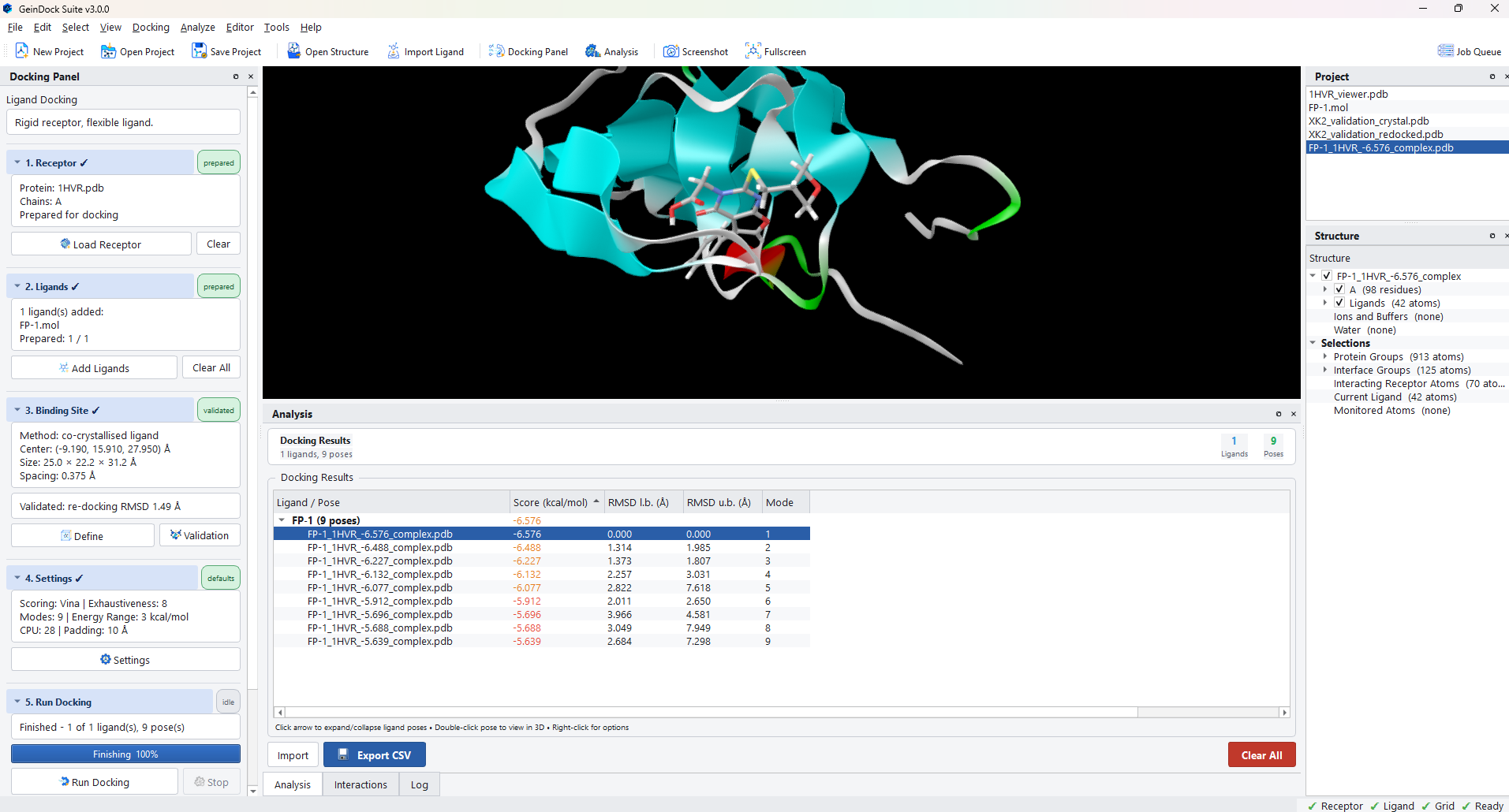
The columns
The table carries columns for every docking mode. The ones that do not apply to the run you are looking at stay empty, so the same table can describe a rigid run and a covalent one without changing shape.
Always present
| Column | What it tells you |
|---|---|
| Ligand / Pose | The ligand name on the group row, and the complex file name on each pose row. The file name carries the score, which makes a directory listing of results readable on its own. |
| Score (kcal/mol) | The scoring function's estimate of binding affinity. More negative is better. |
| RMSD l.b. (Å) | How far this pose is from the best pose, measured conservatively. The best pose is 0 by definition. |
| RMSD u.b. (Å) | The same comparison measured strictly. |
| Mode | The rank of the pose within its ligand, 1 being the best scoring. |
Filled in by particular modes
| Column | Mode | What it tells you |
|---|---|---|
| Side-chain shift (Å) | Flexible | How far the flexible side chains moved from their input positions for this pose. |
| Constraints | Constraint | How many constraints this pose satisfies, out of how many were in force. |
| Satisfied | Constraint | Whether the pose meets the requirement, taking the Require setting into account. |
| Cov. bond (Å) | Covalent | The covalent bond length in the docked pose. |
| Cov. angle (°) | Covalent | The bond angle at the nucleophile. |
| Vina rescore (kcal/mol) | Any | The score this pose receives from a second scoring function, filled in when you rescore. |
| RMSD to ref (Å) | Any | How far this pose sits from a reference pose, filled in after a validation or when a reference is supplied. |
Reading a score
The score is an estimate produced by an empirical function, not a measurement. Treated as an absolute prediction of affinity it will disappoint you; treated as a way of ranking compounds against each other on the same target, with the same receptor and the same box, it is genuinely useful.
| What you want to know | Does the score answer it? |
|---|---|
| Which of these twenty compounds should I test first? | Yes, with care. Rank them, then look at the poses of the top few to check that the ranking is for a sensible reason. |
| Is this compound nanomolar or micromolar? | No. The relationship between the score and a measured affinity is loose, and it differs from target to target. |
| Does compound A bind better than compound B? | Only when the gap is large. Differences of a few tenths of a kcal/mol are within the noise of the method. |
| Where in the pocket does this compound sit? | This is what docking is genuinely good at, and it is the part of the answer worth most of your attention. |
Working with the table
| Action | What happens |
|---|---|
| Click a column header | Sorts by that column. Sorting by score is the default; sorting by RMSD to the best pose groups the alternatives usefully. |
| Click the arrow beside a ligand | Expands or collapses its poses. |
| Double click a pose | Loads that pose into the 3D viewer inside the receptor and makes it the current ligand for every analysis tool. |
| Right click a pose | Opens a menu for that pose: View in 3D Viewer, Copy File Path and Open Containing Folder. The last two are the quick way to hand one pose file to another program. |
| Export CSV | Writes the whole table, including the mode specific columns, to a comma separated file for a spreadsheet or a report. |
| Import | Reads results from a previous session back into the panel, so runs made on different days can be compared side by side. |
| Clear All | Empties the table. The files on disk are untouched. |
Looking at a pose
Double clicking a pose draws it in the receptor. From there every analysis tool works on that pose: the interaction list, the two dimensional diagram, the contact map and the clustering all follow whatever is currently selected.
The Structure panel updates at the same time. The Current Ligand and Interacting Receptor Atoms groups under Selections are recomputed for the pose you chose, which gives you a ready made selection of the residues that pose touches.
What is written to disk
Each pose becomes a complex file inside the project workspace, holding the receptor and that pose together. That is what the viewer draws and what the interaction tools read, and it is also the file to hand to another program, because it needs no further assembly.
The file name carries the ligand name, the receptor name and the score, which means a directory listing is already a ranked summary and a file that has been copied elsewhere still says what it is.