Step 3: Binding site
Placing the search box: from the ligand that was crystallised with the structure, over the whole protein, or by hand, and how to tell whether the box you chose is a good one.
A docking search does not look at the whole protein. It looks inside a rectangular box that you place, and it can only find a pose that fits inside that box. This makes step 3 the single most consequential decision in the whole workflow: a box in the wrong place guarantees a wrong answer, and a box that is too large wastes the search on volume that was never going to bind.
Define opens the Grid Box Configuration dialog.
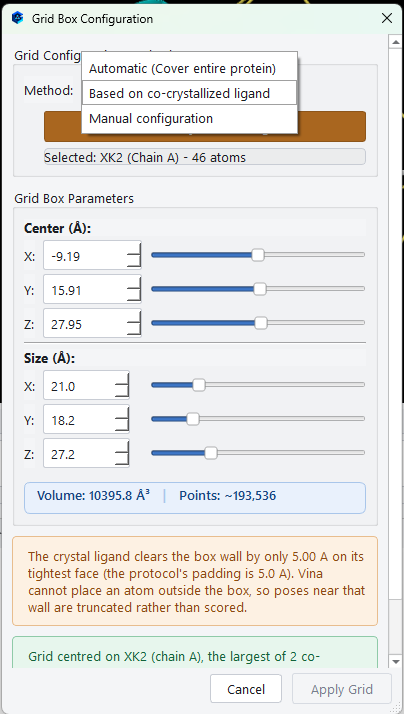
The three methods
Based on co-crystallized ligand
If the structure you loaded contained a bound ligand, this is almost always the right choice, and it is what the dialog selects for you. The application takes the ligand that was removed during receptor preparation, puts the box around where it sat, and pads it enough that a docked compound has room to move.
Select Co-crystallized Ligand opens a picker when the structure contains more than one candidate. Each is listed with its residue name, chain and atom count, and a Type column that classes it as Ligand, Cofactor, Glycan or Additive. The panel on the right draws the one you highlight so you can tell an inhibitor from a buffer molecule at a glance.
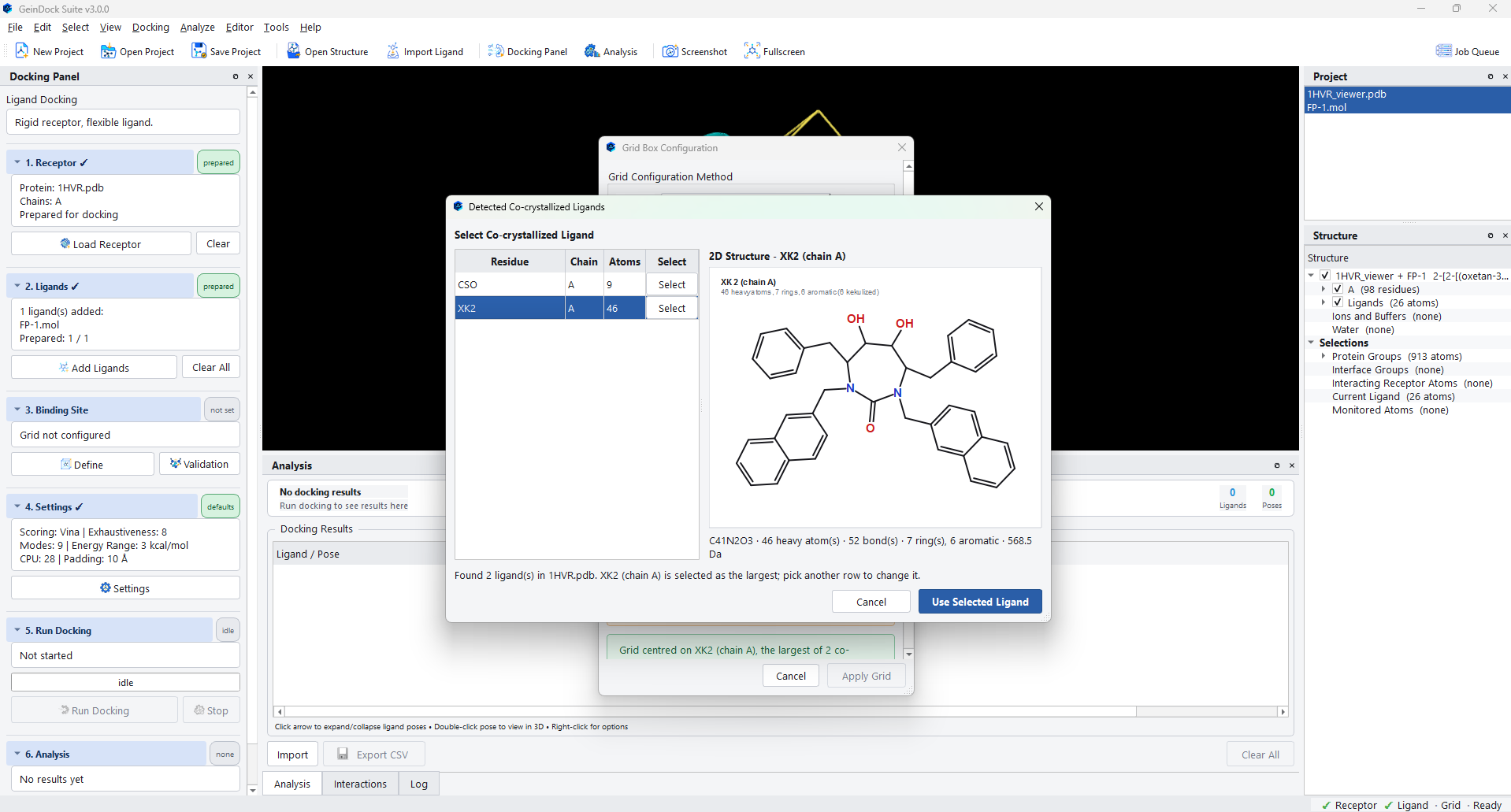
Automatic (Cover entire protein)
Places a box large enough to contain the whole protein. This is blind docking: the search has to find the site as well as the pose. Choose it when you genuinely do not know where the site is, and treat what it finds as a hypothesis to be retested with a tight box.
Manual configuration
Sets the centre and the size yourself, with a spin box and a slider for each of the six numbers. Use this when you know the coordinates of the site from another source, when you want to shift a derived box slightly, or when you are targeting a pocket that has no ligand in the crystal.
Reading the box
| Field | What it means |
|---|---|
| Center (Å) | Where the box sits, in the same coordinate frame as the structure file. These are the numbers to record if you want somebody else to reproduce the run exactly. |
| Size (Å) | The edge lengths. The three are independent, so a box can be a slab or a column rather than a cube, which is often the right shape for a cleft. |
| Volume | The enclosed volume. This is the number that tracks how hard the search will be. |
| Points | How many grid points the box contains at the current spacing. It grows with the cube of the edge length, which is why doubling a box makes a run roughly eight times more expensive. |
The clearance check
The coloured note at the foot of the dialog is a check rather than a description. It measures the gap between the crystal ligand and the tightest face of the box, and tells you whether the pose you would want to reproduce is reachable by construction.
| What the note says | What to do |
|---|---|
| The crystal ligand sits inside the box with comfortable clearance on its tightest face. | Nothing. The box can hold the answer, so a poor result would be about the docking rather than about the box. |
| The crystal ligand clears the box wall by only the padding distance on its tightest face. | Consider enlarging the box a little. The search cannot place an atom outside the box, so poses that press against that wall are truncated rather than scored, and a compound larger than the crystal ligand may not fit at all. |
| The box volume is many times the ligand's own padded volume and its centre sits well away from the ligand centroid. | You are doing blind docking. That is a legitimate thing to do, but read the result accordingly. |
Committing the box
Apply Grid commits it. Step 3 then reports the method, the centre, the size and the grid spacing, and its chip turns to configured.
You can see the box in the viewer at any time with Analyze › Show Grid Box, which draws it as a wireframe around the site. This is the quickest way to confirm that a box you set by hand really is where you meant it to be.
Proving the box before you trust it
Validation, beside Define, answers a harder question: not whether the box is in the right place, but whether the whole configuration can actually reproduce a pose that is known to be correct. It is described in full in Binding site validation, and it is worth running once for every new target.
When a validation run passes, the chip on step 3 changes to validated and the summary gains a line naming the RMSD that was achieved. That verdict describes one specific box; redefining the box withdraws it, because a verdict earned by one configuration says nothing about a different one.