Which mode do I need?
Four docking protocols, what each of them allows to move, what each asks you to supply, and how to choose between them.
GeinDock Suite runs four docking protocols. They share the same receptor, the same ligands and the same binding site; what differs is what is allowed to move, and what a pose has to satisfy before it is reported. You choose between them from Docking › Docking Mode, and the Docking Panel reflects the choice.
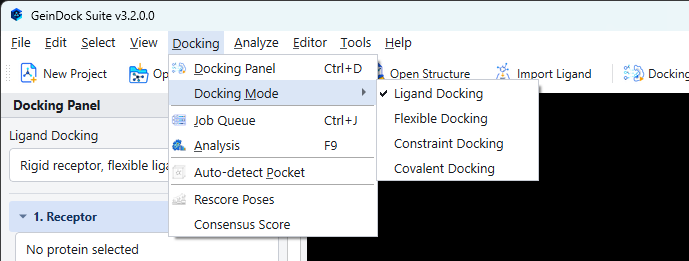
A short decision guide
| Ask yourself | If the answer is yes | Mode |
|---|---|---|
| Do I just want to know how this compound sits in this pocket, and how well? | Start here. It is the fastest, it is what the other three build on, and it is the right answer for most questions. | Ligand docking |
| Does the pocket change shape when something binds, so a rigid receptor would refuse a compound that really fits? | Let the side chains that line the pocket move during the search. | Flexible docking |
| Do I already know something the pose must satisfy, such as a contact with a particular residue or a scaffold that must sit where a known compound sits? | State that condition and have it enforced rather than hoping the search finds it. | Constraint docking |
| Does the compound form a chemical bond to the protein rather than simply sitting in it? | Anchor it to the residue it bonds to. | Covalent docking |
What each mode changes
| Receptor | Ligand | Step 4 becomes | What you supply | |
|---|---|---|---|---|
| Ligand | Rigid | Flexible about its rotatable bonds | Settings | Search configuration |
| Flexible | Selected side chains move | Flexible | Flexible Side Chains | Which residues may move |
| Constraint | Rigid | Flexible | Constraints | The geometric conditions a pose must meet |
| Covalent | The anchoring residue moves | Bonded to the receptor | Covalent Attachment | Which residue atom and which ligand atom carry the bond |
Why three of the four have no settings page
Ligand docking exposes a settings dialog. The other three do not, and this is a design decision rather than an omission.
Each of the specialised protocols derives its own search parameters from the method it implements: the residue selection rules, the way a constraint is turned into something the search can act on, the anchor geometry of a covalent attachment, and the search parameters that go with each. Those derivations are the part of the protocol that was validated. Presenting them as fields you could edit would let a run be invalidated by a change that looked harmless at the time and was impossible to spot afterwards.
Nothing is hidden. Each mode's dialog shows the derived values, and the log records them with every run, so the configuration is always recoverable. It simply is not adjustable.
The verdict a run reports
The specialised modes ask for something specific, so they can report whether they got it. That verdict appears in the Result column of the Job Queue, in the pose table, and it travels with the saved results.
| Verdict | Meaning |
|---|---|
| All met | Every condition the protocol was asked to enforce was satisfied by the reported poses. |
| Warning | The run produced usable poses, but something about them deserves a look before you rely on the result. |
| Not met | The run executed correctly and produced poses, but none of them satisfied the condition you set. |
Switching modes partway through
Switching modes keeps everything except step 4. The receptor, the ligands and the binding site stay exactly as they are, so you can dock the same system three ways without repeating any preparation. What you configured in one mode's step 4 is remembered for when you come back to it.