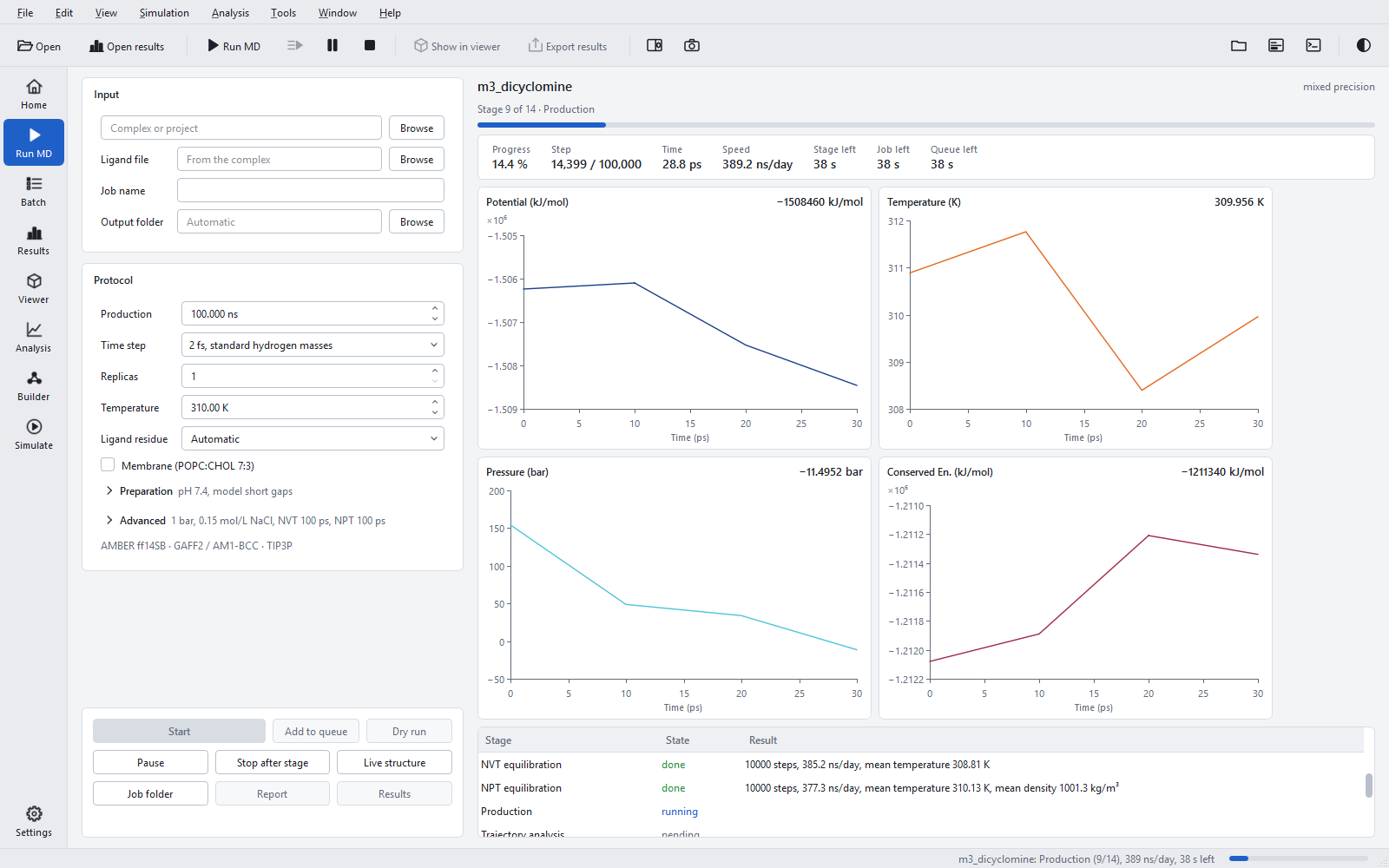
The Run MD page
Starting one simulation from a complex: the input, the protocol, preparation and advanced options, the questions before the start, and the buttons that start, pause and open a job.
Run MD takes one complex from file to results package. The form on the left holds the input and the options; the buttons at its foot stay visible while the form scrolls; the live monitor on the right follows the running job (see Monitoring a running job).
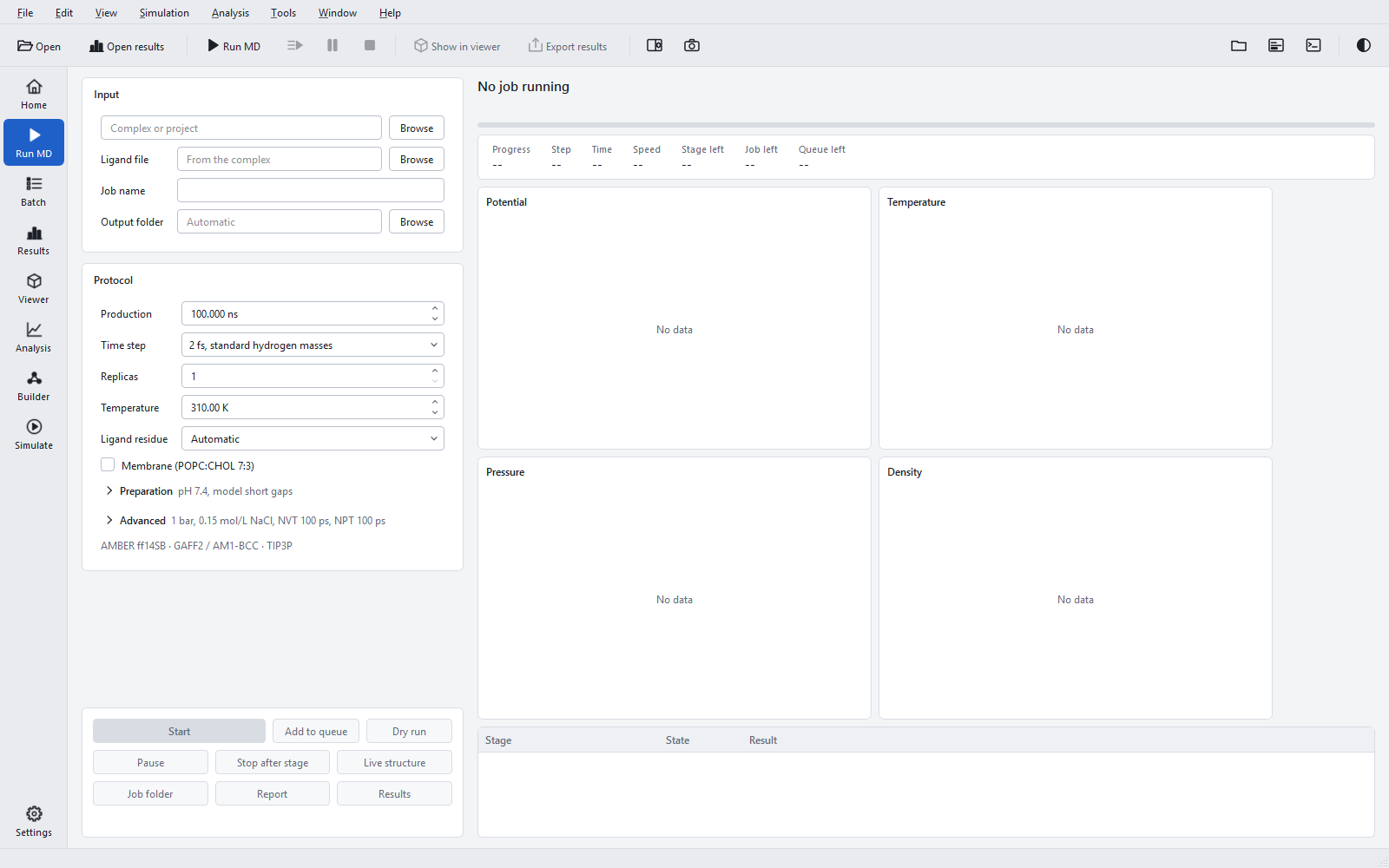
Input
| Control | Meaning | When to change it |
|---|---|---|
| "Complex or project" with "Browse" | The protein with the docked ligand (.pdb, .ent, .cif, .mmcif, .pdbqt) or a project file (project*.json). A file can be dropped on the page. The grey line below reports the ligand found ("Ligand: LIG", "Ligands: A, B (choose one)", "No ligand: protein only", "Unreadable: ...", or "Project <name>"). | Always: this is the job. |
| "Ligand file" | A docked ligand in its own file (.sdf, .sd, .mol, .mol2, .pdb, .pdbqt), copied into the job folder. Empty ("From the complex"): the ligand of the complex. | When the docking program wrote the poses to a separate file. |
| "Job name" | The name of the job and of its folder; filled from the file name. | To run the same complex twice with different settings, give each job its own name. |
| "Output folder" | The parent folder of the job folder. Empty ("Automatic"): a folder mdsim_runs next to the complex. | To keep all jobs in one place, for example on a data drive with enough space for trajectories. |
Choosing another complex clears the choices that belonged to the previous one: pose, copy, sequence, molecules to remove and the membrane decision. A project file fills and locks the whole form (see Input files).
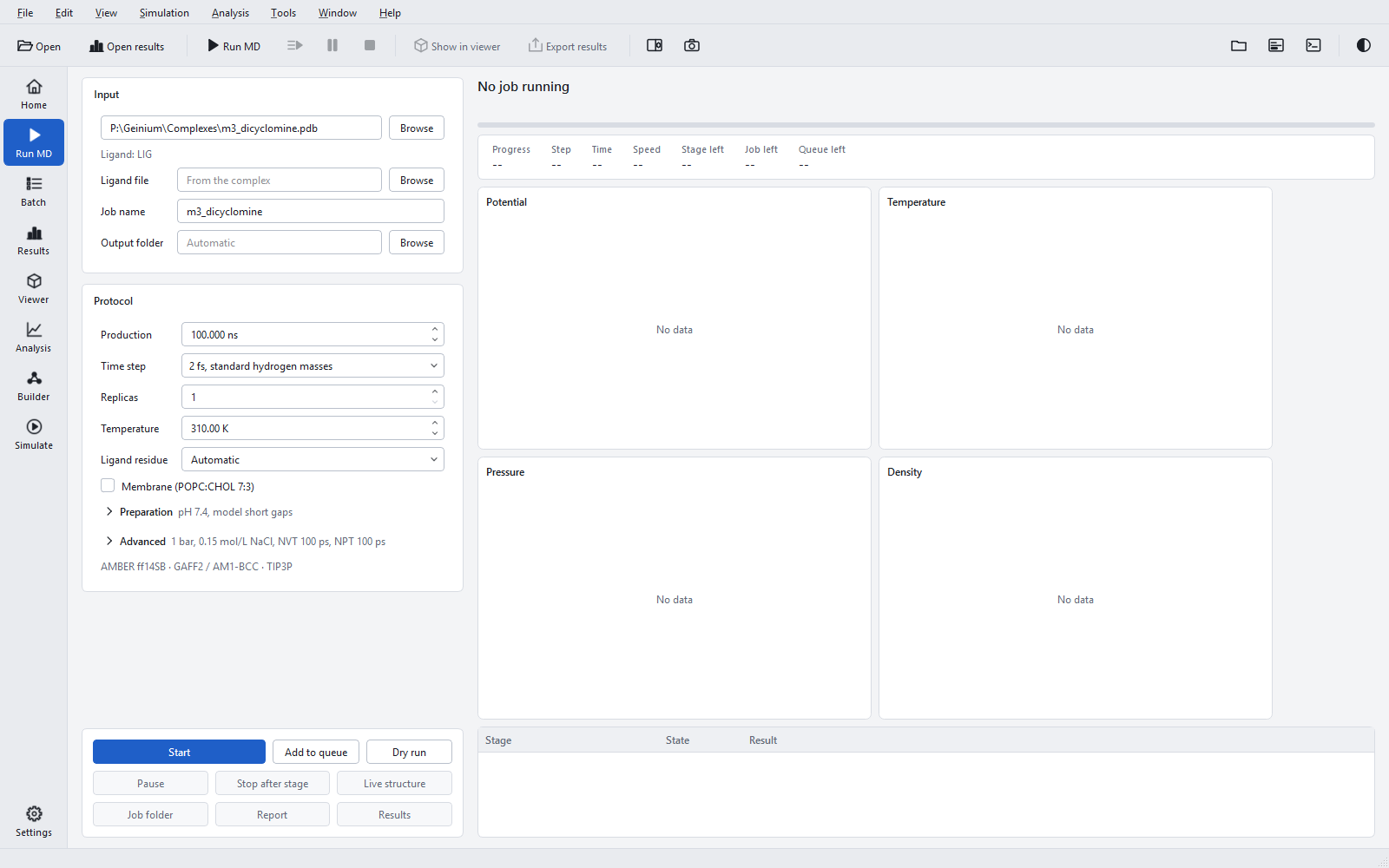
Protocol
| Control | Default (range) | Meaning and when to change it |
|---|---|---|
| "Production" | 100 ns (0.001 to 1,000,000) | Length of the production run of every replica. Shorter for a test of the setup (0.2 ns runs the whole pipeline in minutes), longer for slow processes. |
| "Time step" | "2 fs, standard hydrogen masses" | Or "4 fs, hydrogen-mass repartitioning" (hydrogen masses tripled, two constraint iterations). See The simulation protocol. |
| "Replicas" | 1 (1 to 20) | Independent production runs with different velocity seeds. Use three or more for results you will compare or publish. |
| "Temperature" | 310 K (1 to 1000) | Reference temperature of the thermostat. 310 K is body temperature; use the temperature of an experiment you want to compare with. |
| "Ligand residue" | "Automatic" | The residue simulated as the ligand; "None" simulates the protein alone (no MM-GBSA). See Input files. |
| "Membrane (POPC:CHOL 7:3)" | off | Embeds the protein in a Lipid21 bilayer with a staged equilibration of 8.5 ns per replica; the box controls are then greyed. For membrane proteins; see Box, solvent, ions and membranes. |
The grey line "AMBER ff14SB · GAFF2 / AM1-BCC · TIP3P" under the form names the force fields; its tooltip lists the rest of the model: "V-rescale thermostat, C-rescale barostat, PME, 1.0 nm cut-offs, h-bond constraints; MM-GBSA with GB-OBC2". Other force fields are available on the System Builder page.
Preparation
The "Preparation" section holds the choices about protonation, missing residues and the contents of the input. Its summary line, for example "pH 7.4, model short gaps", shows the current state. The input is scanned in the background as soon as it is chosen; when it needs a decision, the summary ends in "choice needed" and the section opens itself. Rows that do not apply to the input stay hidden.

| Control | Shown | Meaning and when to change it |
|---|---|---|
| "pH" | always | 0 to 14, default 7.4. Protonation of protein and ligand. See Protonation at pH. |
| "Ligand protonation" | always | "At pH" (default) or "As in the input file". |
| "Ligand pose" | when the ligand file holds several poses | The pose that is simulated; "Choose a pose" until one is chosen. |
| "Ligand copy" | when the ligand residue occurs several times | The copy that is simulated; "Choose a copy" until one is chosen. |
| "Missing residues" | always | "Model short gaps" (default), "Cap breaks" or "Charged ends (not recommended)". See Structure preparation. |
| "Longest modelled gap" | always; active with "Model short gaps" | 1 to 12 residues, default 8. Longer gaps are capped, not built. |
| "Cap chain ends" | always | Neutral ACE/NME groups also at the first and last residue of every chain (default: charged termini). |
| "Protein sequence", "Sequence" | when the chain has breaks and the file no sequence | A FASTA file or one-letter codes, used to build missing residues. |
| "Remove molecules" | when the input holds other molecules | Ticked molecules are removed. "Removing a cofactor changes the system." |
| "Remove DNA/RNA" | when the input holds nucleic acids | Simulates the protein without its nucleic-acid partner. |
| "Revert crystallisation artefacts" | when modified residues are found | Turns methylated lysines and oxidised cysteines back into the natural residue. |
| "Metal sites: ..." | when metals are found | The metals and their coordinating atoms. |
| "Advanced" > "Residue states" | always | Per-residue protonation states that win over the pH, with "Add", "Remove" and (with metal sites) "Apply suggested states". |
When a job stops in the structure stage on a choice of the input (molecules to remove, nucleic acids, a ligand copy or pose), the section reopens with the choices, so the job can be corrected and started again in place.
Advanced
The "Advanced" section holds settings that rarely need changing. Its summary line reads, for example, "1 bar, 0.15 mol/L NaCl, NVT 100 ps, NPT 100 ps", with the box when it is not the default, ", MTS" when multiple time stepping is on, and ", n more" for extra keys.

| Control | Default (range) | Meaning and when to change it |
|---|---|---|
| "Pressure" | 1 bar (0.01 to 1000) | Reference pressure of the barostat. |
| "Salt" | 0.15 mol/L NaCl (0 to 2) | NaCl added after neutralisation. |
| "NVT equilibration" | 100 ps | Restrained NVT equilibration of soluble systems. |
| "NPT equilibration" | 100 ps | Restrained NPT equilibration of soluble systems. |
| "Box" | "Rhombic dodecahedron" | Or "Cubic", "Truncated octahedron". The dodecahedron needs the least water. |
| "Solute-box distance" | 1.0 nm (0.8 to 2.0) | Smallest distance between the solute and the box edge. |
| "Multiple time stepping" | "Off" | Or "Long-range every 2nd step": the mesh forces of production every second step. See The simulation protocol. |
| "Concurrent replicas" | "One at a time" | Or "Automatic", 2, 3, 4: replicas of the job running at the same time on one GPU. |
| "More keys" | none | Further keys of the project file, described below. |
The reasons for each default are given in The simulation protocol and Box, solvent, ions and membranes.
More keys
"More keys" opens an editor for any key of the project file that the form does not show: output intervals, the analysis window, MM-GBSA options and others (all listed in Project file keys). The text is a JSON object that is merged over the project the form generates. After OK the button reads "More keys (n)" with the number of top-level keys set. Text that is not a JSON object is refused with "Not a JSON object: ..." and the dialog stays open.

{
  "box":      {"distance_nm": 1.2},
  "analysis": {"start_ns": 10},
  "protocol": {"output": {"xtc_ps": 20}},
  "mmgbsa":   {"decomposition": true}
}
The example widens the box to 1.2 nm, starts the analysis window at 10 ns, writes a frame every 20 ps instead of 10 ps (half the trajectory size), and adds the per-residue decomposition of MM-GBSA, which the form does not offer. Unknown keys are errors; "Dry run" shows the result before anything is started.
Before the start
"Start" and "Add to queue" first check whether the job needs a decision that would change the system. Two questions can appear, in this order. Neither is asked for a job started from a project file, nor for a job whose structure stage has already run or whose decision is already stored.
Missing residues and fusion partners
The "Before the start" dialog appears when residues are missing inside a chain or a fusion partner was found. It reads "<job>: residues are missing inside the chain:" with one line per gap, for example "A:486-488 missing (3 residues)", and offers "Model the missing residues" (with the sequence "from the file", a FASTA file, "or one-letter codes", or the button "Get the sequence of <ID> from the PDB") and "Cap the ends (neutral)". A fusion partner adds "Fusion partner (not part of the native protein):" with "Keep" and "Remove (ends capped)". Nothing is preselected, OK is enabled only when every question is answered, and Cancel leaves the job unstarted with "Not started: missing residues decision needed". The dialog is described in full in Structure preparation.

Membrane protein
The "Membrane protein" dialog appears when the protein has two or more transmembrane segments and no membrane was chosen. It reads "<name> looks like a membrane protein: n transmembrane segments (...). In water it is not in its native environment." and offers "Use a membrane (POPC:CHOL 7:3)", which is preselected, or "Simulate without a membrane" with "Reason (required)". The reason is printed in the report. Cancel leaves the job unstarted with "Not started: membrane decision needed". See Box, solvent, ions and membranes.

Buttons
| Button | What it does | When to use it |
|---|---|---|
| "Start" | Does everything "Add to queue" does, then starts this job. If another job is running, this one is queued behind it ("A job is running: this job is queued"). | To run the job now. |
| "Add to queue" | Asks the questions above, checks the job, and adds it to the batch queue without starting it. | To collect several jobs and start them together from the Batch page. |
| "Dry run" | Checks the job and shows its plan in a read-only dialog "Dry run: <name>"; writes nothing. | Before a long run, to see the stages, steps, seeds and analysis window that will be used. |
| "Pause" | Stops the running job at its next checkpoint; "Start" continues from there. | To free the PC for a while. |
| "Stop after stage" | Finishes the running stage, then stops. | To stop at a clean point, for example after equilibration, to inspect the system. |
| "Live structure" | Shows the running system in the viewer. Available while a job runs. | To watch the ligand in its pocket during production. |
| "Job folder" | Opens the folder of the running or last job in Explorer. | To look at the files. |
| "Report" | Opens report.pdf of the last job. "Available when the report is written". | At the end of the job. |
| "Results" | Opens the figures and tables of the last job on the Results page. "Available after the analysis stage". | At the end of the job, or to look at the analyses before the report is written. |
The dry-run plan starts with "DRY RUN - nothing is written, nothing is computed" and lists the project, the work directory, the inputs with every non-water hetero residue of the file, the system (force field, water, box or membrane, ions and their seed), the protocol with the number of steps of every stage, the replicas with their velocity seeds, the engine settings, the analysis window, and each stage with the action it would take: run, redo, continue or skip. A job that cannot run reports "Cannot run: <reason>" in the status line instead.

The job folder
A job lives in <output folder>\<job name>\, by default mdsim_runs\<job name> next to the complex. It holds:
| Item | Contents |
|---|---|
| The complex (and the ligand file) | Copies of the inputs, so the folder is self-contained. |
project.json | The complete job, rewritten at every start. mdsim pipeline -config project.json reproduces it. |
run\ | The work directory: 01_structure to 09_results (see Project file keys), pipeline.log, and the report as run\09_results\<name>_results\report.pdf. |
Starting a job whose folder already exists continues it: the queue entry is updated rather than duplicated, the job keeps its velocity seed, finished stages are skipped, an interrupted MD stage continues from its checkpoint, and stages whose settings were changed are repeated.
Status messages
| Message | Meaning |
|---|---|
| "<name> started" | The job runs. |
| "<name> queued (n jobs)", "<name> queued (position n)" | The job was added to the queue, or an existing entry for the same folder was updated. |
| "<name> queued behind the running job" | Another job is running; this one follows. |
| "Dry run of <name> passed" | The plan could be made; nothing was written. |
| "Cannot run: <reason>" | The job is not valid as it stands, for example a missing file or a ligand that is not in contact with the protein. |
| "Not started: missing residues decision needed" | The "Before the start" dialog was cancelled. |
| "Not started: membrane decision needed" | The "Membrane protein" dialog was cancelled. |
| "<name>: done - report written; n ns/day" | The job finished; failed jobs show the message of the stage that failed, in red. |