Exporting results
The results package: the PDF report, every figure as an image file, the numbers behind every figure, and the scientific checks that run first.
An export turns a finished job, or several, into a results package: a folder with a PDF report, every figure as an image file at print resolution, every number behind every figure as a CSV table, and a manifest that lists every file with its checksum. The report, the images and the Results page are three uses of the same figures and tables, so they cannot disagree. Before anything is written, a set of scientific checks runs over the job; their findings go to the export log.
Export results is on the Results page, the Batch page, the File menu and the tool bar (Ctrl+E). The last stage of every pipeline run exports the job automatically into 09_results\<name>_results with the log in 09_results\export.log.
The results package
<name>_results\
  report.pdf                    the PDF report
  manifest.json                 every file with its size and SHA-256, units, settings, checks
  images\
    rmsd.png  rmsd.svg  rmsd.pdf            one set per figure (300 dpi PNG, vector SVG and PDF)
    ligand_torsions_p1.png ...              figures with parts: _p1, _p2
    600dpi\rmsd.png ...                     only when 600 dpi copies are requested
  raw-data\
    mmgbsa_frames.csv  pca_projection.csv  fel.csv  contacts_interactions.csv ...   job tables
    rep1\protein_rmsd.csv  ligand_properties.csv  sse.dat ...                         per replica
    system.json  protein.json  ligand.json  analysis_settings.json  interactions.json
One example export of a 100 ns job has 27 figures (29 image parts with the two parts of the torsion profile), 26 tables and a report of 18 pages. Replica tables are always in a rep<i> folder, also when there is only one replica. A package is first written as <name>_results.partial and renamed when it is complete, so a cancelled or failed export leaves nothing behind and keeps a package that was there before; a new export of the same name replaces the package as a whole.
For several jobs the top level holds the comparison figures and raw-data\comparison.csv, and every compound has its own folder with images, raw data and manifest; there is one combined report. See Comparing compounds.
The Export results dialog
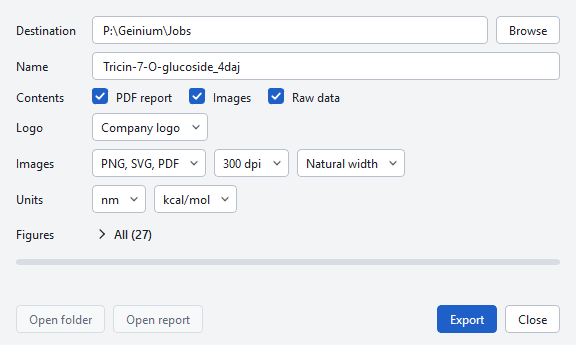
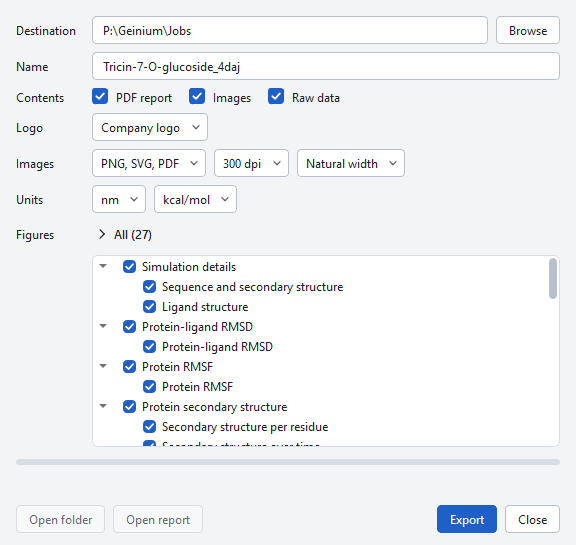
| Control | Choices | When to change it |
|---|---|---|
| Jobs, One combined report | Shown when several jobs are open; all checked, combined report on. | Untick jobs to leave them out. Turn the combined report off only if each job should be exported as a separate package. |
| Destination | The folder in which the package folder is created. | Choose a folder outside the job folder for packages you will send. |
| Name | The package folder is <name>_results; default: the job name, or "comparison" for several jobs. | Give each export a distinct name if you want to keep versions side by side. |
| Contents | PDF report, Images, Raw data. | Leave all on for a complete record; images only for a quick set of figures. |
| Logo | Company logo, Image file (PNG, JPG or SVG), None. | Use your own logo for reports that leave your organisation; none for a neutral report. |
| Images | PNG, SVG, PDF or PNG; 300 dpi or 600 dpi; Natural width, 85 mm, 114 mm, 174 mm. | 600 dpi or vector files for print; a fixed width when a journal asks for single (85 mm), 1.5 (114 mm) or double (174 mm) columns. |
| Units | nm or Å; kcal/mol or kJ/mol. | Follow the convention of the journal or the colleagues who will read the numbers. |
| Figures | All (n), or "k of n" when some are unticked. | Leave out figures that do not apply to your question. |
| Export, Close | Export starts; while it runs the button reads Exporting and Close becomes Cancel. | |
| Open folder, Open report | Enabled after a successful export. | |
| Acknowledge | Appears only when the report was blocked because a membrane protein was simulated in water. | See Scientific checks below. |
The dialog remembers its settings between exports. A figure has a layout for each width it supports and is laid out for the width you choose, never scaled, so the type stays at its printed size. A figure without a layout for a width keeps its natural width; with 85 mm this applies to 12 of the 27 figures of a single job, and the command line lists them.
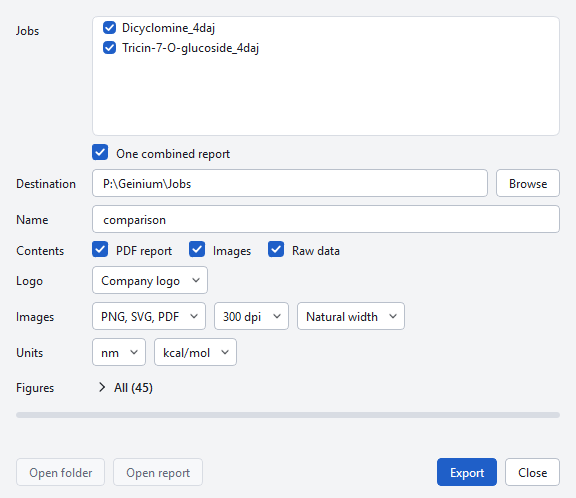

If the analyses of a job were made by an older version, the dialog asks "The analyses of <job> were made by an older version. Recompute them now? The simulations are not repeated." Answering no leaves the job unexported.
Units
One export has one length unit and one energy unit, chosen in the dialog or with -units nm|angstrom and -energy kcal/mol|kJ/mol, and recorded in the manifest. Every figure axis, every report table and every CSV follows them: 1 nm = 10 Å, 1 kcal = 4.184 kJ. Time is always in ns. Degrees, K, bar, kg/m³, %, e, u, mM and kT keep their units; free energies of the landscape are given in kT and in the energy unit. The information files (system, protein, ligand and analysis settings) are converted too, with their keys renamed like the columns; interactions.json keeps its nm keys, because the program reads that file back. The files inside the job folder are never converted.
Images
Every figure is written as PNG (300 or 600 dpi, white background, the resolution stored in the file), SVG and PDF. The style is the same everywhere: an open frame with left and bottom axes, no title inside the image, Arial at 7 to 9 pt at printed size, colours chosen to stay distinct for the common forms of colour-vision deficiency. Every curve is the plain line through its per-frame values. Equal input gives byte-identical PNG and SVG files. How figures are made is described on the page How figures are made.
The PDF report
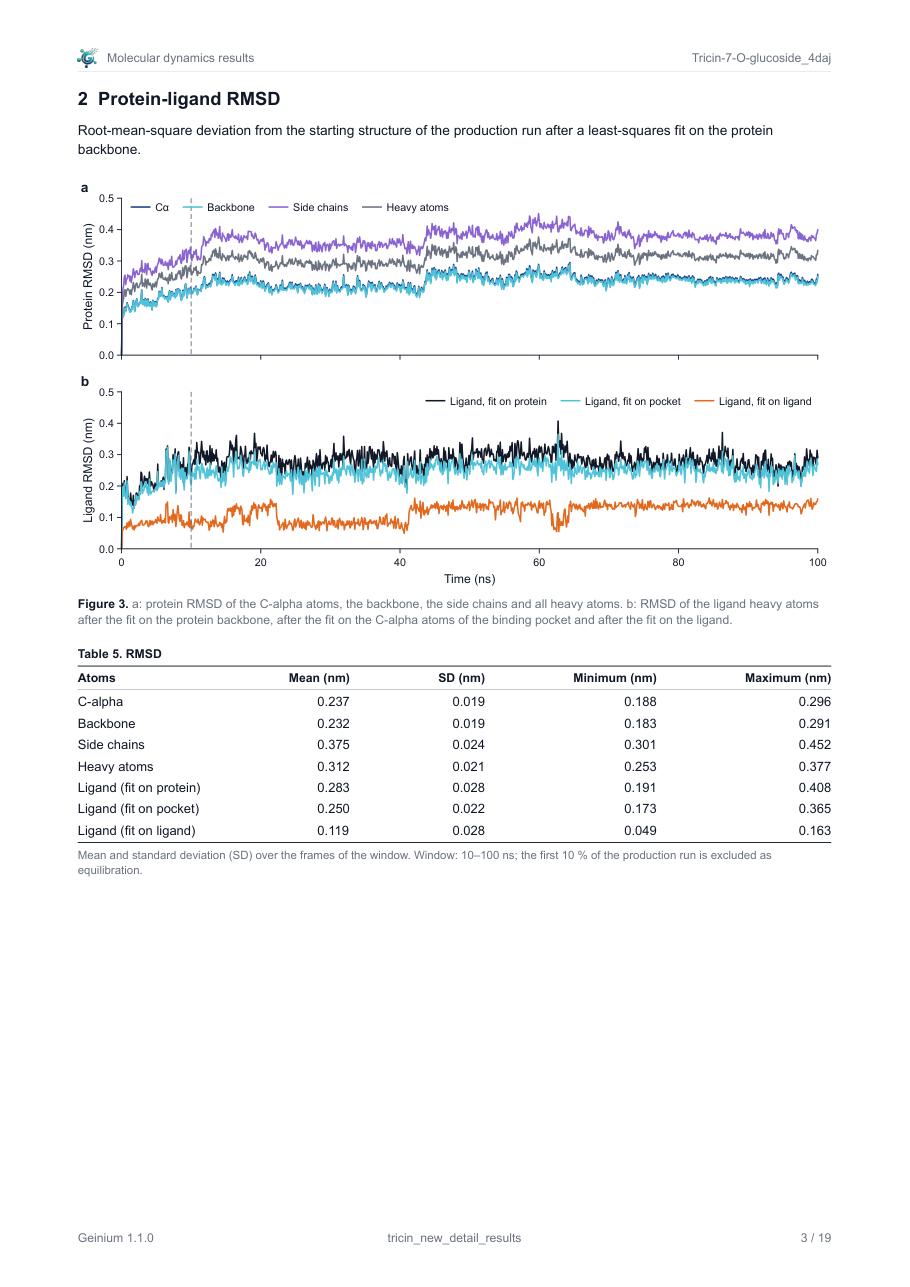
The report is A4 with 18 mm margins, so a 174 mm figure appears at its printed size. Figures are vector graphics, fonts are embedded, and the document has bookmarks for every section and figure. The title is "Molecular dynamics results"; the line under it gives the creation date, the units and the folders of the package. The sections follow a fixed order:
- Simulation details (with the protein, ligand and ions tables and the sequence and ligand figures)
- Protein-ligand RMSD
- Protein RMSF
- Protein secondary structure
- Ligand RMSF
- Protein-ligand contacts
- Ligand torsion profile
- Ligand properties
- Protein compactness and surface
- Binding free energy (MM-GBSA)
- Principal component analysis
- Free-energy landscape
- Run quality
- Analysis settings (every criterion, fit group, window, bin and model setting)
A section whose figures could not be made is left out and listed under "Not included" with the reason. The wording is neutral: what is shown and how it is defined, without interpretation and without words such as "stable" or "favourable"; drawing conclusions is left to the reader. The findings of the scientific checks are never in the report.
The logo. Company logo uses the logo built into the program; it is placed at the right of the title block on the first page and as a small mark at the left of the running head on every later page. Image file uses your own PNG, JPG or SVG in the same places, drawn at its native resolution with its transparency; None leaves both places empty. On the command line: -logo <file> or -nologo; in a project: export.logo.
Raw data
Every table is a CSV file in UTF-8 with a block of header lines that start with # and hold key: value pairs: the definition of the table, the atom groups with their atom counts, the number of frames, the window, the source files and the criteria. The unit of a column is the suffix of its name (_nm, _A, _kcal_mol, _kJ_mol, _ns, _deg and so on); a column without suffix is dimensionless. An empty cell means "undefined", for example the free energy of an unvisited bin. Tables carry the precision of the analysis and no more. No absolute path of your PC appears anywhere in a package.
manifest.json (schema geinium-export/1) records the program and version, the creation time, the units, the figure style and resolution, the report pages and bookmarks, for every job its figures, tables and statistics with the source of every printed number, the counts of the checks, the analysis settings, and every file of the package with its size and SHA-256 checksum.
Scientific checks and the export log
Before the package is written the job is checked: the simulation details against the production run input and log, the system against what was declared, the statistics against the raw data. Each finding has a severity:
| Severity | Effect |
|---|---|
BLOCK | Stops report.pdf until it is resolved or acknowledged with a written justification. Images and raw data are still written. |
WARNING | Written to the log; the report is written. |
INFO | A note for the record, for example which ligand parameters and protonation were used. |
The findings go to the export log only: the Log panel of the application, the console of mdsim export, 09_results\export.log of a pipeline run, or a file given with -log. These lines are from the log of a real export of the dicyclomine complex (four of its seven findings):
Scientific checks of the results export

m3_dicyclomine
  0 blocking, 0 acknowledged, 4 warnings, 3 notes
[WARNING] replicas.min3 @m3_dicyclomine: 1 replica(s): at least 3 independent replicas (different velocity seeds) are needed to report mean ± SD across replicas; the standard deviations of this export are over the frames of one trajectory
[WARNING] convergence.drift @m3_dicyclomine: replica rep1: rmsd drifts by +0.1155 nm between the halves of the analysis window (> 2 x the block-averaged SE 0.0291 nm)
[INFO] ligand.parameters @m3_dicyclomine: ligand parameters: GAFF2 with AM1-BCC charges (net charge +1 at pH 7.4, input +0)
[INFO] ligand.protonation @m3_dicyclomine: Ligand protonation at pH 7.4: input net charge 0, simulated +1: N1 (aliphatic amine) protonated.

Numbers of the statistics tables compared with their declared source in the raw-data tables of the export: 229 of 229 equal| Rule | Severity | What it checks |
|---|---|---|
details.settings | BLOCK | Engine, version, precision, time step, mass repartitioning, ensemble, temperature, pressure and cut-offs of the report against the production run input and log. |
membrane.missing | BLOCK | A membrane protein simulated without a membrane and without a stated reason. |
membrane.flag_conflict | WARNING | Declared soluble, but hydrophobic transmembrane-like segments were found. |
replicas.min3 | WARNING | Fewer than three independent replicas. |
convergence.drift | WARNING | The RMSD differs between the halves of the window by more than twice its block-averaged standard error. |
fit.molecules | WARNING | The fit group spans several molecules. |
ligand.parameters, ligand.protonation | INFO (BLOCK if the parameters are not stated) | How the ligand was parameterised and protonated. |
interactions.hbond_table | INFO | The hydrogen bonds of the interaction analysis against the hydrogen-bond occupancy table. |
numbers.raw_data | BLOCK on a mismatch | Every number of every statistics table recomputed from the raw-data file it names; comparison.csv against the comparison table. |
Acknowledging a blocking finding
The usual blocking finding of a real job is membrane.missing: a membrane protein was simulated in water and no reason was given when the job was set up. The dialog then shows "Report not written: membrane protein simulated in water." and the Acknowledge button.

The dialog offers Use a membrane (POPC:CHOL 7:3) and Simulate without a membrane. The first cannot be applied to a finished run; the status line says "A membrane needs a new simulation: Run MD with the membrane option". The second needs a Reason (required), for example the study of a soluble domain, and is recorded as an acknowledgement. On the command line the same is -ack "rule=justification" (repeatable); in a project, export.acknowledged. Changing an acknowledgement repeats only the export stage of the pipeline, never the simulation or the analyses.
From the command line
mdsim export -job P:\Geinium\Jobs\Tricin-7-O-glucoside_4daj -o P:\Geinium\Export
mdsim export -job P:\Geinium\Jobs\Dicyclomine_4daj P:\Geinium\Jobs\Tricin-7-O-glucoside_4daj -o P:\Geinium\Export -name comparison
mdsim export -job P:\Geinium\Jobs\Tricin-7-O-glucoside_4daj -o out -units angstrom -energy kJ/mol -dpi 600 -width single
mdsim export -job P:\Geinium\Jobs\Tricin-7-O-glucoside_4daj -list
mdsim export -job P:\Geinium\Jobs\Tricin-7-O-glucoside_4daj -o out -ack "membrane.missing=study of the soluble domain"| Option | Meaning |
|---|---|
-job | A job folder, its work folder, or a folder of jobs; several give one combined package. |
-o, -name, -title | Destination folder, package name, report title. |
-units, -energy | nm or angstrom; kcal/mol or kJ/mol. |
-dpi 300|600, -png600, -[no]vector | PNG resolution, additional 600 dpi copies, SVG and PDF files. |
-width natural|single|onehalf|double | Also 85, 114 or 174 (mm). |
-figures | Figure ids separated by blanks or commas; an unknown id is an error and nothing is written. |
-[no]report, -[no]images, -[no]raw | The three kinds of content. |
-[no]compute, -recompute | Compute missing analyses (default) or redo old ones. |
-threshold | Occupancy threshold of the interaction diagram. |
-list | Lists the figure catalogue with the state of every figure for the job; writes nothing. |
-checks | Prints the findings of the scientific checks; writes nothing. |
-ack, -log, -checks-file | Acknowledgement, log file, findings file in the package. |
-logo, -nologo | Another logo, or none. |
-compound-reports | A report in each compound folder of a combined package. |
-timestamp | A fixed time stamp: two exports of the same input are then byte-identical, file for file. |
Exit codes: 0 done, 1 input error, 3 report blocked or an analysis part failed. All other commands are on the page The command line.