Input files
Which files a job starts from: a complex of protein and docked ligand, optionally a separate ligand file, or a project file, and what Geinium checks before it accepts them.
The complex
A job starts from a complex: the protein with the ligand placed in its binding site, usually the output of a docking program or a crystal structure. The "Complex or project" field of Run MD and "Add complexes" on the Batch page accept these files; a file can also be dropped onto the page.
| Format | Extensions | Notes |
|---|---|---|
| PDB | .pdb, .ent | Read directly. Chain identifiers, residue numbers and insertion codes are kept. |
| mmCIF | .cif, .mmcif | Converted to PDB records first (01_structure/input_converted.pdb), keeping author identifiers, insertion codes, alternate locations, models, SEQRES, unobserved residues and LINK records. An entry that cannot be written as PDB stops with a message: a chain identifier longer than two characters, a residue number outside -999 to 9999, or a name longer than four characters. An mmCIF entry gave a byte-identical prepared system compared with the same entry as PDB. |
| PDBQT | .pdbqt | The output of docking programs. Atom types are mapped to elements and only MODEL 1 is used, with a warning. |
| Project file | project*.json | A job written by Run MD, the Batch queue or the Builder. See below. |
A file with several MODEL records is read in full. A later model that shares no residue with the earlier ones is merged, which is how docking programs export a receptor followed by its ligand. A model that repeats residues already read, as in an NMR ensemble, is ignored with a note.
The ligand residue
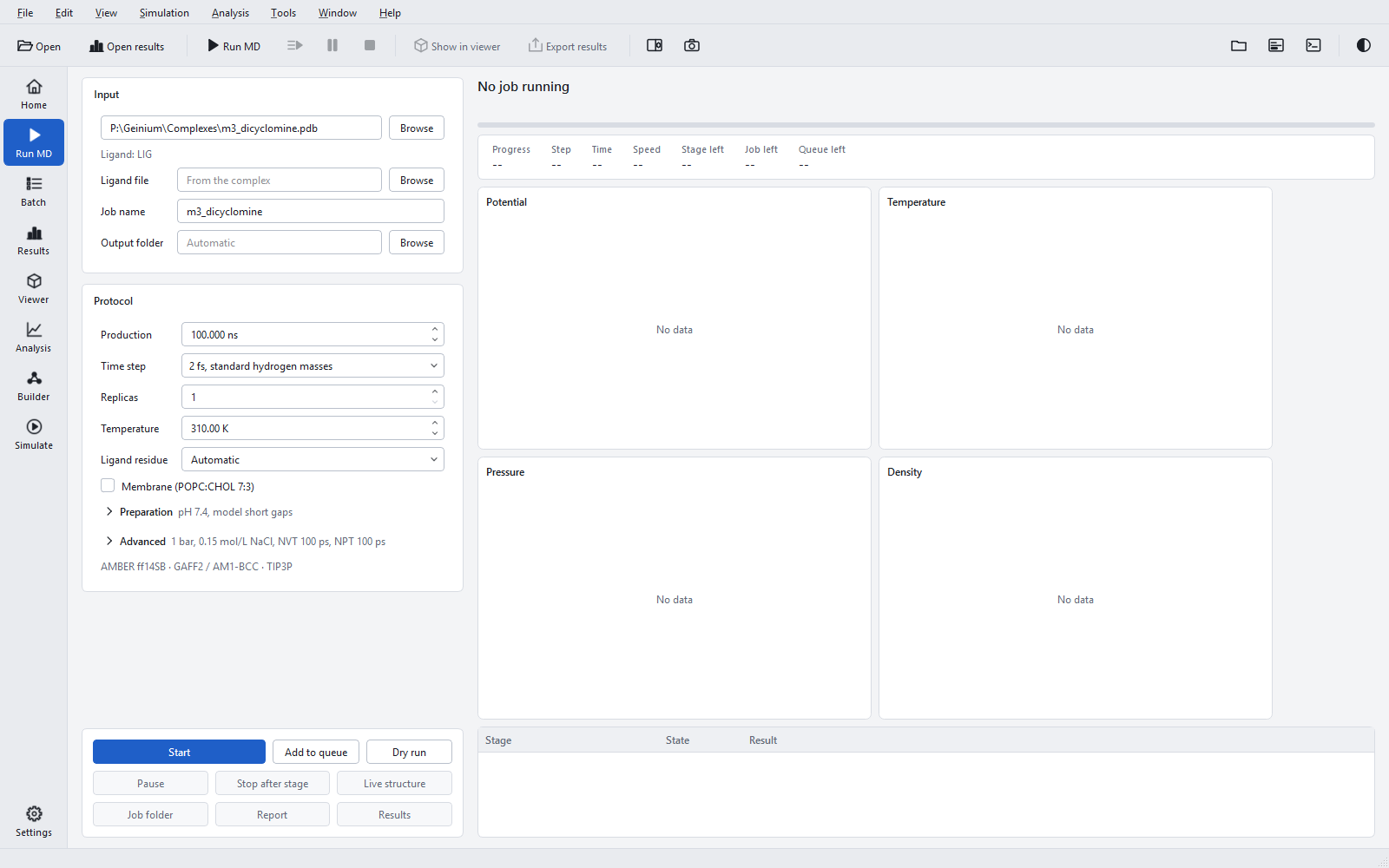
The "Ligand residue" control says which residue of the complex is the ligand. The line under the input field reports what the file contains as soon as it is chosen.
| Choice | What happens | When to use it |
|---|---|---|
| "Automatic" (default) | The only residue that is not protein, water or an ion is the ligand. | A docking complex with one ligand: the usual case. |
| A residue name | That residue is the ligand. The list offers the names found in the file; another name can be typed. | When the file holds several candidate residues, for example a ligand and a buffer molecule. |
| "None" | The protein is simulated alone; there is no ligand, no interaction analysis and no MM-GBSA. | An apo simulation for comparison with the complexes. |
| Info line | Meaning |
|---|---|
| "Ligand: X" | One candidate residue, X, will be simulated. |
| "Ligands: A, B (choose one)" | Several candidates: choose one in "Ligand residue", or the job will not start. |
| "No ligand: protein only" | The file has no residue besides protein, water and ions. |
| "Unreadable: ..." | The file could not be read; the message says why. |
| "Project <name>" | A project file was chosen; see the last section. |
Nucleic acids and crystallisation additives are never offered as ligand candidates.
A separate ligand file
Docking programs often write the ligand poses to their own file. Put the receptor in "Complex or project" and the ligand in "Ligand file" (placeholder "From the complex"); the file is copied into the job folder. Accepted formats are SDF (.sdf, .sd), MOL, MOL2, PDB and PDBQT.
Checks on the ligand
The ligand is checked when the input is scanned and in the first stages of the job, so that a mistake is found within seconds or minutes, not after hours of simulation.
| Check | Rule | What to do |
|---|---|---|
| Poses | A file with several poses is refused until one is chosen. | Choose it in Preparation > "Ligand pose" ("Choose a pose" lists the poses with their scores). |
| Copies | A complex with the ligand residue in several places (several chains of a crystal) is refused until one copy is chosen. | Choose it in Preparation > "Ligand copy". |
| Different ligand residues | Several different ligand residues are refused. | Name one in "Ligand residue". |
| Contact | The closest distance between a ligand heavy atom and a protein heavy atom must lie between 0.15 and 0.6 nm. Above 0.6 nm the job stops ("not in contact with the protein ... same coordinate frame?"); 0.4 to 0.6 nm gives a warning; below 0.15 nm the atoms overlap and the job stops. | Use the docked pose in the receptor frame. A warning between 0.4 and 0.6 nm is worth a look in the viewer before the run. |
| Elements | H, C, N, O, F, P, S, Cl, Br and I only. Metals, boron, silicon and selenium are refused. | A ligand with other elements cannot be parametrised by the built-in method; see Ligand parameters. |
| Fragments | The ligand must be one connected molecule. | Remove counter-ions and salts from the ligand file. |
A docking PDB that holds heavy atoms only is accepted: bond orders, hydrogens and formal charges are perceived from the geometry, and hydrogens are then set for the chosen pH (see Protonation at pH).
What stops a job
Some contents of a structure cannot be simulated with the built-in force fields. Geinium stops rather than guess, names what it found, and offers the way out in the Preparation section, which opens itself with the choices.
| Content | What happens | Way out |
|---|---|---|
| DNA or RNA | The structure stage stops: a protein-nucleic acid complex cannot be simulated here. | "Remove DNA/RNA" simulates the protein without its partner, if that answers your question. |
| Covalent ligand | Stops with "Covalent ligand: not supported", detected from LINK or CONECT records or a ligand-protein distance below 0.20 nm. | None in this version; simulate a non-covalent analogue. |
| Metal in the ligand | Refused: the ligand method covers H, C, N, O, F, P, S, Cl, Br and I. | None for the built-in method. |
| Cofactors, glycans, unknown molecules | The structure stage stops and lists them. | "Remove molecules": tick what may be removed. Removing a cofactor changes the system, so do it only when the cofactor is not needed for the question. |
| Crystallisation additives (SO4, PO4, GOL, EDO, PEG) | Removed automatically with a warning. | Nothing to do. |
| Modified residues | Residues without parameters stop the job. | See Structure preparation for the residues that can be reverted. |
| A membrane protein without a membrane | A question before the start. | See Box, solvent, ions and membranes. |
Project files as input
A project file (project.json) written by Run MD, the Batch queue or the System Builder can be chosen instead of a complex. It holds the complete job: inputs, preparation, protocol and analysis settings. The form then shows the values of the file and locks them; each control says "Set in <file>" as its tooltip. This is how a job is repeated exactly, or continued in the same folder. To change a setting, edit the file (see Project file keys) or start a new job from the complex.